N2W
VS
AWS Backup

The AWS Backup alternative built for real recovery

AWS Backup is not built for cost savings or granular recovery. Nor can it orchestrate a full failover/failback across regions, accounts, or clouds. Enter N2W.

4.8
AWS Marketplace Logo
A tl;dr comparison of AWS Backup vs N2W
Johnson & Johnson
Philips logo
HP logo in grey
Dyson logo
western union logo
Why teams switch to N2W

AWS Backup has its limitations

computer icon

Limited to a single AWS Org, in a single cloud

AWS Backup’s cross-account backup works only between accounts in the same AWS Organization. AWS effectively locks orgs into a single-cloud AWS model with no true multi-cloud ability, a major constraint for MSPs and enterprises. N2W covers cross-org AWS, Azure, and AWS ↔ Azure restore from one console. MSPs get native multi-tenancy instead of juggling accounts.
cost saving icon

The “free” backup tool gets expensive, fast

AWS Backup archives a full copy every time, keeps the source snapshot too, and gives you no choice of storage tier. N2W archives incrementally, deletes the original after the archive is verified (ZeroEBS), lets you pick any S3 or Glacier tier, and powers down non-critical compute with Resource Control.
shield icon with a checkmark

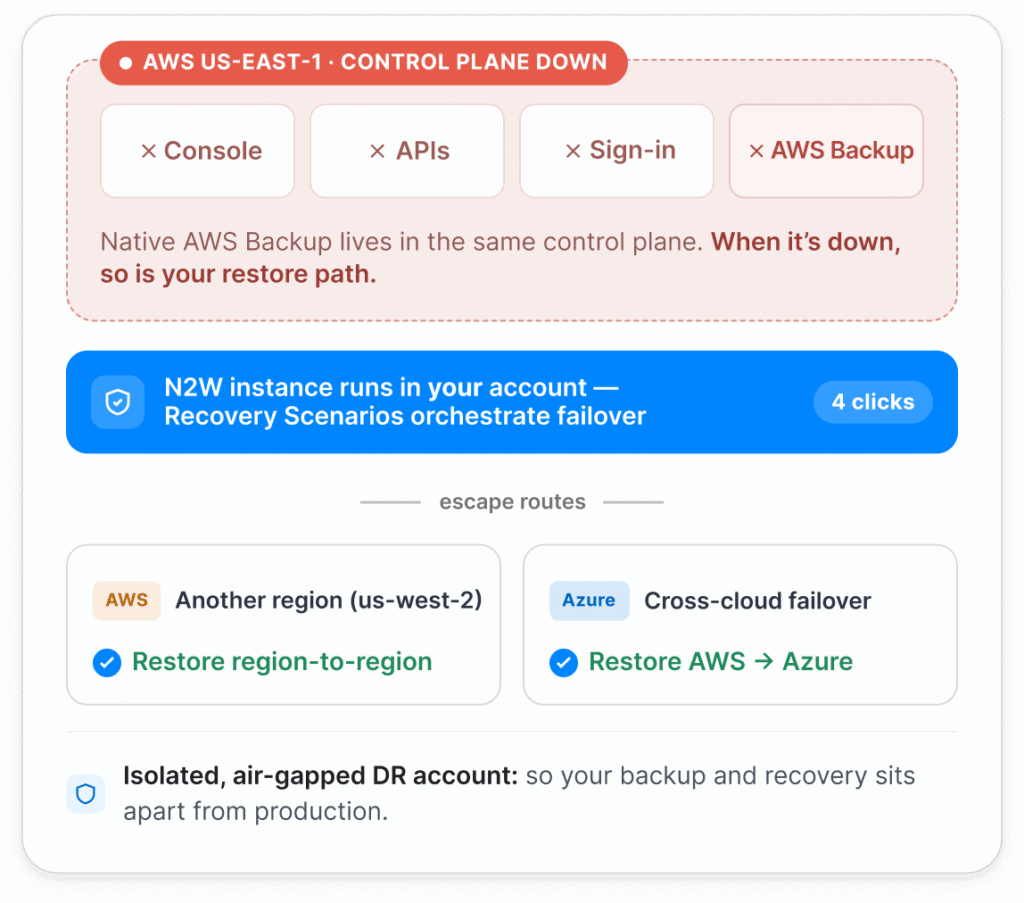
If your control plane is down, so is your DR

AWS Backup restores one resource at a time, through the same console that goes dark in an outage. N2W pre-orchestrates failover in 4 clicks, network config included, and can land your workloads in another region or in Azure, so a single failed region doesn’t strand you. Also AWS Backup also has no true granular recovery which is key, given most restores are on the file or folder level.
Feature Comparison

N2W vs AWS Backup

Capability
N2W
AWS Backup only for AWS
Core AWS services (EC2, EBS, RDS, Aurora, Redshift, DynamoDB, DocumentDB, Outposts, EFS, FSx, VPC, S3, EKS)
checkmark icon
checkmark icon
AWS Outposts (AWS Backup stores to the parent Region, not on the Outpost)
checkmark icon
minus icon, yellow background
60-second backup interval
checkmark icon
minus icon, grey background
cloud icon
Cloud-native architecture
Single product for multicloud: covers both AWS and Azure
checkmark icon
minus icon, grey background
One console across AWS accounts (AWS Backup is limited to a single AWS Org.)
checkmark icon
minus icon, grey background
Multi-tenancy for MSPs, native
checkmark icon
minus icon, grey background
shield icon
Recovery and orchestration
Orchestrated full multi-resource failover / failback in 4 clicks
checkmark icon
minus icon, grey background
Multi-generation file and folder-level recovery (FLR) with no pre-indexing
checkmark icon
minus icon, grey background
Backup and restore of VPC and network configurations
checkmark icon
minus icon, grey background
AWS ↔ Azure restore inside one product
checkmark icon
minus icon, grey background
DR backups of encrypted resources
checkmark icon
minus icon, grey background
Scheduled DR drills / dry runs without per-policy test charges
checkmark icon
minus icon, yellow background
cost icon
Cost Management
Resource Control (power down non-critical compute on a schedule)
checkmark icon
minus icon, grey background
Incremental archiving (vs re-archiving full backups every time)
checkmark icon
minus icon, grey background
Choose any S3/Glacier storage tier for archive (or Wasabi or Azure)
checkmark icon
minus icon, yellow background
ZeroEBS (auto-delete the original snapshot after the archive is verified)
checkmark icon
minus icon, grey background
Ingest existing snapshots and archive (AnySnap Archiver)
checkmark icon
minus icon, grey background
Custom DR backup retention (separate from production)
checkmark icon
minus icon, grey background
shield icon
Security and data sovereignty
Immutability for EBS and S3
checkmark icon
checkmark icon
Encryption in transit and at rest
checkmark icon
checkmark icon
Air-gapped backups in an isolated DR account
checkmark icon
minus icon, yellow background
Customizable auditing and reporting (Datadog, Splunk, Bocada)
checkmark icon
minus icon, grey background
RESTful API with no Lambda scripting required
checkmark icon
minus icon, grey background
checkmark icon
Native, included
minus icon, yellow background
Partial / with caveats
minus icon, grey background
Not supported, or requires additional product
Reflects generally available features as of June 2026, verified against current AWS Backup documentation before publication.

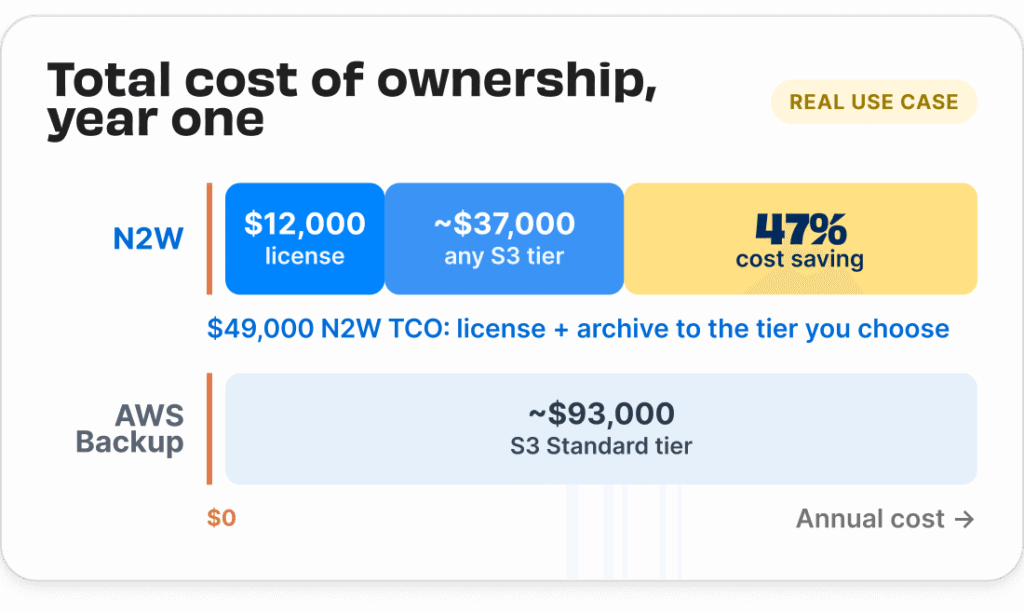
“Free” is the part that gets pricey

The real cost hides in how it stores your data. Three defaults inflate the bill and N2W reverses all three.

Where AWS Backup costs you more:
Diagram showing a real example of the total cost of ownership between N2W and AWS Backup with the former saving 47% on costs.
Diagram showing how an AWS outage can take out AWS Backup, leaving you unable to restore vs N2W which allows for cross-region and cross-cloud DR

When AWS is down, don’t bet DR on AWS

AWS Backup is a native AWS service. So, in the event of another AWS outage, the console, APIs, and the sign-in you’d use to start a restore are in the same control plane that’s down.

How N2W keeps recovery available:
Frequently Asked Questions

Questions about AWS Backup vs N2W

Isn't AWS Backup free?

right arrow

It’s free to license, not free to run. AWS Backup archives a full copy every time, keeps the original snapshot next to the archive, and locks you into one cold tier that costs more than Glacier but restores about as slowly. Add per-policy charges for DR-test restores and zero compute controls, and the storage bill climbs. N2W charges one flat monthly rate, whether you’re protecting a 100GB instance or a 100TB one, and incremental archiving, ZeroEBS, and Resource Control usually save significantly more than the license costs. Go month-to-month with no commitment, or take an annual plan for extra savings.

What does N2W do that AWS Backup doesn’t?

right arrow

Orchestrated recovery in 4 clicks (Recovery Scenarios), multi-generation file-level recovery, Resource Control for compute savings, archiving into Wasabi and other tiers, AWS ↔ Azure cross-cloud restore, Multicloud processes, native MSP multi-tenancy, and customizable reporting into Datadog, Splunk, and Bocada.

What happens if AWS itself has an outage?

right arrow

That’s the case to plan for. The October 2025 and March 2026 outages took down the AWS console and sign-in along with the workloads, and AWS Backup runs in that same control plane. The N2W instance itself is protected by a preconfigured policy that enables its backup and restore in the event of an outage. N2W keeps recovery options open for your data: pre-orchestrated failover in 4 clicks, and the ability to restore into another region or into Azure so you aren’t waiting on a single AWS region to come back. N2W also automatically backs itself up for maximum resilience.

Can I keep AWS Backup and add N2W?

right arrow

Yes. N2W runs as an AMI in your own account and AnySnap Archiver can ingest your existing snapshots, so you don’t start from scratch. Most teams run N2W as their primary backup and DR product.

How is N2W deployed?

right arrow

N2W deploys as an EC2 instance or Azure VM inside your account, from AWS Marketplace or Azure Marketplace. With practically no learning curve, you can spin up a trial and run your first backup in ~20 minutes.

Does N2W cover the same AWS services?

right arrow

N2W protects core AWS services including EC2, EBS, RDS, Aurora, Redshift, DynamoDB, DocumentDB, EFS, FSx, VPC, S3, EKS, and AWS Outposts, plus the cost and recovery layer AWS Backup leaves out.

Hasn’t AWS always had a backup tool?

right arrow

No. AWS shipped AWS Backup in January 2019. N2W has been building cloud backup and recovery since 2013, about six years earlier, and it’s the only thing we do. AWS Backup just centralized snapshot tools; it didn’t add the cost controls or orchestrated recovery a dedicated product brings.

AWS, AWS Backup, Amazon EC2, EBS, RDS, S3, and related marks are trademarks of Amazon.com, Inc. or its affiliates, used here for comparison and identification only. N2W is not affiliated with or endorsed by AWS. Comparison based on publicly available product information as of June 2026.