N2W
VS
Commvault

The Commvault alternative for backup without the complexity

With Commvault you have to: deploy and maintain access nodes, climb a steep learning curve, and pay for every user, TB, and VM. N2W eliminates that bloat and complexity for AWS and Azure backup & DR.

4.8
AWS Marketplace Logo
A tl;dr comparison of Commvault vs N2W
Johnson & Johnson
Philips logo
HP logo in grey
Dyson logo
western union logo
Why cloud teams switch to N2W

Easy, fast, secure

computer icon

Simple by design

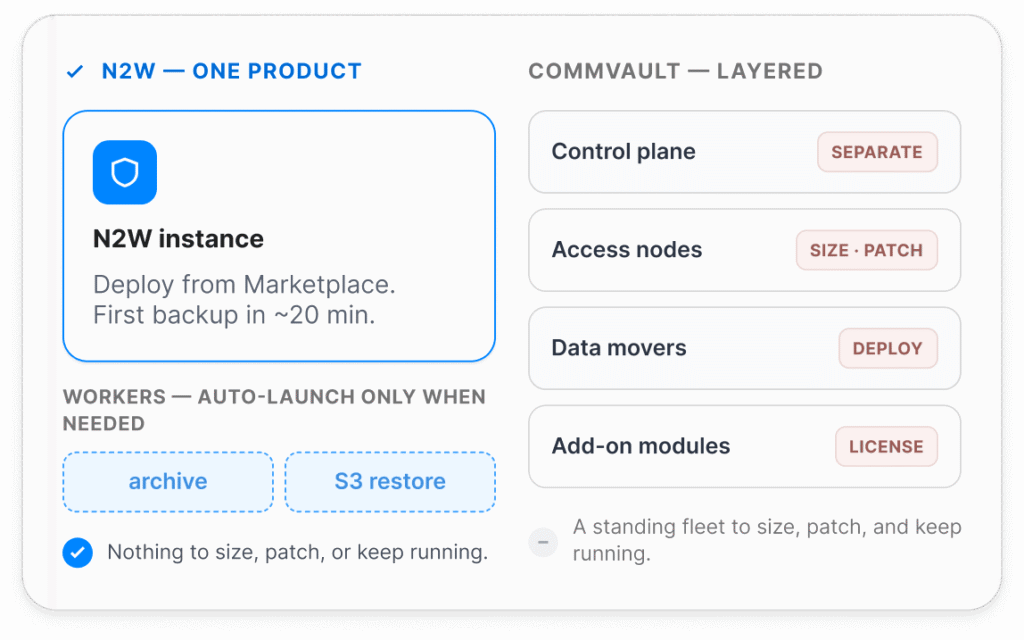
Commvault Cloud needs access nodes deployed + maintained in your cloud, driven by a separate control plane, and reviewers consistently flag a steep learning curve and complex setup. N2W is one product: deploy from Marketplace, and set up your first backup policy in ~20min.
cost saving icon

Savings by design

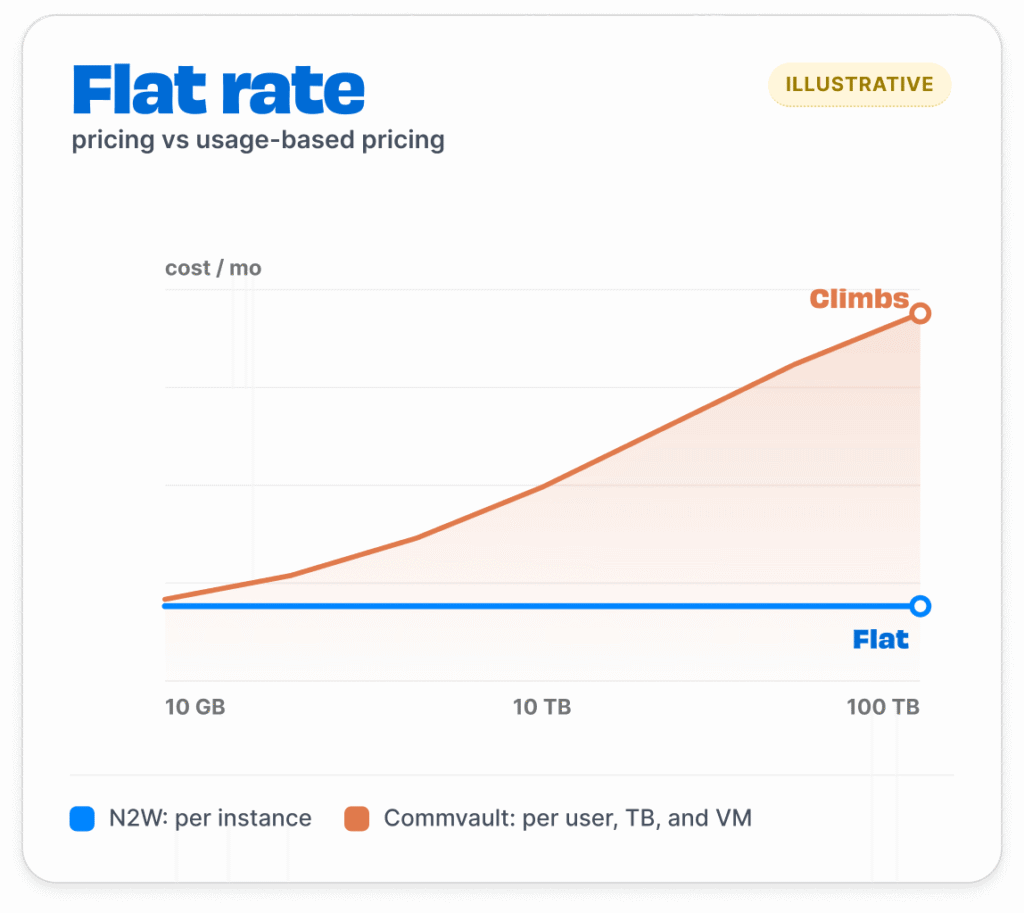
Commvault prices per user, per TB, and per VM, with database backup from $90/TB per month and extra costs for services and training. With N2W, a 100GB instance and a 100TB instance cost the same flat monthly rate. And Resource Control plus archiving can save more than the cost.
shield icon with a checkmark

Secure by design

Commvault Metallic uses SaaS provisioned storage where backups are written to a Commvault-managed cloud tenant. N2W runs as IaaS inside your own isolated environment. That means your data never leaves your cloud and you can harden your security to your own level of need.
Feature Comparison

N2W vs Commvault Cloud

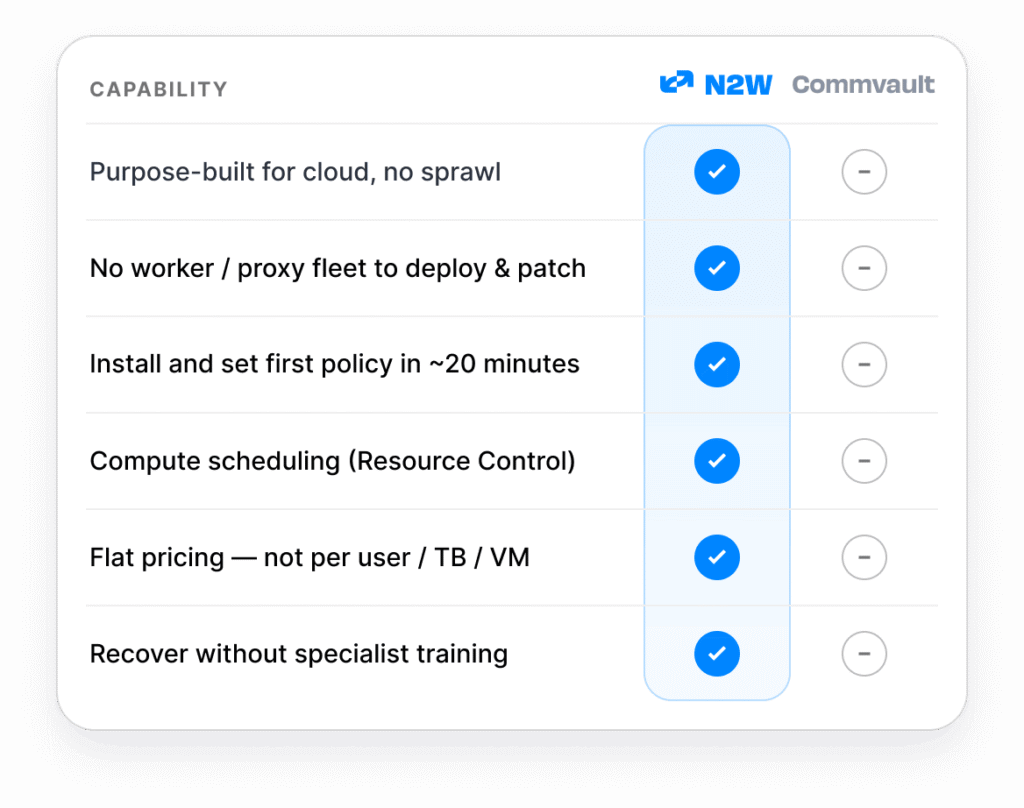
Capability
N2W
Commvault multi-product platform
Backup for core AWS and Azure workloads
checkmark icon
checkmark icon
Purpose-built for cloud (not a general platform spanning on-prem)
checkmark icon
minus icon, grey background
One platform for Multicloud. No license layering.
checkmark icon
minus icon, grey background
cloud icon
Cloud-native architecture
Runs entirely in your own account as IaaS (no vendor-managed data plane)
checkmark icon
minus icon, yellow background
No persistent worker / proxy fleet to deploy, size, and patch (workers auto-launch only as needed)
checkmark icon
minus icon, grey background
One self-contained product (no separate control plane plus data movers)
checkmark icon
minus icon, grey background
Set up and run your first backup in ~20 minutes
checkmark icon
minus icon, grey background
shield icon
Recovery and orchestration
Streamlined cross-cloud restore. Not configuration dependent.
checkmark icon
minus icon, grey background
Orchestrated full failover / failback in 4 clicks
checkmark icon
minus icon, yellow background
Recovery without specialist training or a steep learning curve
checkmark icon
minus icon, grey background
Cross-cloud restore (AWS ↔ Azure)
checkmark icon
minus icon, yellow background
Capture, clone and restore all VM metadata (VPC, Transit Gateway, Load Balancers, Azure VNet)
checkmark icon
minus icon, grey background
cost icon
Cost Management
Resource Control (power down non-critical compute on a schedule)
checkmark icon
minus icon, grey background
Incremental archiving to S3, Glacier, Azure Blob, or Wasabi
checkmark icon
minus icon, yellow background
Custom DR backup retention (separate from production)
checkmark icon
minus icon, yellow background
Flat, predictable pricing (not per-user / per-TB / per-VM). No additional software or add-on licenses.
checkmark icon
minus icon, grey background
shield icon
Security and data sovereignty
Your data never leaves your account; vendor has no access
checkmark icon
minus icon, yellow background
Immutable S3 archive
checkmark icon
checkmark icon
Air-gapped backups
checkmark icon
checkmark icon
Encryption in transit and at rest
checkmark icon
checkmark icon
You hold and control the encryption keys
checkmark icon
minus icon, yellow background
checkmark icon
Native, included
minus icon, yellow background
Partial / with caveats
minus icon, grey background
Not supported, or requires additional product
Reflects generally available features as of June 2026, verified against current Commvault product docs before publication. Comparison targets the Commvault Cloud (SaaS) offering.

Backup you can run without a specialist

Nobody wants to wrestle a complex console to get production back. N2W is built so an IT generalist can recover fast under pressure.

How N2W stays simple:
Diagram showing the simplicity of N2W compared to Commvault's setup
diagram illustrating the potential for steady price increases over time with Commvault's pricing model

Predictable price, savings built in

Commvault’s usage-based model means the bill grows with every user, TB, and VM. N2W is a simple, flat-rate whether you’re protecting a 100TB instance or a 10GB one. Plus cost controls are built in.

Why N2W saves you more:
Frequently Asked Questions

Questions about Commvault vs N2W

Is N2W as capable as Commvault?

right arrow

For cloud backup and recovery, yes, and it’s simpler. But be fair to both: Commvault is a broad platform that also protects M365, Salesforce, endpoints, on-prem, and more clouds. If you need one tool for all of that, Commvault fits. If your job is protecting AWS or Azure workloads, N2W does that without the complexity, the learning curve, or the cost.

How long does it take to get running?

right arrow

N2W deploys from AWS or Azure Marketplace and runs its first backup in about 20 minutes, with no access nodes or proxies to stand up. Commvault Cloud needs access nodes deployed and configured, and reviewers describe the initial setup as complex and time-consuming, often requiring real technical expertise.

Where does my data live?

right arrow

With N2W, in your own cloud. N2W runs as an EC2 instance or Azure VM inside your environment, makes license calls out, and never moves your backup data off your infrastructure. Commvault Cloud’s managed (Air Gap Protect) storage is run by Commvault under its subscription. This means any Commvault data breach could breach your data.

Is N2W cheaper than Commvault?

right arrow

The models are very different. Commvault prices per user, per TB, and per VM (database backup starts around $90/TB per month) plus services and training, so the bill climbs with your data. N2W charges one flat monthly rate no matter how much you protect: a 100GB instance and a 100TB instance cost the same. You can go month-to-month with no commitment or choose an annual plan for extra savings, and built-in Resource Control and archiving can save much more than the subscription costs.

Can N2W handle disaster recovery, not just backup?

right arrow

Yes. In fact, that’s really where we shine. Recovery Scenarios orchestrate full failover and failback in 4 clicks, with VPCs/VNets restored to a working state (Commvault does not natively do this), and you can recover across regions or into Azure for cross-cloud DR.

Commvault, Commvault Cloud, Metallic, and Air Gap Protect are trademarks of Commvault Systems, Inc., used here for comparison and identification only. N2W is not affiliated with or endorsed by Commvault. Comparison based on publicly available product information as of June 2026.