N2W
VS
Azure Backup

The Azure Backup alternative built for better restore

N2W backs up Azure VMs, Managed Disks and Azure SQL from inside your own subscription, with low RPO. It recovers the VNet with the VMs, into the region or subscription you choose, and prices by number of VMs, not amount of data.

5.0
Microsoft Azure logo
N2W compared with Azure Backup, by capability
Capability N2W Azure Backup
One product across AWS, Azure, GCP Yes No
Recovery in 4 clicks (Recovery Scenarios) Yes No
RPO as low as 60 seconds Yes No
Compute scheduling (Resource Control) Yes No
Flat rate per VM, not per GB of data Yes No
VNet configuration backup and restore Yes No
Johnson & Johnson
Philips logo
HP logo in grey
Dyson logo
western union logo
Why teams switch to N2W

Bigger savings. Easier recovery.

computer icon

Full recovery into any region

Azure Backup's cross region restore goes only to the paired region. N2W's Recovery Scenarios bring back your VMs with the VNet configuration and subnets, in the order you set, into the Azure region or subscription you choose. And run the same scenario as a drill without disrupting production.
cost saving icon

A bill that doesn't grow with your data

Azure Backup's protected-instance increases with the size of each VM, and vault storage is billed on top. N2W is priced on how many instances you protect. It archives to the Blob tier of your choosing, on the schedule you set. Plus, with N2W Resource Control, you can save on compute, too.
shield icon with a checkmark

Automate reporting without a Logic App

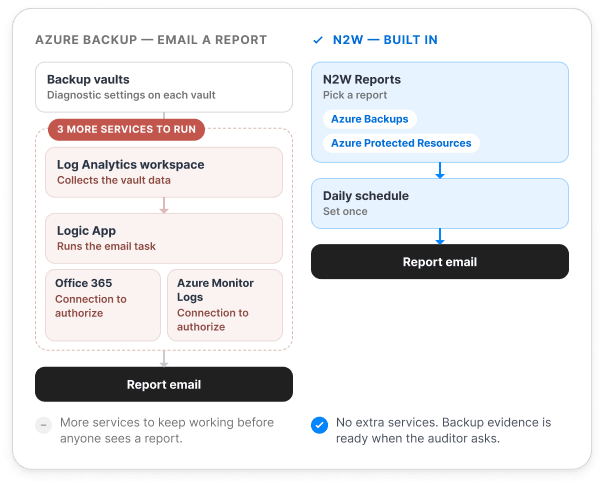
To get a recurring Azure Backup report by email, you first send each vault's diagnostic data to a Log Analytics workspace, then deploy a Logic App and authorize its Office 365 and Azure Monitor Logs connections. N2W has Reports built in. Just pick a report and choose your schedule.
Feature Comparison

N2W vs Azure Backup

Capability
N2W
Azure Backup
Azure VMs and Managed Disks
Yes
Yes
Azure SQL Database (Azure Backup leaves it to the database's own automated backups)
Yes
No
SAP HANA, Azure Files, Blobs, PostgreSQL, AKS
No
Yes
VNet network configurations
Yes
No
cloud icon
Cloud-native architecture
Azure, AWS, and Google Cloud in the same console
Yes
No
Backups stay in your own Azure environment
Yes
Yes
Multi-tenancy for MSPs, native
Yes
No
Unified AWS/Azure account model
Yes
No
shield icon
Recovery and orchestration
60-second backup interval
Yes
No
Ordered multi-VM recovery in 4 clicks
Yes
No
VNet configuration and subnets recovered with the VMs
Yes
No
Recover VMs to any Azure region (Azure Backup: the paired region only, not from archived points)
Yes
Partial
Recover VMs to another subscription (Azure Backup: limits on recovery-point tier, vault setup and tenant)
Yes
Partial
Recovery testing and DR drills (Azure: test failover of a recovery plan needs Site Recovery)
Yes
Partial
cost icon
Cost Management
Flat-rate pricing by instance count, not data size
Yes
No
Incremental archiving (Azure converts archived points to full copies)
Yes
No
Archive any backup, with no age or retention rules (Vault-archive takes monthly and yearly points only, after 3 months)
Yes
Partial
Choose the archive tier: Azure Blob Hot, Cool or Cold, or Wasabi (Azure Backup: Vault-archive only)
Yes
Partial
ZeroMD (delete the original snapshot after the archive is verified)
Yes
No
Resource Control (power down non-critical VMs on a schedule)
Yes
No
shield icon
Security and data sovereignty
Immutable backups
Yes
Yes
Copy outside Azure, with separate credentials and object lock (Wasabi)
Yes
No
Encryption in transit and at rest
Yes
Yes
Scheduled backup reports by email, built in (Azure needs Log Analytics and a Logic App)
Yes
No
Native, included
Partial / with caveats
Not supported, or requires additional product
Generally available features as of October 2026, checked against Microsoft Learn documentation. Prices are East US list.

Cut Azure backup costs without cutting retention

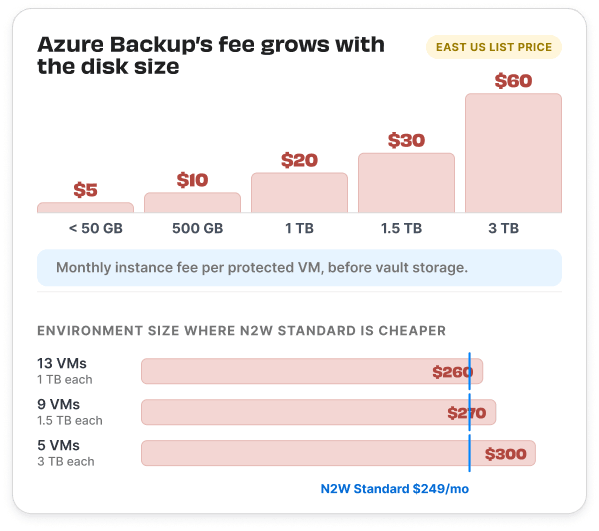
Azure Backup charges each VM $10 a month for every 500 GB it holds. So the fee grows every time a disk does.

How N2W saves you more:
diagram showing Azure Backup costs growing as data volumes grow
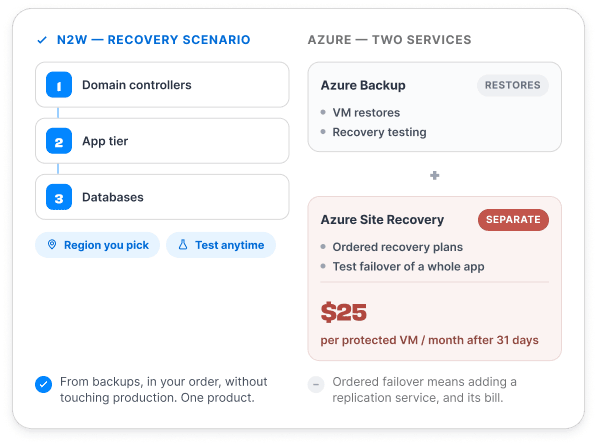
Diagram showing the differences between using N2W for Azure Backup and Recovery vs Azure Backup + ASR

Backup and recovery orchestration in one product

Coordinated application failover (ordered recovery plans, test failover of a whole application) is Azure Site Recovery's job, a separate replication product.

Plenty of Azure estates don't need continuous replication. For those, N2W's Recovery Scenarios bring an application back from backups in a set order (domain controllers first, app tier second, databases third), into the region you pick, and you can test the scenario whenever you want without touching production.

Reporting without the sprawl

To get a recurring Azure Backup report by email, you first send each vault’s diagnostic data to a Log Analytics workspace, then deploy a Logic App and authorize its Office 365 and Azure Monitor Logs connections.

That’s three more services to set up and keep working before anyone sees a report. N2W, on the other hand, has Reports built in. Pick a report, such as Azure Backups or Azure Protected Resources, put it on a daily schedule, and it arrives by email. Your backups shouldn’t need another system to explain themselves.
Frequently Asked Questions

Questions about Azure Backup vs N2W

What is the best alternative to Azure Backup?

right arrow

It depends on what you protect. For Azure VMs that need the whole environment recovered in order, frequent backups and cost that doesn't grow with data size, N2W is the closest fit. If you rely on Azure Backup for SAP HANA, Azure Files, on-premises servers or log-level SQL Server backups inside VMs, keep it for those and consider running N2W alongside it.

Is N2W cheaper than Azure Backup?

right arrow

For VMs with large disks, usually. Azure Backup charges each VM $10 a month per 500 GB of data (East US), plus vault storage. N2W's Standard plan is $249 a month for up to 20 instances, whatever they hold, so Azure Backup's instance fees pass it at 13 VMs of 1 TB each. Storage stays on your Azure bill with either product.

How often can Azure Backup back up a VM?

right arrow

Once a day on the Standard policy, and as often as every 4 hours on the Enhanced policy. N2W backs up Azure VMs as often as every 60 seconds.

Does Azure Backup include disaster recovery?

right arrow

Partly. Azure Backup restores VMs, supports Cross Region Restore to the paired region, and lets you run recovery drills. Ordered recovery plans and application failover come from Azure Site Recovery, a separate service priced at $25 per protected VM per month in East US after the first 31 days. N2W includes ordered recovery and drills in the backup product.

Can I use N2W and Azure Backup together?

right arrow

Yes. A common split is N2W for VMs, Azure SQL databases and ordered recovery, with Azure Backup kept for SAP HANA, Azure Files or on-premises servers, which N2W doesn't protect, or for log-level SQL Server backups inside VMs.

How is N2W deployed on Azure?

right arrow

N2W deploys as a VM in your own subscription from Azure Marketplace, and it's agentless on the VMs it protects. With practically no learning curve, you can start a trial and run your first backup in about 20 minutes.

Microsoft, Azure, Azure Backup and Azure Site Recovery are trademarks of the Microsoft group of companies, used here for comparison and identification only. N2W is not affiliated with or endorsed by Microsoft. Comparison based on publicly available product information as of October 2026.