

Content updated: August 2026
How to back up Kubernetes on AWS (EKS)
To back up Kubernetes on AWS, you protect the cluster state and its persistent volumes together, then restore them to the same cluster or a new one. Two managed options do this: AWS Backup, which now natively supports Amazon EKS, and N2W, which backs up EKS using Velero and schedules it on a policy alongside your other AWS resources. Self-managed Velero is the third route if you’d rather run it yourself.
This is part of a series of articles about Kubernetes security
In this article:
- Understanding Amazon EKS Backup Structure
- Tutorial #1: Backup your EKS Clusters with AWS Backup
- Limitations of AWS EKS Backup
- Tutorial #2: Policy-Driven EKS Backup with N2W
- Comparison table: when to use each
Amazon EKS backup structure in AWS Backup
AWS added native Amazon EKS support to AWS Backup on November 10, 2025. The integration provides agentless, policy-based protection for both Kubernetes cluster state and persistent application data.
An EKS backup is stored as a composite recovery point. Think of it as one recovery point with several coordinated components inside it:
- An Amazon EKS cluster configuration child recovery point, containing the cluster state and configuration.
- A separate persistent-volume child recovery point for each supported Amazon EBS volume, Amazon EFS file system, or Amazon S3 bucket attached through a persistent volume claim and supported CSI driver.
This structure keeps the Kubernetes configuration and its persistent data together as one logical backup while still allowing AWS Backup to track and recover the underlying components separately.
The cluster-state backup can include Kubernetes manifests and EKS configuration such as access entries, managed node groups, Fargate profiles, Pod Identity associations, networking settings, logging, encryption settings, storage classes, secrets, ConfigMaps, StatefulSets, DaemonSets, persistent volume claims, custom resource definitions, roles, and role bindings.
EKS backups do not include:
- Container images stored in Amazon ECR, Docker Hub, or another registry
- VPCs, subnets, and other underlying network infrastructure
- Automatically generated resources such as nodes, events, leases, jobs, and controller-created pods
Container images and infrastructure therefore need their own protection or infrastructure-as-code strategy.
Each child recovery point is encrypted. The EKS configuration child uses the AWS KMS key associated with the destination backup vault. Persistent-storage children follow the encryption model of their underlying service, such as EBS snapshots, AWS Backup for S3, or AWS Backup for EFS.
Tutorial #1: Backup your EKS Clusters with AWS Backup
AWS Backup can capture an EKS cluster’s configuration and supported persistent storage in one coordinated backup operation. You can create backups on demand or assign EKS clusters to a scheduled backup plan.
What gets backed up
An EKS backup contains two main components:
EKS cluster state and configuration
This includes the Kubernetes manifests and EKS configuration required to reconstruct the desired state of the cluster and its workloads.
Persistent application data
AWS Backup protects supported EBS, EFS, and S3 storage attached to the cluster through persistent volume claims and supported EKS CSI drivers.
AWS Backup groups these components into a single composite recovery point, with nested recovery points for the cluster configuration and each supported persistent-storage resource.
Prerequisites
Before starting an EKS backup:
- Set the cluster authorization mode to
APIorAPI_AND_CONFIG_MAP. AWS Backup uses an EKS access entry to access the cluster; it does not require an AWS Backup agent or add-on inside the cluster. - Attach
AWSBackupServiceRolePolicyForBackupto the AWS Backup service role. This provides the permissions required to protect the cluster and supported EBS and EFS storage. - For clusters using Amazon S3 persistent storage, also attach
AWSBackupServiceRolePolicyForS3Backupand complete the AWS Backup for S3 prerequisites. - Confirm that the destination vault’s encryption and retention settings meet your security and compliance requirements.
Step 1: Create an on-demand EKS backup
To create an on-demand backup in the AWS Backup console:
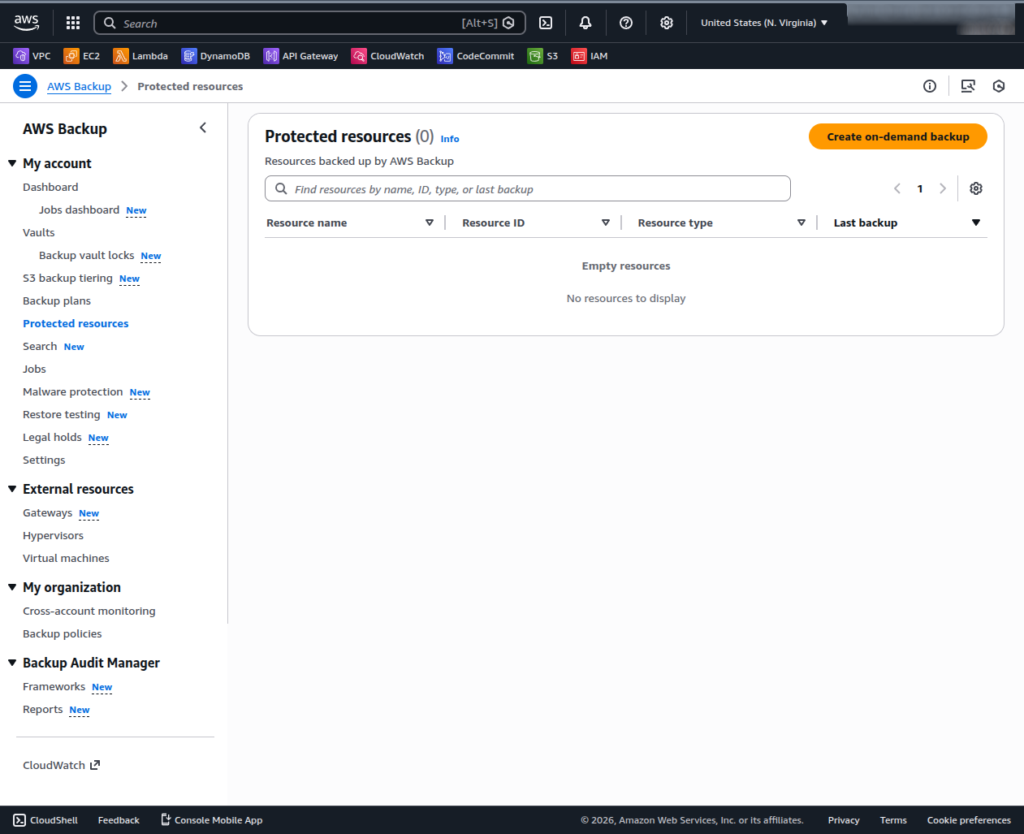
- Open the AWS Backup console and navigate to Protected Resources.
- Click Create on-demand backup button.
- Under Resource type, select Amazon EKS.
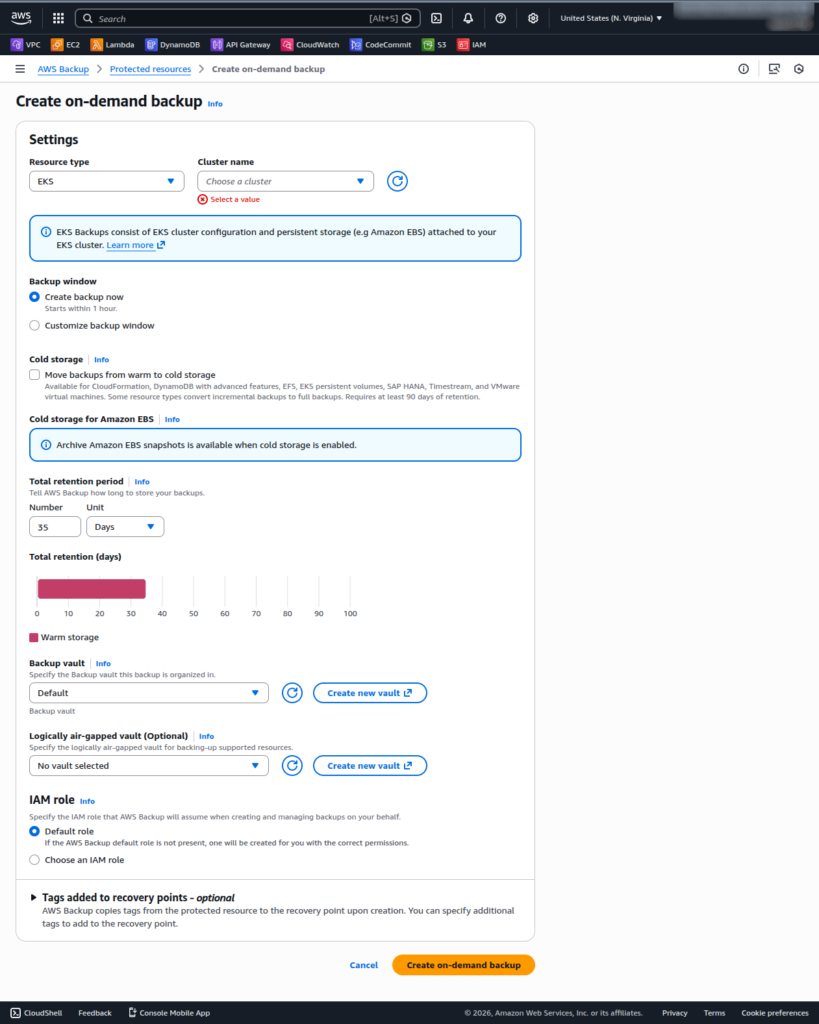
- Select the EKS cluster to back up.
- Click Create on-demand backup.
- Configure settings like retention period and cold storage transitions.
- Click Create on-demand backup to start the job.
AWS Backup creates a parent backup job for the composite recovery point and child jobs for the cluster configuration and persistent-storage recovery points.
Lifecycle settings have one constraint: the composite recovery point and EKS cluster-state child cannot transition to cold storage. Only underlying persistent-storage child recovery points that support a cold tier can make that transition.
Backup Job Status
An EKS backup may report the following outcomes:
- Completed: The cluster configuration and all included persistent-storage resources were successfully protected.
- Failed: The backup did not complete. Correct the reported problem and run the backup again.
- Partial: One or more nested resources, such as a persistent volume, did not complete successfully. You can rerun an on-demand backup after resolving the underlying failure.
- Completed with issues: AWS Backup created the recovery point, but it could not retrieve one or more Kubernetes objects. Configure AWS Backup event notifications through Amazon SNS to identify the affected objects.
Each nested recovery point has its own status. A nested recovery point with a Completed status can be restored independently where the underlying resource supports it.
Managing and Protect EKS Recovery Points
From the AWS Backup vault, you can manage the EKS composite recovery point and its nested storage recovery points.
AWS Backup supports EKS composite-recovery-point copies within the same account and Region, across AWS Regions, and across AWS accounts. These copies can be created on demand or through backup-plan copy rules, providing an additional recovery path if the production account or Region is unavailable.
For immutability, you can apply AWS Backup Vault Lock to the destination vault:
- Governance mode allows authorized administrators to change or remove the lock.
- Compliance mode becomes immutable after its grace period. Neither users (including the root user) nor AWS can alter the lock or delete protected recovery points before their retention periods expire.
Retention settings should be reviewed carefully before enabling Compliance mode because they cannot be shortened after the vault becomes immutable.
Persistent-volume child recovery points can be deleted, disassociated, copied, or restored where supported. The EKS cluster-state child maintains a one-to-one relationship with the composite recovery point and cannot be independently deleted or disassociated.
Step 2: Restore an Amazon EKS Backup
AWS Backup supports several levels of EKS recovery, from a complete cluster restore to a single persistent-storage resource.
Restore scopes and targets
Entire cluster
Restore all included Kubernetes resources and persistent volumes to:
- The original source cluster
- Another existing EKS cluster
- A new EKS cluster created during the restore workflow
AWS Backup provides a limited set of options when creating a cluster during recovery. For greater control over networking, compute, add-ons, and security configuration, create the destination cluster separately and select it as the restore target.
Namespace-level restore
Restore up to five selected namespaces, including their Kubernetes objects and corresponding persistent storage. Namespace restores target an existing EKS cluster because some dependencies may be cluster-scoped.
Individual persistent-storage restore
Restore an individual EBS, EFS, or S3 child recovery point without restoring the complete EKS cluster state. The destination options and behavior follow the restore workflow of the underlying storage service.
AWS Backup also supports manifest-only recovery through its API and CLI, allowing Kubernetes manifests to be restored without the associated EBS, EFS, or S3 data.
Non-destructive restore behavior
EKS restores are non-destructive:
- Existing Kubernetes objects in the target cluster are not overwritten.
- Existing objects are not deleted.
- Objects that already exist are skipped, even when their configuration differs from the backup.
- AWS Backup does not upgrade, downgrade, or otherwise change the target cluster’s Kubernetes version.
This protects the target from an accidental rollback, but it also means a restore will not correct configuration drift in objects that already exist. Use SNS notifications and EKS audit logs to identify skipped or failed objects.
Restore prerequisites and compatibility checks
Before beginning a restore:
- Verify that IAM roles used by the workloads exist in the destination account and Region.
- Confirm that the Kubernetes API versions used by the backed-up objects are supported by the target cluster. AWS Backup performs a best-effort restore between Kubernetes versions, but significant version differences can create compatibility problems.
- Install the required EBS, EFS, or Mountpoint for Amazon S3 CSI drivers in an existing target cluster.
- Make sure referenced S3 buckets and container-image registries are reachable from the destination account and Region.
- Pre-create required security groups and other external dependencies when restoring into a different environment.
- Confirm that EBS volumes can be restored into an Availability Zone containing an appropriate EKS node.
- Attach
AWSBackupServiceRolePolicyForRestoresto the restore role. AddAWSBackupServiceRolePolicyForS3Restorewhen restoring S3 data.
For cross-cluster restores using IAM Roles for Service Accounts, AWS Backup does not automatically replace the source cluster’s OIDC provider references. Configure an OIDC provider on the destination cluster, update IAM trust policies, and verify the role ARNs in service-account annotations. AWS recommends EKS Pod Identity for workloads that need simpler cross-cluster restore portability.
Restore workflow in the console
To restore a composite EKS recovery point:
- Open the AWS Backup console.
- Choose Backup vaults.
- Open the vault containing the EKS recovery point.
- Select the composite recovery point and choose Restore.
- Choose Restore full EKS cluster or Select namespaces to restore.
- Select an existing target cluster or configure a new cluster for a full-cluster restore.
- For a namespace restore, select the existing target cluster and enter up to five namespaces.
- Optionally define a custom restore order for Kubernetes resource types.
- Select the IAM restore role.
- Choose Restore backup.
To restore an individual persistent-storage resource, select the relevant nested recovery point and follow the corresponding EBS, EFS, or S3 restore workflow.
A restore job may show COMPLETED even when one or more Kubernetes objects could not be restored. Enable SNS notifications and review the job’s status message rather than relying only on the headline job status.
Persistent-storage restore behavior
Amazon EBS
You must select an Availability Zone for the restored EBS volume. AWS Backup then attempts to schedule the associated pod in the same Availability Zone so that the volume can be attached.
Amazon S3
AWS Backup restores and remounts supported S3-backed persistent storage. Confirm that bucket versioning, permissions, and cross-account or cross-Region access are correctly configured.
Amazon EFS
EFS data is restored under a generated directory prefix. AWS Backup does not create EFS access points or mount targets during the restore, so these components must be configured manually before the restored file system can be remounted.
Cross-Region, cross-account, and immutable EKS backups
AWS Backup supports copying EKS composite recovery points:
- Within the same account and Region
- Across AWS Regions
- Across accounts
- Into supported opt-in Regions
This makes it possible to separate backup administration from production, retain a geographically independent copy, and recover after a Regional or account-level incident. Support for an underlying storage child can still depend on the capabilities and limitations of EBS, EFS, or S3.
For stronger deletion protection, store the copied recovery point in a vault protected by AWS Backup Vault Lock. Compliance-mode Vault Lock provides write-once, read-many protection and prevents early deletion or retention changes after the grace period expires.
New in March 2026: Logically air-gapped vault support
AWS added Amazon EKS support to AWS Backup logically air-gapped vaults.
- Is locked in Vault Lock Compliance mode by default
- Stores immutable EKS backup copies
- Can use an AWS-owned key or a customer-managed AWS KMS key
- Can receive EKS backups as the primary backup target or as a copy destination
- Can be shared with another account through AWS Resource Access Manager
- Supports recovery access through AWS Organizations Multi-party approval
- Allows an authorized shared account to restore directly from the vault without first copying the recovery point into another vault
Regional availability varies, so confirm support in the AWS Backup feature matrix before designing the recovery workflow.
Current Limitations of AWS Backup for Amazon EKS
Native EKS support removes much of the scripting traditionally required for Kubernetes backup, but it does not protect every dependency or storage configuration.
Important limitations include:
- Persistent volumes using CSI migration, in-tree storage plugins, or ACK controllers are not supported.
- Amazon FSx persistent volumes attached through a CSI driver are not supported.
- For Amazon S3, AWS Backup protects the full bucket rather than an individual bucket prefixes attached to CSI mount points.
- S3 backups created as part of an EKS backup are snapshot backups only.
- EFS persistent volumes using non-root subpath mounts are not supported; root file-system handles and access-point handles are supported.
- Cross-account EFS backups are not supported through the EKS backup workflow.
- EKS clusters running on AWS Outposts are not supported.
- VPCs, subnets, load balancers, external container images, and other infrastructure dependencies are not included.
- The EKS cluster-state child is always a full backup. EBS, EFS, and S3 child recovery points can be incremental where the underlying service supports incremental backups.
- The EKS composite and cluster-state recovery points cannot be indexed and searched. Supported persistent-storage child recovery points may be indexed and searched independently where the underlying service supports AWS Backup Search.
- Only eligible persistent-storage child recovery points can transition to cold storage.
- Backup, copy, and restore operations remain subject to AWS Backup service quotas.
Native EKS backup is therefore best treated as one layer of a broader resilience strategy. Protect the composite cluster recovery point, but also account for container registries, infrastructure as code, identity dependencies, networking, external secrets, and regular restore testing. Test restores regularly so recovery works when you need it.
Tutorial #2: Policy-Driven EKS Backup with N2W
AWS Backup’s native EKS integration covers the basics, but it backs up each resource in the plan independently, while N2W lets you put an app’s EKS namespace and its RDS database on one policy and manage/recover them as a unit.
How N2W’s EKS Backup Works
N2W takes a different approach. It uses Velero to handle the Kubernetes-layer backup and recovery, and integrates that directly into the same policy engine you use for every other AWS resource.
The result: one policy can back up an EKS namespace running a WordPress deployment and the RDS database it depends on. So it’s scheduled, automated, and recoverable as a unit.
This architecture also means N2W isn’t subject to some of the limitations of AWS Backup’s native EKS support: there’s no 5-namespace restore cap, namespace renaming during recovery is supported, and you can choose whether to include cluster-scoped resources.
Prerequisites
Before adding EKS to an N2W policy, Velero must be installed as a one-time setup. See the Velero Installation Guide in our docs (Appendix H) for full instructions. At a minimum you’ll need:
- An S3 bucket for storing Kubernetes manifests
- An IAM role with S3 and EBS snapshot permissions, configured via IRSA or EKS Pod Identity
- The velero-plugin-for-aws installed on the cluster
- Network connectivity between the VPC and the EKS API endpoint (outbound HTTPS, port 443)
- An EKS Access Entry for the N2W instance’s IAM role with AmazonEKSClusterAdminPolicy scoped to the Velero namespace
- For cross-Region and cross-account DR, you’ll need Portable (Kopia) mode. Standard (EBS snapshots) is same-Region only.
IRSA is the recommended authentication method for production environments. EKS Pod Identity is simpler to configure if your cluster doesn’t have an OIDC provider set up.
Step 1: Add EKS Resources to a Policy
- In the N2W console, navigate to Policies and open or create a policy.
- Select the Backup Targets tab and click Add Backup Targets.
- Choose EKS Clusters to back up an entire cluster (all namespaces, cluster-scoped resources, and persistent volumes), or EKS Namespaces to target specific namespaces only.
- Select your cluster or namespaces from the list.
- Configure your schedule, retention, and lifecycle settings as you would for any other resource type.
To combine EKS with other AWS resources in the same policy (for example, an EKS namespace and an RDS instance that the application depends on) simply add both as backup targets within the same policy. They’ll be backed up on the same schedule and managed together.
Step 2: Recover EKS Clusters or Namespaces
- In the Backup Monitor, select the AWS Cloud view.
- Use the Search backups box to find your EKS resource by resource ID or tag value.
- Filter by resource type using the By Instance list. Select EKS Cluster or EKS Namespace.
- Select the resource, choose a backup from the list, and click Recover.
- Select the target Cluster Name from the list that appears.
To restore the full cluster: Select the cluster backup. This restores all namespaces, workloads, persistent volumes, and optionally cluster-scoped resources.
To restore specific namespaces:
- Select the Namespaces tab.
- To include cluster-scoped resources (ClusterRoles, ClusterRoleBindings, CRDs), check Include Cluster Resources. This is recommended when restoring into a new or empty cluster; leave it unchecked when restoring into an existing cluster to avoid conflicts.
- Select one or more namespace names from the Namespace Name list.
- Optionally rename each namespace using the Target Namespace Name field (useful for restoring into the same cluster without overwriting the live environment).
- Click Recover.
When to Use N2W vs. Native AWS Backup for EKS
| AWS Backup | Velero (self-managed) | N2W | |
|---|---|---|---|
| How it works | AWS-managed EKS backup | You install and run Velero yourself | N2W runs Velero for you; add EKS clusters or namespaces to a policy like any AWS resource |
| What’s captured | Cluster state + persistent volumes (one composite recovery point) | Cluster manifests in S3 + PV snapshots | Namespaces + cluster-scoped resources, EBS snapshots of PVs, manifests in S3 |
| Cross-Region / cross-account DR | Yes (copy recovery points) | Manual to set up | Yes |
| Back up EKS with other AWS resources in one policy | Within AWS Backup | No | Yes (EKS alongside RDS, EBS, and the rest) |
| Immutability / air-gapped vault | Yes | Not supported | Not supported for EKS. Immutability is available for S3 and EBS |
| Setup + effort | Managed, per cluster | Self-managed (install, maintain, run garbage collection) | Velero required on each cluster, then policy-driven in the N2W console |
When each makes sense
Native AWS Backup works if EKS is your only workload and you’re happy living inside AWS’s plan-and-resource-assignment model. Setup is light. Day-2 ops stay simple.
N2W fits when EKS is one piece of a bigger AWS footprint that has to be backed up, restored, and recovered together. N2W adds cross-region and cross-account DR for EKS specifically, so the same policy that protects your EC2 fleet and RDS databases now covers your Kubernetes workloads with matching resiliency.
Two scenarios where the math gets obvious:
- A namespace restore beyond AWS Backup’s 5-namespace limit.
- A regional outage where you need to recover EKS, RDS, and EC2 into a clean DR account without scripting your way out of it.
Frequently asked questions about backing up EKS
You have two managed options. AWS Backup natively supports EKS: create a backup plan that captures the cluster and its persistent volumes as one recovery point, then restore to the same or a new cluster. N2W backs up EKS with Velero and lets you add clusters or namespaces to a policy alongside your other AWS resources, with cross-Region and cross-account recovery in its portable mode.
Yes. AWS Backup added native EKS support in late 2025. It protects cluster state plus persistent volumes as a composite recovery point, with policy-driven schedules, retention, cross-Region and cross-account copies, and immutable vaults.
For EKS, native AWS Backup is the simplest fully-managed path. N2W is a good fit if you want Velero’s Kubernetes-native backup without running Velero yourself, managed on a policy with the rest of your cloud backups. Running Velero self-managed is a third option.
Persistent volumes on EKS are usually EBS or EFS through the CSI driver. AWS Backup captures them as part of the EKS recovery point, so the data returns with the cluster. You can also snapshot the underlying EBS or EFS directly. Note: there are some limitations when it comes to certain persistent volumes.
Two ways. You can copy the recovery point to the target Region with AWS Backup’s cross-Region copy, then restore it to a new or existing cluster there. The restore is non-destructive and won’t overwrite existing objects or change the cluster’s Kubernetes version. Or use N2W’s Portable mode to copy at file level into Amazon S3, and restore that copy into a different Region.
No. N2W runs Velero for you. Velero is installed on every source and destination cluster and N2W manages it, so you get Kubernetes-native backup without operating Velero, writing its manifests, or maintaining its upgrades. Self-managed Velero remains a valid third option if you want direct control.
Four things: the Kubernetes objects in the whole cluster or in selected namespaces, cluster-scoped resources including optional ClusterRoles, ClusterRoleBindings and CRDs, EBS snapshots of the persistent volumes, and the manifests themselves stored in S3.
Yes. Namespaces can be backed up and restored individually, into the same cluster or a different one, and the namespace can be renamed during the restore. That makes it usable for cloning an environment, not only for recovery.
Through Portable mode. N2W has two backup modes and the mode decides your DR reach. Standard mode takes EBS snapshots of the persistent volumes, which is the faster of the two and stays in the same Region. Portable mode uses Kopia to copy at file level into Amazon S3, and that copy restores into a different Region, a different AWS account, or a different cluster. Both modes operate within AWS.
Yes. EKS clusters and namespaces are added to an N2W policy alongside other AWS resources, so cluster backups run on the same schedule and retention as the rest of the estate rather than in a separate tool.
No. N2W’s EKS backup is built on Velero and works independently of AWS Backup’s native EKS support. They are two separate paths, which is why this page covers both.