
What Are Ransomware Protection Services?
Ransomware protection services are comprehensive solutions to defend systems against ransomware attacks. These services typically involve a combination of preventive, detective, responsive, and recovery mechanisms specially engineered to defend against the complex threat landscape presented by ransomware.
Organizations use these services to mitigate the risks posed by ransomware, which can cause significant financial and operational damage if systems become compromised. By implementing a thorough strategy, organizations can lower the probability of a successful attack and minimize potential damage.
The primary objective of these services is to maintain the integrity, confidentiality, and availability of an organization’s data. With ransomware attacks becoming more sophisticated, protection services use advanced threat intelligence, machine learning, and real-time analysis to offer dynamic defense systems.
Today’s protection services also have to keep pace with a fast-changing threat landscape. Attackers increasingly use AI to accelerate phishing, reconnaissance, and lateral movement, while ransomware-as-a-service has made advanced campaigns widely accessible. At the same time, the rise of data-theft extortion and tightening regulation around ransom payments are reshaping how organizations plan both their defenses and their recovery.
Editor’s note: Updated the article to reflect current ransomware trends as of 2026, including AI-powered attacks, ransomware-as-a-service, data-theft extortion, and new ransom-payment regulations, plus a new section on the evolving threat landscape.
In this article:
- Types of Ransomware Protection Services
- Malware vs Ransomware Protection
- Notable Ransomware Protection Services Focused on Disaster Recovery
- Notable Ransomware Protection Services Focused on Detection and Response
- Frequently Asked Questions
Types of Ransomware Protection Services
There are two main types of ransomware protection services:
Disaster Recovery Solutions
Recovery solutions focus on restoring data and systems post-attack. By maintaining regular, secure backups, organizations can restore systems to their original state without succumbing to ransom demands. It is crucial that backups are stored separately from the main network to prevent them from being compromised during an attack.
In addition to backups, employing data recovery tools and techniques helps recover files encrypted by ransomware. These tools can break encryption or reverse engineering workarounds to return systems to normal operation. An effective recovery plan ensures business continuity and can prevent long-term damage following a ransomware incident.
Detection and Response Solutions
Detection mechanisms identify ransomware attacks once they have breached initial defenses. Advanced detection systems use behavioral analysis to monitor for anomalies indicative of ransomware activity, such as unusual file encryption processes or spikes in data exfiltration. Real-time monitoring tools aid in detecting threats as they develop. Because attackers now use AI to generate polymorphic malware that rewrites itself to slip past signatures, leading detection systems increasingly rely on AI and behavioral analytics to flag novel and previously unseen ransomware.
By analyzing incoming and outgoing network traffic, these services can identify patterns or signatures associated with known ransomware strains. Alongside automated systems, human oversight remains important, with security teams regularly reviewing alerts and investigating potential threats.
Incident response strategies often involve external ransomware protection services deploying rapid containment measures once an attack is detected. These services can isolate affected systems from the rest of the network to prevent further spread, and immediately disable compromised user accounts or services. Quick action limits the damage and gives security teams time to assess the extent of the breach.
After containment, external providers assist with forensic analysis to determine how the ransomware entered and what vulnerabilities were exploited. They also help coordinate recovery efforts, including system restoration from clean backups and the removal of malware remnants. Some services offer negotiation support if an organization considers paying the ransom, although recovery without payment is strongly prioritized.
Related content: Read our guide to ransomware backup
Malware vs Ransomware Protection
Malware protection refers to the broad category of security measures designed to detect, block, and remove all types of malicious software, including viruses, trojans, spyware, worms, and ransomware.
Ransomware protection is a specialized subset of malware protection that focuses specifically on detecting, preventing, and recovering from file-encrypting extortion attacks.
Key differences:
| Feature | Malware Protection | Ransomware Protection |
| Scope | Broad coverage against all types of malware | Focused on ransomware-specific threats |
| Detection Methods | Signature-based, heuristic, behavioral | Behavioral analysis, file encryption detection, rollback capabilities |
| Response Mechanisms | Quarantine, deletion, alerts | File rollback, encryption halt, network isolation, backup restore |
| Recovery Options | Typically removes the threat but may not recover encrypted files | Often includes point-in-time recovery, immutable backups, and system rollback |
| Tools Used | Antivirus, EDR, anti-malware scanners | DRaaS, ransomware rollback, immutable storage, endpoint protection with anti-encryption capabilities |
The Evolving Ransomware Threat Landscape
Ransomware has shifted from opportunistic file encryption toward fast, automated campaigns. Recent industry research indicates that roughly 80% of ransomware attacks now involve AI in some form, from AI-generated phishing to automated reconnaissance and lateral movement across a network. The ransomware-as-a-service (RaaS) model has industrialized these operations, lowering the barrier to entry so that even low-skill actors can launch sophisticated attacks. As a result, the median time between initial intrusion and payload execution has fallen to under a week.
Extortion tactics have escalated in parallel. More than 70% of ransomware incidents now involve data exfiltration, with attackers threatening to leak stolen data or contact customers and regulators to increase pressure. Ransomware now factors into roughly 44% of data breaches, up from around a third the prior period, yet most organizations refuse to pay and the majority that do are targeted again. This is why modern protection increasingly pairs prevention and detection with immutable, quickly recoverable backups.
Notable Ransomware Protection Services Focused on Disaster Recovery
Head to Head Comparison
| Product | Description | Pros | Cons |
| N2W | Cloud-native backup and DR for AWS/Azure with ransomware resilience, cross-cloud restore, and immutable backups. | – Cross-region and cross-cloud recovery – Immutable and air-gapped backup architecture – Cross-account /subscription isolation – Orchestrated failover – Granular file-level and instance recovery – Configuration capture – Automated DR drills – Reduced attack surface | – Snapshot-based protection (not continuous block-level replication) – Primarily focused on IaaS workloads – Does not include built-in endpoint malware detection engine |
| Nasuni | File data platform with built-in ransomware detection and rapid restore for edge workloads. | – Immutable snapshots – Targeted file-level recovery – Edge-level detection – Incident reporting for compliance | – Limited offline access – Clunky logs/reporting – Slow permission changes – UI not ideal for large datasets |
| Zerto (HPE) | Continuous data protection and ransomware rollback with fast, journal-based recovery across hybrid/multi-cloud. | – Near-zero RPO/RTO – Journal-based rollback – Crash-consistent VM restores – App-centric protection | – Higher cost – Windows-only deployment – Limited reporting customizations – Documentation gaps |
| Acronis | Integrated cyber protection with backup, DR, anti-malware, and AI-powered ransomware detection. | – Unified platform (backup + security) – AI-based threat detection – Fast rollback & restore – Endpoint coverage | – Sluggish UI – Steep learning curve – Pricey for SMBs – Support delays |
| Arcserve | Unified backup and cybersecurity platform with Sophos integration and immutable storage. | – Deep malware protection via Sophos – Immutable on-prem/cloud storage – Unified console for DR + AV – WipeGuard & CryptoGuard features | – On-prem dependency – Slow restores – Support inconsistency – Risk of data loss from failures |
| Malwarebytes OneView | MSP-focused ransomware protection with rollback, multi-tenant control, and centralized monitoring. | – Ransomware rollback – Centralized MSP management – Lightweight agent – Simplified billing & alerts | – Occasional endpoint performance dips – Limited report customization – False positives possible – Feature learning curve |
| Check Point Harmony | Enterprise endpoint protection suite powered by AI threat intel and anti-ransomware tools. | – ThreatCloud AI engine – File rollback & encryption block – Zero-day/phishing defense – Intel TDT processor support | – High resource usage – Complex policy setup – Expensive – UI usability issues |
| CyberProof | Managed ransomware protection service with expert-led detection, response, and continuity planning. | – Managed detection & response – Forensic analysis & recovery – DR planning & compliance support – Real-time threat intelligence | – High cost for SMBs – Less transparency into backend – Reporting lacks depth – Onboarding can be complex |
| Sophos Intercept X | AI-driven endpoint protection with CryptoGuard rollback and advanced exploit prevention. | – AI-based prevention – Rollback for encrypted files – Remote ransomware blocking – Exploit defense & web control | – High system load – Initial setup complexity – Limited reporting – MacOS integration gaps |
| CrowdStrike Falcon | Cloud-native, AI-powered EDR/XDR platform with ransomware defense and threat hunting. | – Adversary OverWatch threat hunting – Behavioral ransomware detection – Threat intel-driven – Red/Blue team simulations | – Premium pricing – Steep learning curve – False positives without tuning – UI complexity |
1. N2W

N2W is a cloud-native backup and disaster recovery solution built specifically for AWS and Azure, with expanding support for Multicloud environments. Designed for high-performance, large-scale cloud operations, N2W enables enterprises to rapidly protect, replicate, and restore their cloud workloads with minimal RTO and RPO.
Pros:
- Cross-cloud disaster recovery: Seamlessly replicate and immediately restore workloads across AWS and Azure regions, accounts/subscriptions, or even to and from Wasabi, ensuring business continuity even in the event of regional outages or account compromise.
- Rapid Full Environmental and Granular recovery flexibility: Rapidly restore full environments, individual VMs (EC2 instances), or even single files—within minutes—supporting a range of recovery needs from critical outages to simple human error.
- Configuration-aware backups: Capture and restore not only data but also critical configuration, network, and security settings—so recoveries are fast, accurate, and production-ready.
- Cost-optimized archival tiering: Automatically move older backups to low-cost storage tiers like S3 Glacier, ensuring long-term retention stays budget-friendly without sacrificing compliance or access.
- Immutability and ransomware resilience: Backup copies can be isolated and protected against accidental deletion or ransomware attacks, with immutable, air-gapped options and IAM-aware recovery workflows.
- Automated orchestration and failover: Schedule regular, automated disaster recovery drills complete with resource prioritization and comprehensive reporting.
- Reduced attack surface via customer-account deployment and isolated DR architecture.
Cons:
- Snapshot-based protection (not continuous block-level replication)
- Primarily focused on IaaS workloads
- Does not include built-in endpoint malware detection engine
Related content: read our guide to ransomware protection for enterprise
2. Nasuni Ransomware Protection

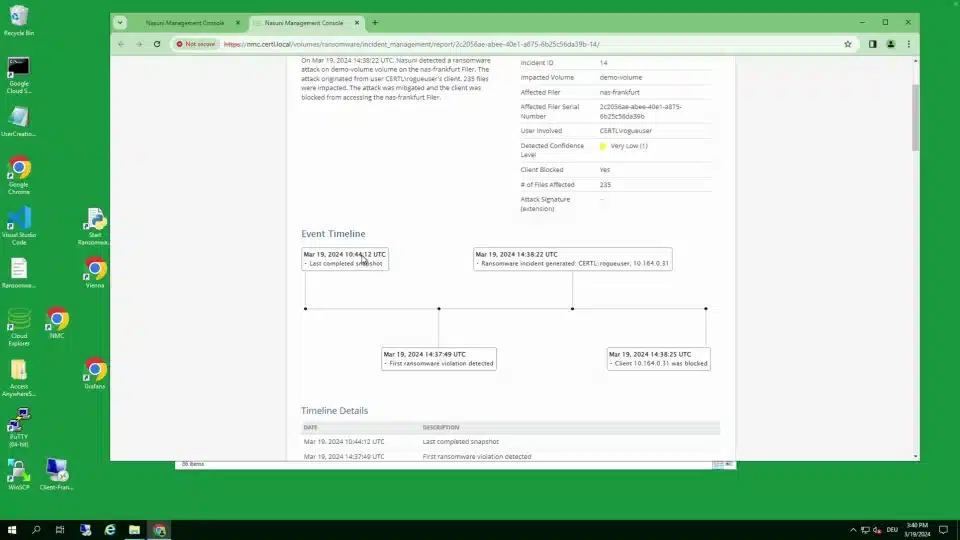
Nasuni Ransomware Protection is an edge-focused solution to detect, respond to, and recover from ransomware attacks. Built into the Nasuni File Data Platform, it delivers real-time detection, immutable storage, and rapid recovery capabilities that support large-scale enterprise environments.
Pros:
- Edge detection: Monitors file activity at the edge using known threat signatures and behavioral analytics to identify ransomware.
- Incident reporting: Automatically generates incident reports, aiding compliance, insurance claims, and response planning.
- Recovery process: Recovers millions of files by surgically restoring only the affected data to clean, previous versions.
- Immutable snapshots: Maintains immutable file snapshots to ensure data can’t be altered or deleted by attackers.
- Restore capabilities: Restores individual files, folders, or entire volumes to reduce downtime and data loss.
Cons (as reported by users on G2):
- Limited reporting capabilities: Users note that built-in reporting lacks automation and customization, requiring manual effort for tasks like status sharing
- File system navigation issues: Some users find it difficult to locate specific files or identify storage utilization by file types
- Slow permission changes: Making changes across large file systems can be slow and lacks intuitive tools
- Cumbersome log access: Log review processes involve filtering large, unstructured text files, making investigation inefficient
- Offline access constraints: As a cloud-based platform, Nasuni may limit access during network disruptions or in remote areas
Bugs in new releases: Frequent bugs in version updates are a concern, with some users requesting more robust pre-release testing
Source: Nasuni
3. Zerto

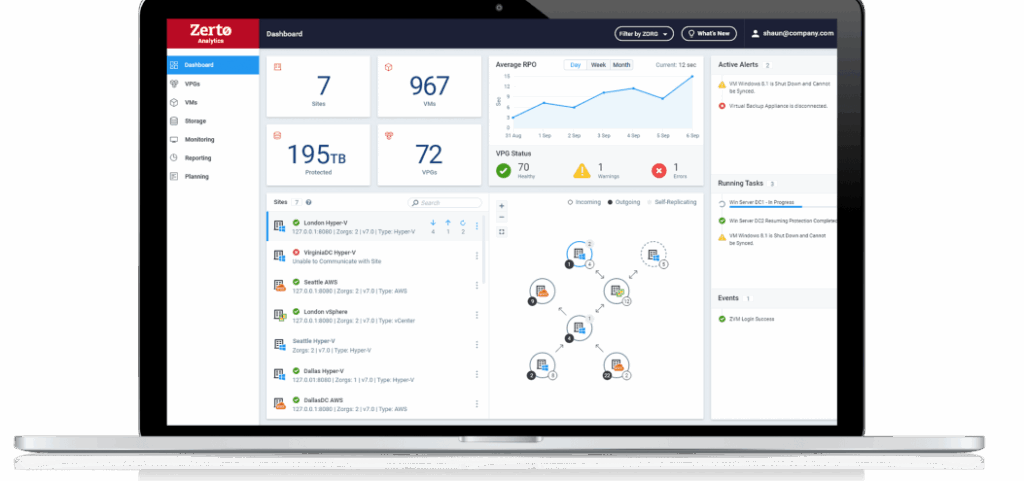
Zerto is a disaster recovery and ransomware resilience platform that helps organizations detect and recover from cyberattacks. Its main focus is enabling organizations to rapidly return to a healthy operational state following disruptions like ransomware, with minimal downtime and data loss.
Pros:
- Continuous data protection (CDP): Replication and journaling detect changes in real time.
- Ransomware detection: Detects encryption events, triggering alerts and tagging journal checkpoints for quick recovery.
- Rapid recovery: Restores applications and data to a state before corruption occurred.
- Crash-consistent multi-VM recovery: Recovers complex applications with multiple virtual machines as a single unit.
- Automated orchestration and failover: Helps simplify disaster recovery with automation for testing and failover.
Cons (as reported by users on G2):
- Expensive for smaller environments: Users note Zerto may not be cost-effective for mid-sized organizations with limited IT budgets
- Requires Windows OS: Deployment depends on Windows Server, which some users find restrictive
- Limited documentation: API documentation is incomplete or unclear, requiring extra effort to implement integrations
- Reporting limitations: The reporting interface lacks customization and flexibility for end-user needs
- Minor interface issues: Some usability quirks, such as case-sensitive login fields, impact user experience
Occasional bugs: Version upgrades sometimes introduce bugs or lag behind expected release cycles
Source: Zerto
4. Acronis

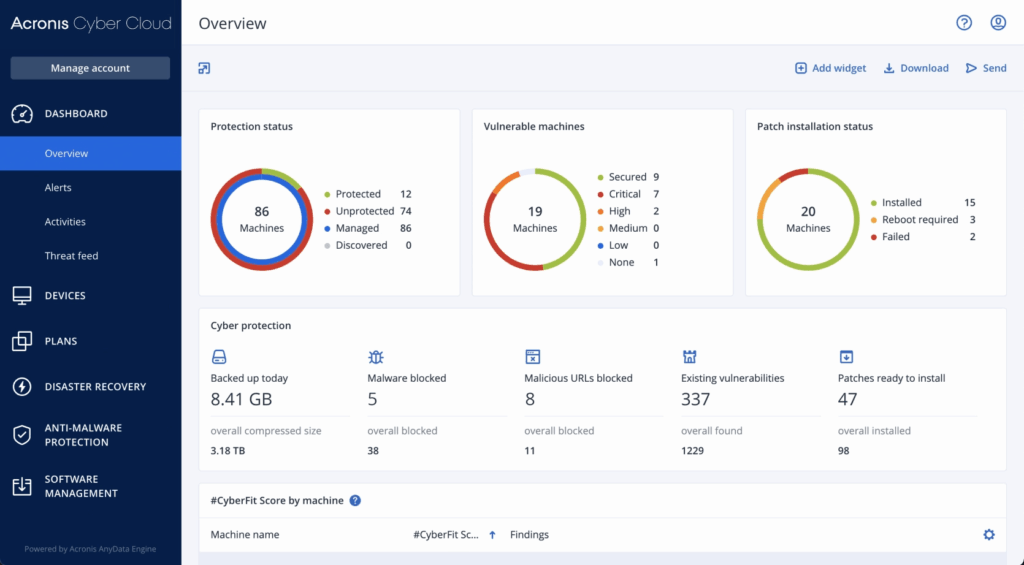
Acronis is a cyber protection platform that combines data backup, disaster recovery, and endpoint security to provide ransomware defense. It offers proactive, active, and reactive protection measures that identify, prevent, and neutralize ransomware threats.
Pros:
- Multi-layered ransomware protection: Combines prevention, detection, and response tools—including AI-assisted threat detection—to block ransomware threats.
- Automated backups and rollbacks: Performs continuous file and full-image backups with automated rollback options to recover from encrypted or corrupted states.
- Integrated cyber protection: Merges endpoint security and data protection into a single solution.
- Threat intelligence: Improves defense mechanisms with updated threat data to detect and respond to the latest attack vectors.
- Recovery capabilities: Supports rapid recovery across endpoints and systems to ensure business continuity.
Cons (as reported by users on G2):
- Slow performance: Users experience lag in the UI and longer backup or restore times, especially for large volumes
- Complex interface for new users: The dashboard and configuration options can be overwhelming for first-time users
- Expensive licensing model: Pricing is considered high compared to simpler backup solutions
- Support challenges: Inconsistent customer support with delayed responses during downtime has been reported
- Steep learning curve: Advanced configuration and feature use require time to master, limiting accessibility for smaller teams
Documentation and licensing clarity issues: Users report unclear technical documentation and confusion around feature entitlements
Source: Acronis
5. Arcserve

Arcserve is a unified data protection platform that combines backup, disaster recovery, and ransomware defense in an integrated solution. It delivers a security framework to prevent, detect, and neutralize threats while keeping data immutable and readily recoverable.
Pros:
- Ransomware protection: Uses a multi-layered defense strategy to prevent and immunize backup data from ransomware and cyberattacks.
- Immutable backup storage: Ensures backup data cannot be altered or deleted by malicious software, supporting both on-premises and cloud storage.
- Integrated cybersecurity with Sophos: Includes Sophos Intercept X Advanced, offering deep learning malware detection, CryptoGuard anti-ransomware, and WipeGuard for boot-record protection.
- Threat detection: Uses signatureless detection and behavioral analytics to identify both known and unknown threats.
- Unified backup and disaster recovery: Consolidates protection for physical, virtual, cloud, and SaaS environments.
Cons (as reported by users on G2):
- Slow restore times: Users report delays during recovery processes, impacting business continuity
- Backup reliability issues: Backup failures due to datastore issues or infrastructure dependencies are a concern
- Lack of direct cloud backup: Some users note the absence of native cloud backup support, reducing flexibility
- Customer support inconsistencies: Support quality varies, with slow or ineffective responses during critical incidents
- Data deletion risks: In some cases, datastore failures have led to permanent loss of all backup data
On-premises reliance: The platform depends heavily on local IT infrastructure, limiting recovery in some scenarios

Source: Arcserve
Notable Ransomware Protection Services Focused on Detection and Response
6. Malwarebytes OneView

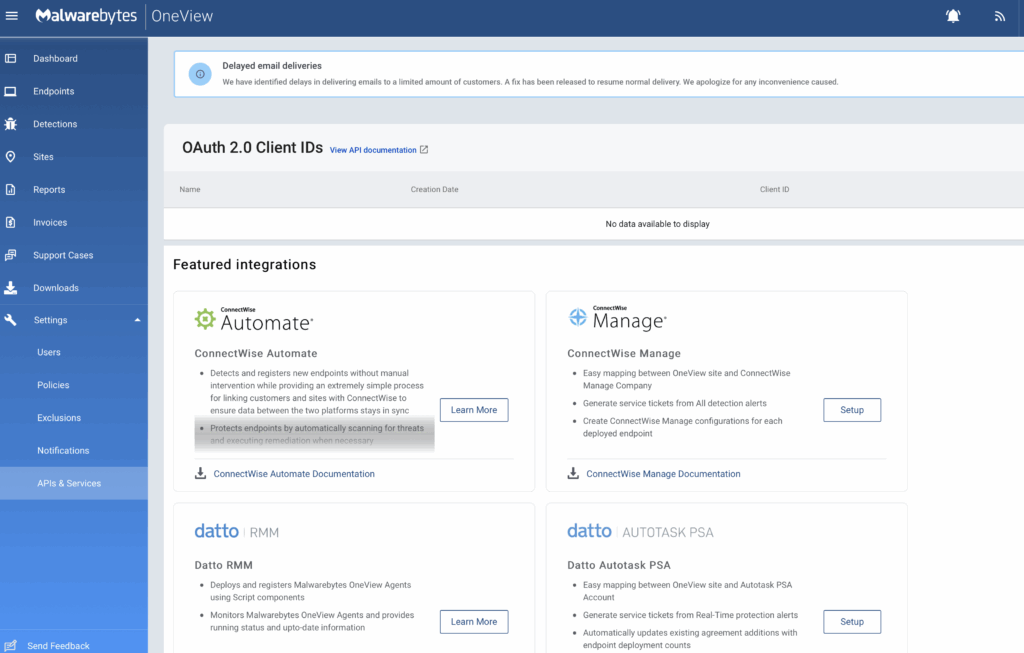
Malwarebytes OneView is a centralized security management platform for IT service providers to simplify the delivery of endpoint protection across multiple clients. It offers ransomware rollback capabilities, allowing recovery of files and systems affected by attacks without relying on external backups.
Pros:
- Ransomware rollback: Restores systems to their pre-attack state using rollback technology, reducing downtime and avoiding ransom payments.
- Customizable protection settings: Configures security policies based on client environments.
- Centralized monitoring and alerts: Offers dashboards, reports, and real-time notifications to track client security postures and respond quickly to threats.
- Single lightweight agent: Deploys a unified agent to handle ransomware, malware, breaches, and vulnerabilities.
- Simplified billing and reporting: Offers detailed usage, audit logs, and billing history at the site level to simplify client invoicing and management.
Cons (as reported by users on G2):
- Aggressive threat blocking: The platform may over-block legitimate processes or tools, requiring manual adjustments
- Limited reporting flexibility: Reports lack deep customization, and some users find log exports cumbersome
- Performance impact on endpoints: Users report occasional slowdowns or resource usage spikes on protected devices
- Steep learning curve for new features: Admins may need time to fully understand newer capabilities like DNS filtering and patch management
- Dashboard customization limitations: Some users want more control over which modules or scores are visible
Documentation gaps: Support content and setup guides lack clarity in some areas, especially for advanced configurations
Source: Malwarebytes

7. Check Point Harmony Endpoint

Check Point Harmony Endpoint is a unified endpoint security solution to protect remote and hybrid workforces from cyber threats such as ransomware, phishing, and zero-day malware. Built on Check Point’s ThreatCloud AI, it uses intelligence from over 60 AI engines to block attacks across various vectors.
Pros:
- Ransomware and malware protection: Detects and blocks ransomware based on behavioral analysis, restores encrypted files via automated snapshots, and includes processor-level protection through Intel TDT.
- Zero-day and phishing defense: Phishing protection with browser security tools like URL filtering, credential reuse detection, and heuristic analysis of suspicious web elements.
- Threat intelligence and forensics: Backed by ThreatCloud AI for real-time threat detection. Provides forensic reports and MITRE ATT&CK mapping for attack analysis.
- Data protection and GenAi security: Full disk encryption, removable media encryption, DLP tools, and GenAI security features to detect and prevent sensitive data loss across endpoints.
- Endpoint detection and response (EDR/XDR): Automated incident reporting, threat hunting, and sandboxing for investigation and blocking of unknown malware.
Cons (as reported by users on G2):
- High resource consumption: Endpoint devices may experience performance degradation due to resource-intensive processes
- Complex configuration: Initial setup and policy tuning are time-consuming and require technical expertise
- Steep learning curve: Users report difficulty understanding and managing all available features at first
- Cost concerns: The platform is perceived as expensive, especially for smaller teams or budget-conscious organizations
- Limited documentation: Insufficient guidance during deployment and troubleshooting may slow onboarding
Interface usability issues: Dashboards are not always intuitive, making it harder to locate certain features

Source: Check Point
8. CyberProof Ransomware Protection

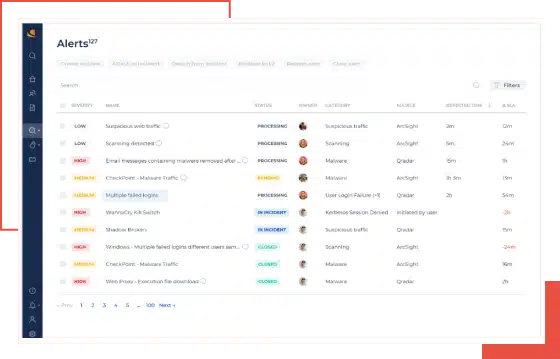
CyberProof Ransomware Protection is a managed security service to help organizations defend against sophisticated ransomware attacks through proactive measures and expert-led response. The service combines threat intelligence, virtual analyst technology, and a skilled cybersecurity team to deliver continuous monitoring, early detection, and rapid mitigation.
Pros:
- Managed ransomware defense: End-to-end service covering assessment, solution implementation, and ongoing management of ransomware protection.
- Threat intelligence: Utilizes real-time intelligence to anticipate and neutralize ransomware tactics before they can cause harm.
- Incident response and recovery: Includes expert-led incident response, forensic investigation, and support for data recovery and business continuity.
- Backup and disaster recovery planning: Ensures data availability and minimizes downtime through tailored continuity strategies.
- Regulatory compliance support: Helps organizations align with global data protection standards, reducing risk of fines and legal issues.
Cons:
- Limited platform visibility: Some users report a lack of transparency into backend operations and protection workflows
- Inconsistent reporting detail: Reports may lack the depth or granularity needed for advanced forensic analysis
- High cost for smaller environments: The managed service model can be expensive for organizations with basic needs
- Onboarding complexity: Integration into existing environments and processes may require extensive vendor support
Scalability limitations for SMBs: The solution is optimized for large enterprises, with fewer self-service options for smaller teams
Source: CyberProof
9. Sophos Endpoint

Sophos Endpoint is an AI-driven endpoint protection platform built to stop modern cyber threats before they can disrupt business operations. Based on Intercept X, it combines deep learning, behavioral analysis, and exploit prevention to deliver a prevention-first security strategy.
Pros:
- AI-powered threat prevention: Multiple deep learning models block known and unknown threats without relying on signature-based detection.
- CryptoGuard ransomware protection: Detects and stops malicious file encryption and automatically rolls back impacted files to their safe state.
- Remote ransomware defense: Blocks attacks launched from unmanaged or compromised devices within the same network.
- Anti-exploit technology: Includes preconfigured exploit mitigations to stop fileless and zero-day attacks that bypass traditional defenses.
- Behavioral and web controls: Reduces attack surface with integrated controls for applications, websites, and connected peripherals.
Cons (as reported by users on G2):
- High system resource usage: Scans and updates can slow down devices, especially older hardware
- Complex configuration: Initial setup and policy creation often require time and training
- Steep learning curve: Users report difficulties understanding the interface and feature set without guidance
- Limited reporting customization: Users want more flexible alerting and report generation options
- Compatibility issues: Integration with Microsoft tools, especially Intune on macOS, can be problematic
Customer support limitations: Some users experience delays, language barriers, or incomplete responses

Source: Sophos
10. CrowdStrike Falcon

CrowdStrike Falcon is an AI-native cybersecurity platform to deliver proactive and adaptive protection against modern ransomware threats. It replaces traditional endpoint solutions with real-time, intelligence-driven defense supported by threat hunting and behavioral analysis.
Pros:
- AI-native ransomware protection: Uses machine learning and behavioral analytics to detect and block ransomware without relying on signatures.
- Adversary intelligence: Built on real-world insights from active threat actors.
- Adversary OverWatch threat hunting: A managed hunting team that identifies and stops stealthy, human-led attacks before ransomware can deploy.
- Hands-on exercises: Includes tabletop, red team/blue team, and adversary emulation exercises to test and improve ransomware response readiness.
- Endpoint visibility: Delivers detection coverage and analytic visibility across the environment.
Cons (as reported by users on G2):
- High cost: Falcon is considered premium-priced, which may be prohibitive for smaller businesses
- Complex interface: The console offers deep functionality but can overwhelm new users
- Frequent false positives: Behavioral detections may trigger excessive alerts before tuning is complete
- Limited filtering options in investigations: Event and alert searches lack flexibility, slowing forensic analysis
- Steep learning curve for advanced features: Threat hunting, API usage, and custom queries require experience
Support delays under load: Some users report slow response times during busy periods or escalated cases

Source: CrowdStrike
How to Choose Ransomware Protection Services
Selecting the right ransomware protection service involves more than comparing product features. Organizations must align solutions with their threat landscape, operational needs, and recovery objectives. Here are key considerations when assessing ransomware protection services:
- Threat coverage: Ensure the solution defends against a broad spectrum of ransomware types, including fileless attacks, zero-day exploits, and advanced persistent threats. It should detect both known malware and novel attack patterns using behavioral analytics.
- Detection and response capabilities: Look for services offering real-time monitoring, automated threat response, and 24/7 security team support. Features like rollback, quarantine, and forensic analysis are critical for containing and mitigating active attacks.
- Recovery and resilience: Evaluate the service’s backup and recovery mechanisms. Look for immutable storage, offline backups, and fast restore options that can bring systems back online with minimal data loss and downtime.
- Integration with existing infrastructure: Choose solutions that can integrate with the existing security stack, including SIEM tools, identity management systems, and endpoint agents. API support and flexible deployment options (cloud, on-prem, or hybrid) are essential.
- Scalability and management: Consider how well the service can scale with the organization’s size and complexity. Centralized management consoles, automation capabilities, and multi-tenant support are valuable for simplified administration.
- Compliance and reporting: Verify whether the solution supports compliance with relevant regulations (e.g., GDPR, HIPAA) through audit logs, incident reporting, and data handling features.
- Vendor expertise and support: Assess the vendor’s experience in dealing with ransomware threats. Managed services, threat hunting capabilities, and access to expert guidance can significantly improve response readiness.
- Cost and licensing model: Evaluate the total cost of ownership, including subscription fees, deployment costs, and support services. Transparent pricing and flexible licensing can help manage security within budget constraints.
- Regulatory and reporting obligations: Account for evolving rules on ransom payments and breach disclosure. Some jurisdictions now bar public-sector and critical-infrastructure organizations from paying ransoms and require victims to report incidents or notify authorities before making any payment, which raises the importance of documented detection, response, and recovery.
Frequently Asked Questions
Traditional antivirus software primarily detects known threats using signature-based detection. Ransomware protection adds behavioral analysis, rollback features, and immutable backup integration to identify and respond to active encryption attempts—even from unknown or fileless ransomware strains.
Yes. Ransomware protection can stop many attacks, but it’s not foolproof. Backups—especially immutable, air-gapped, or offsite ones—are critical for restoring systems after a successful breach. A good ransomware protection strategy includes layered security and reliable recovery mechanisms.
Many modern tools use AI, machine learning, and behavioral analysis to detect zero-day ransomware based on unusual encryption behavior or system changes. However, detection isn’t guaranteed, so multiple layers of defense (including containment and recovery) are still required.
Immutable backups cannot be altered or deleted, even by admins or malware. This makes them resistant to ransomware encryption or erasure attempts. They’re essential for reliable recovery after an attack.
Yes—if the solution includes rollback, journaling, or clean backups. Tools like N2W support point-in-time recovery or rollback features to restore data from just before the attack occurred.
Yes. Many services offer features that support data protection regulations like GDPR, HIPAA, and ISO 27001—such as audit logging, reporting, immutable backups, and incident response documentation. These capabilities matter more as governments introduce mandatory ransomware incident reporting and, in some regions, restrict or prohibit ransom payments, making documented recovery a regulatory expectation rather than only a best practice.
Absolutely. Cloud platforms like AWS, Azure, or Google Cloud operate under a shared responsibility model. You are responsible for securing your workloads and data. Ransomware can still impact cloud environments, especially if IAM, backups, or endpoint security are misconfigured.
At least quarterly, or more frequently for critical systems. Regular testing validates backup integrity, recovery workflows, and team readiness—ensuring you’re prepared when a real incident occurs.
Threat intelligence feeds inform detection engines of new ransomware strains, tactics, and indicators of compromise. This improves early detection, speeds up response, and enhances automated defenses across endpoints and networks.
Learn more about N2W’s Ransomware features to keep your data safe and always recoverable.