What Are Cloud Recovery Tools?
Cloud recovery tools for business continuity use cloud-based solutions to replicate, back up, and restore data and applications after a disruption, ensuring minimal downtime. Popular options include N2W, Azure Site Recovery, Zerto, and AWS Elastic Disaster Recovery.
Unlike traditional disaster recovery systems, cloud recovery tools operate primarily in virtualized or cloud-native ecosystems, making them more scalable, agile, and accessible from distributed locations. These tools can support a variety of use cases from simple file or database recovery to complex, multi-tier application failover scenarios.
By managing snapshots, orchestrating automated failover, and integrating with cloud-native services, cloud recovery tools help minimize downtime and data loss. This capability is crucial for organizations that rely on cloud-hosted workloads and need to ensure business continuity in the face of threats such as cyberattacks, accidental deletions, or large-scale infrastructure outages.
This is part of a series of articles about disaster recovery in cloud
In this article:
- The Importance of Cloud Recovery Tools for Business Continuity
- Key Features of Cloud Recovery Tools Supporting Business Continuity
- On-Premises vs Cloud Recovery
- Notable Cloud Recovery Tools for Business Continuity
- Frequently Asked Questions
The Importance of Cloud Recovery Tools for Business Continuity
Business continuity depends on the ability of a company to maintain operations during and after disruptive events. Cloud recovery tools play a crucial role by ensuring that critical data and applications remain available, even when primary systems fail. They automate backup schedules, enable rapid restores, and provide mechanisms for failover and failback, all of which are vital in minimizing operational interruption and financial impact.
For regulated industries or businesses with strict service level agreements (SLAs), recovery time objectives (RTOs) and recovery point objectives (RPOs) are key performance metrics. Cloud recovery tools meet these targets by restoring services quickly and limiting data loss to within tolerable thresholds. The end result is improved resilience, reduced risk, and the ability to maintain customer trust even during unforeseen events.
Key Features of Cloud Recovery Tools Supporting Business Continuity
Data Protection and Backup
Data protection and backup are fundamental capabilities of any cloud recovery tool. These systems offer automated, scheduled backups of files, databases, virtual machines, and sometimes even entire cloud environments. Backups are encrypted and stored in highly durable cloud storage, ensuring that even if the primary system is compromised, up-to-date copies remain accessible and secure.
Modern tools often include continuous data protection (CDP), reducing the interval between backups and lowering the risk of data loss. They support various restore options, including full environment recovery or selective file restoration. This granular approach lets organizations bounce back from both minor issues such as file corruption and major incidents like ransomware attacks.
NOTE: While CDP delivers near-zero RPOs by capturing every write operation, it can require more storage and bandwidth than traditional snapshot-based backups—making it important to balance data protection needs with budget considerations.
Geographic Redundancy and Multi-Region Support
One of the strengths of cloud recovery tools lies in their support for geographic redundancy. By replicating data across multiple data centers or cloud regions, these tools mitigate risks associated with regional outages or natural disasters. They ensure that, even if a specific region goes offline, data and workloads can be restored from unaffected locations.
Multi-region support also helps organizations comply with data sovereignty regulations and business policies that mandate disaster recovery provisions in separate jurisdictions. This approach not only improves business continuity but also optimizes disaster recovery strategies for complex, globally distributed environments.
Cross-Cloud Recovery
Some recovery tools keep a copy of your backups with a second cloud provider, so an outage or a compromised account at one provider can’t reach both copies. N2W, for example, archives AWS backups into Azure Blob or Wasabi, and restores EC2 instances from a storage repository into Azure as bootable VMs for Ubuntu 22 and 24 guests. Windows instances restore as data disks, and the path runs one way, AWS to Azure. A second provider also helps with a multi-cloud strategy and with policies that call for geographically separate copies.
Automated Failover and Orchestration
Automated failover is the ability of a recovery tool to detect failures and switch critical workloads to backup systems without manual intervention. Orchestration features coordinate the restoration of interconnected services, ensuring that dependencies are resolved and applications come online in the correct order. This automation reduces human error and speeds up recovery time.
Cloud recovery tools with orchestration capabilities typically provide pre-defined and customizable runbooks. These workflows encompass everything required to bring enterprise apps, databases, and networking back online, allowing operations teams to meet aggressive RTOs even in complex IT landscapes.
Here’s what that looks like on AWS with N2W. A Recovery Scenario groups the instances behind one application and gives each a launch order, so tiers come up in the sequence the application needs, with instances in the same group launching in parallel. At recovery time you can override the instance type, VPC, subnet, IP address and tags for each instance, which matters when the recovery region doesn’t mirror production. Before any of that, network cloning recreates the VPC, subnets, route tables, security groups and load balancers in the target region or account from an editable CloudFormation template, so recovered instances have a network to land in.
What automates failover and failback?
Failover moves production to the recovery region or account; failback returns it once the primary is healthy again. A tool automates both when it can recreate the network, launch the application in order and reverse the direction without a rebuild. N2W does this across AWS regions and accounts. Recovery into Azure runs one way, AWS to Azure, so plan failback from Azure separately.
Automated Disaster Recovery Drills
Automated disaster recovery drills simulate real-world failure scenarios to test the effectiveness of recovery plans without disrupting production systems. These drills validate the readiness of cloud recovery workflows, highlight configuration issues, and ensure that both tools and teams can meet defined RTOs and RPOs.
Cloud recovery platforms typically allow scheduled or on-demand testing in isolated environments. This ensures that recoveries can be performed as planned, and any gaps (such as untested dependencies or outdated configurations) can be addressed proactively. Regular drills also support compliance requirements by generating audit trails and test reports, providing evidence that disaster recovery strategies are current and effective.
Drills only get run if they’re cheap and quick. N2W’s dry run launches nothing, so it costs nothing, and a full failover test costs only what the cloud provider charges for the resources while they run. N2W charges nothing for either. Randstad Spain cut its full DR test from most of a day to under an hour, 8x faster, after automating it.
Granular Recovery Options
Not every recovery scenario requires a full-scale failover. Granular recovery options let administrators restore individual files, application objects, virtual machines, or full environments as needed. This flexibility is especially valuable for responding to accidental file deletions, localized corruption, or user errors without triggering a broader, more disruptive recovery operation.
Recovery tools can also restore to previous application states using point-in-time snapshots or versioning. This capability allows organizations to recover only the affected parts of their infrastructure, reducing downtime and data exposure while conserving resources compared to full environment restores.
Visibility, Monitoring, and Reporting
Visibility across backup and recovery operations is vital for compliance, troubleshooting, and optimization. Cloud recovery tools typically offer dashboards and real-time monitoring to track backup job status, storage usage, and recovery readiness. Custom alerts and automated reporting highlight potential risks or compliance gaps before they escalate.
Reporting also supports audit requirements and internal policies by documenting recovery actions and system changes. This transparency simplifies management, improves accountability, and ensures that organizations can validate their business continuity posture at any time.
Cost Optimization and Backup Lifecycle Automation
Modern cloud recovery tools do more than protect data—they help IT teams optimize resources and reduce spend. Built-in archiving and tiering tools automatically move older backups to cost-efficient storage, while scheduled power-downs reduce compute costs in DR environments.
Smart policies can prevent cloud waste, alert teams to underutilized volumes, and make backup lifecycle management a drama-free process. The result: greater resilience and better ROI from your cloud infrastructure.
On-Premises vs Cloud Recovery
On-premises disaster recovery (DR) relies on physical infrastructure (secondary data centers, dedicated hardware, and internal IT teams) to replicate and recover critical systems. While this model offers complete control over hardware configurations, security policies, and network topologies, it comes with significant capital and operational costs. Organizations must maintain duplicate environments, manage hardware lifecycles, and staff personnel to ensure readiness.
Cloud-based recovery shifts infrastructure responsibilities to cloud providers. Organizations replicate workloads to the cloud, paying only for the storage and compute resources they use. This model eliminates the need for redundant hardware and offers elastic scalability, making it easier to adapt to changing workloads or test disaster recovery plans without disrupting production.
| Criteria | On-Premises Recovery | Cloud Recovery |
| Cost | High upfront CAPEX (hardware, facilities); ongoing OPEX for maintenance | Pay-as-you-go; lower entry cost; reduced infrastructure burden |
| Scalability | Limited by physical capacity; requires provisioning in advance | Elastic; scales up/down on demand |
| Speed of Deployment | Slow; setup can take months | Fast; ready-to-use infrastructure |
| Maintenance | Internal teams required for hardware, updates, and patching | Managed by cloud provider |
| Testing | Often manual and infrequent due to complexity | Automated DR drills possible without downtime |
| Geographic Redundancy | Requires multiple physical sites | Built-in with multi-region support |
| Security Control | Full control over environment; complex to manage | Shared responsibility model; provider-managed infrastructure security |
| Vendor Lock-In | Low—fully controlled in-house | Medium to high, depending on provider capabilities and architecture |
| Compliance | Easier to enforce strict on-site data residency | Must verify provider certifications and data locality options |
In practice, many organizations now adopt hybrid recovery models, using on-premises systems for immediate, local restores and cloud recovery for large-scale disaster scenarios. This approach blends control with flexibility while minimizing cost and complexity.
Notable Cloud Recovery Tools for Business Continuity
Head to Head Comparison
| Product | Description | Pros | Cons |
| N2W | Backup and disaster recovery platform for AWS and Azure, deployed inside your own cloud account. Built for fast recovery, isolated DR accounts and low-cost DR testing. | – Cross-region and cross-account recovery, plus one-way recovery from AWS into Azure – Immutable backups and a cross-cloud air gap – Orchestrated failover and $0 dry-run DR tests – Kubernetes (EKS) protection – Clones AWS VPC networking (subnets, route tables, security groups) to the recovery region or account – Cost controls (archiving, idle shutdown, lifecycle management) – Policy-based automation across accounts and subscriptions | – Focused primarily on IaaS workloads – Not a continuous block-level replication platform – Limited SaaS application coverage (e.g., Microsoft 365) |
| HPE Zerto | Continuous data protection platform with journal-based rollback. Supports hybrid and multi-cloud DR for VMware, Azure, AWS. | – Near-zero RPO with CDP- Multi-VM application consistency- Journal-based rollback to exact points- Strong ransomware rollback support | – High cost for SMBs- Windows Server required- Reporting limitations- API documentation gaps |
| AWS Elastic Disaster Recovery (DRS) | AWS-native DRaaS platform for replicating on-prem and cloud workloads to AWS. Automates staging, failover, and recovery. | – Low-cost staging area- Fast recovery with low RPO/RTO- Point-in-time restores- Integrated with AWS ecosystem | – AWS-only (no cross-cloud)- Complex failback- Limited diagnostics/logging- Surprise data transfer costs |
| Azure Site Recovery (ASR) | Microsoft’s DRaaS platform for VMs, physical servers, and select AWS workloads. Enables region-to-region failover and rollback. | – Multi-platform replication- Application-consistent recovery- Centralized Azure portal- Continuous replication support | – Azure-only DR- Complex setup for hybrid- Bandwidth usage can be high- Limited cross-cloud support- Cost predictability challenges |
1. N2W

N2W’s dry run is the piece most relevant to business continuity. It exercises a full recovery plan using read-only AWS APIs, checks that subnets, IAM permissions and specific IP addresses are still available, and reports what would have failed. Nothing launches, so it costs nothing and can run monthly between full quarterly failover tests. Recovery Scenarios then launch grouped resources in a defined order for multi-tier applications. N2W runs inside your own AWS or Azure account, so recovery doesn’t depend on a vendor’s control plane being reachable.
Pros:
- Automated backups & rapid recovery: Recover individual files, full servers or entire environments in under 60 seconds. City of Oakland restored a full environment in about 30.
- Cross-region and cross-cloud DR: Restore across AWS accounts and regions, and from AWS into Azure as bootable VMs (Ubuntu 22 and 24; Windows as data disks).
- Kubernetes support: Back up and restore EKS clusters from the same console and policies as EC2 and RDS, using managed Velero inside the cluster.
- Immutable backups & air-gapped DR: Lock backups with S3 Object Lock in compliance mode, so not even the root user can delete them before retention ends. Keep a copy in a separate DR account, or with a second provider in Azure Blob or Wasabi.
- Smart cost-saving tools: Power down idle resources, archive old snapshots, and save up to 92% on backup storage.
- Orchestrated failover & DR drills: Recover multi-tier apps in a set launch order with networking cloned from production, and run DR tests on schedule or on demand.
- Advanced reporting & alerting: Track protection and backup status with scheduled reports and custom alerts.
Cons:
- Focused primarily on IaaS workloads
- Not a continuous block-level replication platform
- Limited SaaS application coverage (e.g., Microsoft 365)
Learn more about how N2W delivers ridiculously fast, secure recovery.
2. HPE Zerto

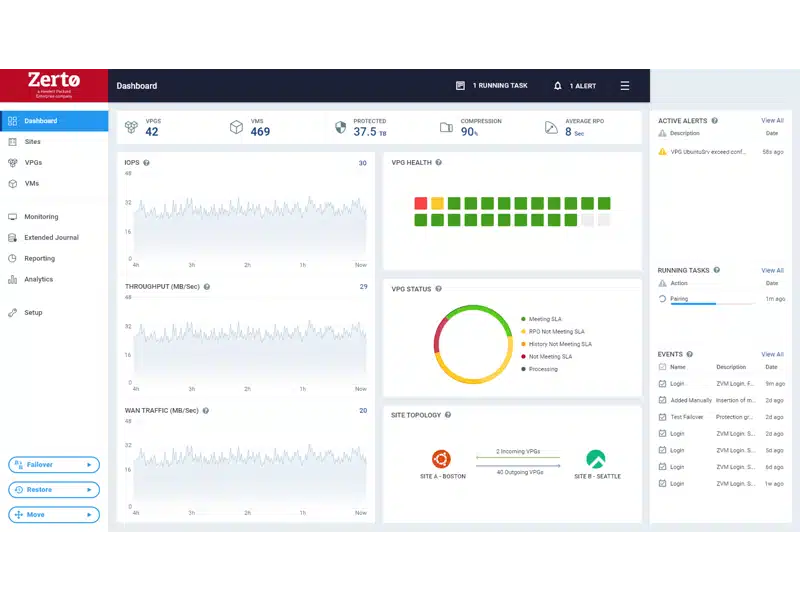
HPE Zerto is a software-based cloud recovery solution that ensures continuous data protection and disaster recovery across on-premises, hybrid, and multicloud environments. It uses near-synchronous replication and a journal-based recovery model to minimize data loss and downtime. Zerto allows organizations to migrate and protect workloads across various platforms including VMware, Azure, and AWS.
Pros:
- Continuous data protection (CDP): Near-synchronous replication without snapshots or agents, enabling recovery points just seconds apart
- Journal-based recovery: Enables rollbacks to thousands of previous states for precise recovery
- Ransomware resilience: Detects malicious activity and restores workloads to a clean, pre-attack state within minutes
- Multicloud and hybrid agility: Supports replication and recovery across on-premises, public cloud, and multicloud platforms
- Application-centric protection: Maintains write-order consistency across multi-VM applications, even when distributed
Cons (as reported by users on G2):
- High cost for smaller environments: Users note that Zerto may be too expensive for smaller organizations
- Limited OS deployment options: Deployment requires Windows Server, which some users find restrictive
- Room for improvement in reporting: The reporting interface lacks customization options for end-user needs
- Documentation gaps: Users report difficulty with using APIs due to limited or unclear documentation
Minor user interface issues: Some users mention small usability quirks, such as case-sensitive login fields
Best suited for enterprises with high RPO/RTO demands—but may require greater resource planning and budget.
3. AWS Elastic Disaster Recovery

AWS Elastic Disaster Recovery (AWS DRS) is a managed service that enables recovery of on-premises or cloud-based applications to AWS. It continuously replicates data to a low-cost staging area in an AWS account, minimizing the need for idle infrastructure and reducing disaster recovery costs.
Pros:
- Staging area: Continuous replication uses low-cost storage and minimal compute, with resources activated only during recovery
- Fast recovery times: Recover applications in minutes with near-zero RPOs and RTOs, using the latest data or historical points
- Point-in-time recovery: Restore to previous states to mitigate the impact of corruption or ransomware
- Unified recovery process: Standardized workflows for testing, failover, and failback across diverse workloads
- Automated operations: Automate environment setup, resource cleanup, and integration with monitoring tools
Cons (as reported by users on Peerspot):
- Bandwidth limitations: High bandwidth requirements can strain networks during continuous replication
- Unclear logging and diagnostics: Logging lacks depth, making it harder to troubleshoot or audit issues
- No integrated ticketing system: Users struggle to track issues or support requests within the platform
- Failback process complexity: Failback is not always intuitive and may fail without clear error guidance
- Cost variability: Some users report unexpected costs, especially related to data transfer and usage spikes
Limited AI automation: Lacks advanced automation for deployment and security hardening
AWS-native only: DRS is tightly integrated with AWS infrastructure, which simplifies setup—but limits use cases for hybrid or multi-cloud strategies.

4. Azure Site Recovery

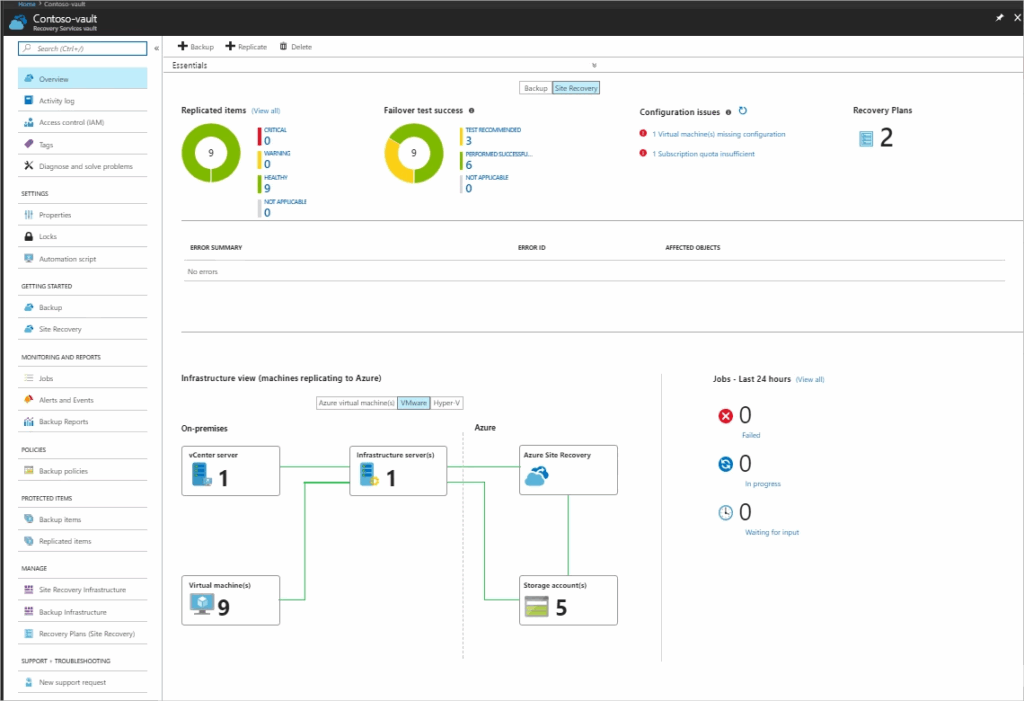
Azure Site Recovery is Microsoft’s disaster recovery-as-a-service (DRaaS) offering that helps organizations maintain business continuity during planned or unexpected outages. It replicates virtual and physical machines from a primary site to Azure or another region, enabling quick failover and access to applications. Once the primary environment is restored, workloads can be failed back with minimal disruption.
Pros:
- Multi-platform replication: Supports replication of Azure VMs, VMware VMs, Hyper-V, physical servers, and AWS Windows instances
- Region-to-region protection: Enables replication between Azure regions or from Azure extended zones to their connected region
- Centralized management: Configure, monitor, and manage replication, failover, and failback through the Azure portal
- Application-consistent recovery points: Capture in-memory data and in-process transactions to ensure consistency during failover
- Low RPO and RTO targets: Continuous replication and fast failover help meet recovery objectives
Cons (as reported by users on G2):
- Complex initial setup: Configuration can be time-consuming, especially for non-Azure or hybrid environments
- Limited platform support: Support is focused on VMware, Hyper-V, and Azure VMs—physical servers and non-Azure services may require workarounds
- Unpredictable recovery times: Users note a lack of transparency in failover progress and completion status
- Network bandwidth demands: Large-scale replication may affect other network activities if bandwidth is constrained
- Cost unpredictability: Data transfer, storage, and licensing costs can be hard to estimate without detailed planning
- Lacks cross-cloud support: ASR does not support failover to non-Azure clouds like AWS
Best suited for organizations already standardized on Azure and Hyper-V. ASR doesn’t support cross-cloud failover to other cloud providers like AWS—limiting DR flexibility in heterogeneous environments.
Related content: Read our guide to cloud disaster recovery solutions
Frequently Asked Questions
Cloud backup focuses on copying and storing data so it can be restored if lost or corrupted. Cloud recovery goes further by restoring entire systems, applications, and infrastructure so operations can resume quickly. Backup is one component of recovery, but recovery tools include orchestration, failover, and automation.
Not always. Some organizations fully replace on‑premises DR with cloud recovery, while others use a hybrid approach. Hybrid models keep local recovery for fast restores and use the cloud for large-scale disasters, geographic redundancy, or ransomware scenarios.
At a minimum, recovery plans should be tested annually. For critical workloads, quarterly or even monthly automated DR drills are recommended. Regular testing helps validate RTOs and RPOs, uncover configuration gaps, and meet compliance requirements.
Yes, when configured correctly. Most tools support encryption in transit and at rest, role-based access control, audit logs, and immutable backups. Security still follows a shared responsibility model, meaning organizations must properly configure access policies, networking, and identity management.
Many cloud recovery tools are designed to support standards such as SOC 2, ISO 27001, HIPAA, and GDPR. Key features include data residency controls, audit reporting, and encryption. Organizations should verify provider certifications and ensure recovery regions align with regulatory requirements.
RTOs can range from minutes to hours, depending on automation and orchestration capabilities. RPOs may range from near-zero with continuous data protection to several hours with snapshot-based backups. Actual values depend on workload criticality, replication method, and budget. Snapshot-based tools have closed much of the gap: N2W backs up as often as every 60 seconds (the RPO) and recovers in under 60 seconds (the RTO).
AWS Elastic Disaster Recovery and Azure Site Recovery automate failover within their own clouds; failback on Elastic Disaster Recovery is one of its common complaints. HPE Zerto uses continuous replication with journal-based rollback across VMware, Azure and AWS. N2W automates failover and failback across AWS regions and accounts from snapshots, and adds one-way recovery from AWS into Azure.
Cloud recovery is often more cost-effective than maintaining a secondary data center, but costs vary. Storage, replication traffic, testing, and recovery events can add up. Tools with lifecycle automation, tiered storage, and resource shutdown features help control long-term costs.
Yes, if the backups survive the attack and the restore is fast. Survival comes from immutability and separation: a copy locked in S3 Object Lock compliance mode can’t be deleted even with stolen root credentials, and a copy in a separate DR account or a second cloud is out of the attacker’s reach. Speed comes from automation: N2W recovers in under 60 seconds, and City of Oakland restored a full environment in about 30.
Key factors include workload compatibility, RTO/RPO capabilities, ease of use, automation features, compliance support, and total cost of ownership. The best tool aligns technical capabilities with business continuity requirements rather than focusing on features alone.
Conclusion
Cloud recovery tools are critical for maintaining business continuity in dynamic and distributed IT environments. They provide scalable, automated solutions to protect and recover data and applications, supporting rapid response to disruptions.
With features like automated failover, geographic redundancy, and granular restore capabilities, these tools reduce downtime, limit data loss, and help meet compliance and operational resilience requirements. Organizations that integrate cloud recovery into their continuity planning are better prepared to respond to failures and maintain essential services without interruption.