

Why Your Azure Backup Bill Keeps Climbing and How to Fix It
If you’re an Azure customer who’s watched your backup line items grow quarter after quarter, you’re not alone. Or perhaps you haven’t even thought to analyze your storage costs because that’s just ‘what the bill says’.
Azure backup costs have a way of quietly spiraling in ways that are hard to predict, and even harder to explain to your finance team. At N2W, we’ve spent years helping AWS customers reclaim significant budget on backup storage, and we’ve now brought that same capability to Azure. To go along with it, we’ve launched a free online Azure Cost Savings Calculator that forecasts what you could be saving. Here’s how to make the most of it.
Understanding Your Current Azure Backup Costs
Before you can fix a problem, you need to understand what you’re actually paying for. Azure Backup is Microsoft’s native, policy-driven backup service, and on the surface, it seems straightforward. But the pricing model has two layers that often catch teams off guard.
The first is a licensing fee: Azure Backup charges a per-VM service cost just for the privilege of backing up the machine. This cost exists before a single byte of storage is consumed.
The second is storage cost: backed-up data lives in what Azure calls a Backup Vault, which uses either Locally Redundant Storage (LRS) or Geo-Redundant Storage (GRS). Both are priced at premium rates, and neither automatically tiers your older data down to cheaper, cooler storage. Every recovery point, whether it’s from last week or three years ago, sits in the same vault at the same price.
Why Costs Spiral Out of Control
Once you understand the baseline, it becomes clearer why bills tend to grow faster than expected. There are a few specific dynamics at play.
Tiered licensing jumps. Azure Backup’s per-VM fee is based on the size of the VM’s data, broken into tiers in 500 GB increments. The problem is that even a slight overage pushes you into the next tier entirely. So a 505 GB VM costs significantly more than one at 499 GB. Over time, as disks grow naturally from OS patches, application data, and log accumulation, VMs quietly cross tier boundaries without anyone noticing until the bill arrives.

No automatic cold tiering. Unlike cloud object storage (which offers hot, cool, cold, and archive tiers), Azure Backup Vault doesn’t automatically move aging recovery points to cheaper storage. Monthly and yearly backups that you’re keeping for compliance purposes (i.e. 7-year or 10-year required retention) sit in an inefficiently priced vault. For organizations with long retention requirements, this adds up to enormous unnecessary spend.
The permanent first full backup. Azure Backup uses an incremental-forever architecture, but every VM requires a baseline full backup that must be retained in hot storage indefinitely. For large VMs, this initial full backup alone can represent a substantial chunk of your ongoing storage cost and there’s no native way to remove it without losing your recovery chain.
How N2W Fixes It
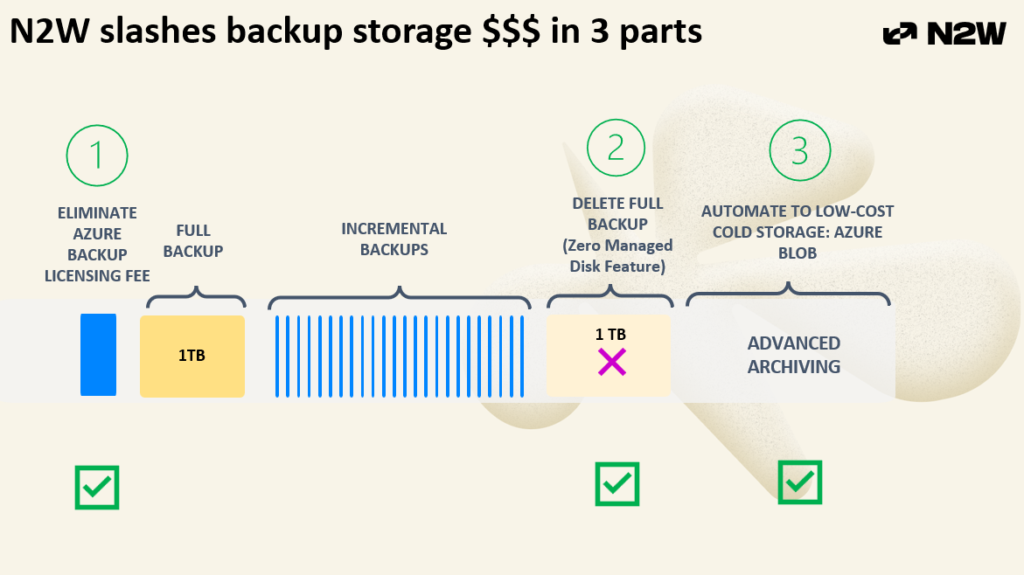
N2W addresses Azure backup costs in three distinct ways, each targeting one of the problems described above.
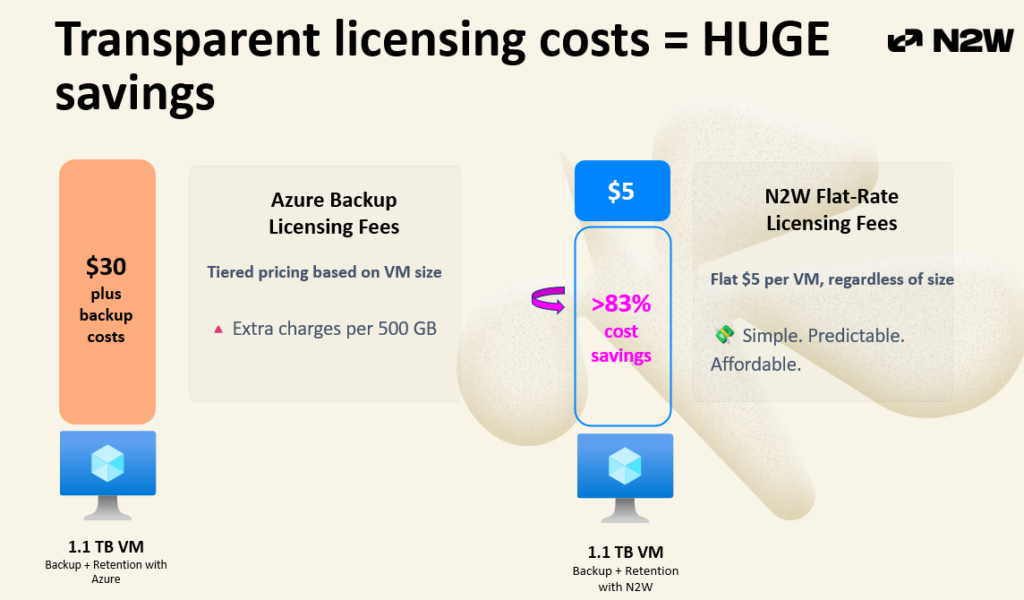
Flat, transparent licensing. Instead of Azure’s tiered model, N2W charges a fixed $5 per VM per month regardless of VM size. Whether you’re backing up a 100 GB instance or a 2 TB application server, the licensing cost is the same. This eliminates tier-boundary surprises entirely and makes budget forecasting straightforward. For example, you would be charged $30/month for a 1.1 TB VM vs $5 with N2W:
Zero Managed Disk. N2W’s snapshot-based architecture doesn’t rely on the original source disk the way Azure Backup does. Because N2W snapshots contain all referenced blocks independently, you have the option to delete the managed disk after backup, eliminating the need to keep that original disk in hot storage. This feature alone can cut storage costs significantly, particularly for large VMs, and it’s one of the most commonly overlooked opportunities for savings.
Copy to cold Azure Blob storage. For long-term retention, N2W can automatically stream backups into Azure Blob Storage which is dramatically cheaper than keeping data in an Azure Backup Vault. This happens automatically, with no manual effort required. For teams with compliance-driven retention policies that span years or even decades, the difference compounds into very large numbers.
Using our Azure Cost Savings Calculator
We built the Azure Cost Savings Calculator to take the guesswork out of all of this. Rather than asking you to trust our math, we give you a tool to run your own numbers.
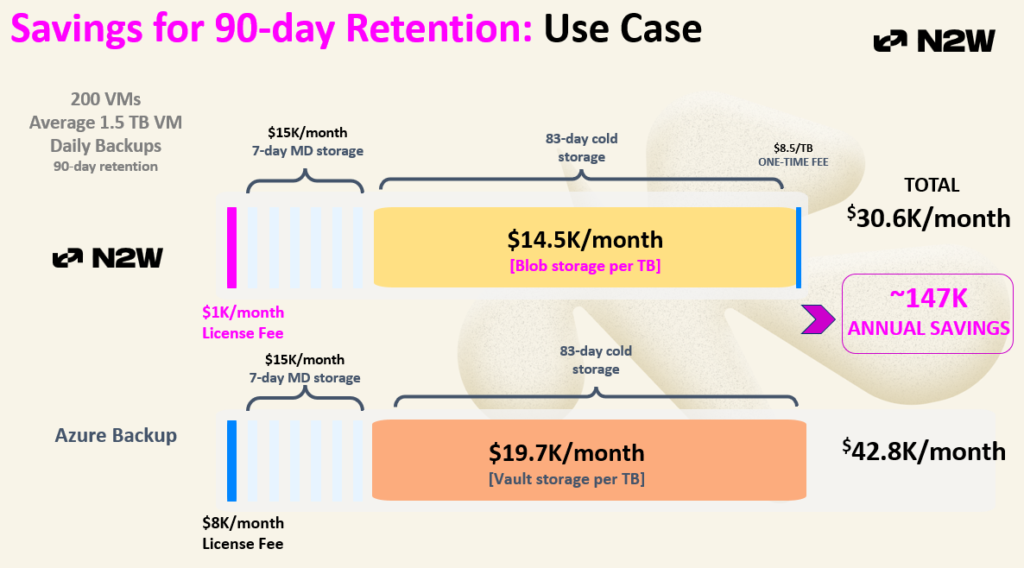
The calculator lives on our website under the Resources tab. It takes your environment inputs (VM count, sizes, change rates, retention policies) and calculates a full total cost of ownership comparison between your current Azure Backup setup and what you’d pay with N2W. It accounts for all N2W costs (licensing fees, processing costs) so the savings figure you see is net of everything.
The calculator supports two primary use cases. For short-term retention (daily backups retained for fewer than 90 days) and long-term retention (90 days or more, typically weekly or monthly backups for compliance). You will see the resulting compounding savings of eliminating service fees and moving aging recovery points to Azure Blob rather than keeping them in the vault.
If you add Zero Managed Disk into the mix, savings can potentially double, the calculator surfaces shows this option, as well.
We’ve run this for real customers. In one recent example, a customer with a moderately sized Azure environment (not accounting for Zero Managed Disk at all) found significant annual savings just from the licensing difference and cold storage tiering alone. Larger environments, especially those with a mix of large VMs and long retention requirements, tend to see savings well into six figures.
Azure Site Recovery: Great for Continuity, Not a Backup Solution
While much of the conversation revolves around Azure Backup, it’s equally important to acknowledge Azure Site Recovery (ASR), a service many organizations already use and one that Microsoft often recommends running in parallel with Azure Backup.
While Azure Backup is designed for point-in-time backups, the traditional restore-from-history model, ASR provides continuous replication of live, writable disks to another Azure region to support high availability during outages. Because ASR replicates active disks and focuses on near-zero RPO rather than flexible RTO, it is not a true backup solution. There are no point-in-time recovery options, and its purpose is to keep Tier-0, mission-critical workloads running with recovery point objectives measured in seconds.
This narrow use case is exactly where ASR shines, but also where many inefficiencies emerge. In practice, customers often misinterpret ASR as a backup tool, leading them to replicate far more virtual machines than necessary, including test/dev and other noncritical systems. This over-replication quickly drives up spend without delivering meaningful backup value.
The result is that ASR becomes an expensive, overly broad replication strategy, rather than the targeted continuity solution it was meant to be. And for teams relying solely on Azure Backup, they may miss out on N2W’s valuable recovery orchestration and failover automation.
Next Steps
If you want to go deeper, we offer a personalized cost savings health check where we’ll take you through the calculator step by step personalized for your backup environment. We also provide our backup and DR best practices such as cross-subscription DR, recovery scenarios, metadata cloning and automated dry runs and other built-in-compliance features.
N2W provides enterprise-grade cloud backup and recovery for AWS and Azure. To learn more about cloud backup and DR best practices as well as cost savings features, book a demo here.