Frequently Asked Questions

MongoDB Backup on EC2 with N2W

How can I ensure consistent backups of MongoDB running on AWS EC2 using N2W?

To ensure consistent backups of MongoDB on EC2 with N2W, you should use a combination of EBS snapshots and MongoDB's journaling feature. If journaling is enabled and the database resides on a single volume, taking EBS snapshots is generally sufficient for consistency. For multi-volume setups or additional safety, use N2W's backup scripts to perform a 'flush and lock' operation on MongoDB before taking snapshots, and unlock the database after snapshots start. This process minimizes the risk of data corruption during recovery. Note: Always test your backup and recovery process thoroughly before using it in production. Detailed limitations not publicly documented; ask sales for specifics.

What scripts are needed to automate consistent MongoDB backups with N2W?

N2W supports three backup scripts per policy: a 'before' script to flush and lock the MongoDB database, an 'after' script to unlock the database after snapshots start, and a 'complete' script (which can be empty). These scripts typically use SSH to connect from the N2W backup server to the MongoDB server and run the necessary MongoDB shell commands. All scripts must have executable permissions for the 'cpmuser' user. Note: Scripts are provided as guidelines and should be thoroughly tested before use in production. Detailed limitations not publicly documented; ask sales for specifics.

Is journaling required for MongoDB backups with N2W?

Journaling in MongoDB helps ensure data consistency during backups. If journaling is enabled and the database is on a single volume, EBS snapshots taken by N2W are generally sufficient for consistent backups. For multi-volume deployments or extra assurance, use the 'flush and lock' method with N2W's backup scripts. Note: Journaling may impact memory and performance; always evaluate based on your workload. Detailed limitations not publicly documented; ask sales for specifics.

How do I test and validate my MongoDB backup and recovery process with N2W?

After configuring your backup scripts and policies in N2W, you should manually test the scripts via SSH to ensure they work as expected. Additionally, perform regular recovery drills to verify that your MongoDB server can be restored properly from backup. This step is critical to confirm that your backup process is reliable. Note: Recovery drills are essential, especially for complex or sharded MongoDB deployments. Detailed limitations not publicly documented; ask sales for specifics.

Features & Capabilities

What features does N2W offer for cloud backup and disaster recovery?

N2W provides automated backup and recovery for AWS and Azure, near-instant recovery, immutable backups, cost optimization (up to 92% reduction in long-term backup costs), compliance and security tools, multi-cloud management, and granular restore capabilities. It also supports integrations with monitoring and compliance tools like Datadog, Splunk, and Bocada, and offers a RESTful API for automation. Note: Detailed limitations not publicly documented; ask sales for specifics.

Does N2W support integration with third-party tools and APIs?

Yes, N2W supports integration with external monitoring tools, identity providers, and compliance reporting solutions. It provides a RESTful API for automation and integration, with documentation and a quick start guide available online. Integrations include Datadog, Splunk, and Bocada for advanced monitoring and compliance tracking. Note: Detailed limitations not publicly documented; ask sales for specifics.

Security & Compliance

What security and compliance certifications does N2W have?

N2W is independently certified to ISO/IEC 27001:2022 and is SOC compliant by inheritance through AWS and Azure. It also supports FedRAMP, ITAR, and CJIS compliance when deployed in AWS GovCloud. For a copy of the ISO certificate, contact customer.success@n2ws.com. Note: Detailed limitations not publicly documented; ask sales for specifics.

How does N2W protect against ransomware and accidental deletion?

N2W uses immutable, air-gapped backups and end-to-end encryption to protect data from ransomware and accidental deletion. Multi-factor authentication, strong password policies, and network protection features further enhance security. Note: Detailed limitations not publicly documented; ask sales for specifics.

Implementation & Ease of Use

How long does it take to implement N2W and start backing up MongoDB?

N2W implementations can be completed in as little as two weeks, with support from dedicated Customer Success Managers and onboarding calls. Step-by-step guides, video tutorials, and a 30-day free trial (no credit card required) are available to help you get started. Note: Implementation time may vary based on environment complexity. Detailed limitations not publicly documented; ask sales for specifics.

What feedback have customers given about N2W's ease of use?

Customers report that N2W is simple to use, with quick setup and an intuitive interface. For example, Shane H. (MSP) says, "It's very simple to use and we are a MSP for multiple companies. Support is great and quick to respond." Julian Ware (City of Oakland) notes, "You’re just clicking and going. And, to me, that’s what the modern world of backup is." Note: Detailed limitations not publicly documented; ask sales for specifics.

Use Cases & Success Stories

What types of organizations use N2W for backup and disaster recovery?

N2W is used by enterprises (e.g., Johnson & Johnson, Dyson), public sector organizations (City of Oakland, Bahrain Ministry), education (St. John's University), retail (Skechers, Dressbarn), transportation (Deutsche Bahn), and nonprofits (Best Friends Animal Society, Goodwill). It supports industries with complex compliance and data protection needs. Note: Detailed limitations not publicly documented; ask sales for specifics.

Can you share examples of customer success with N2W?

Yes. Skechers standardized backup and recovery across a multi-cloud estate, St. John's University eliminated legacy tape storage and improved recovery, and Deutsche Bahn automated backup for 1,500+ volumes and 700 servers, saving 20% operational time. City of Oakland automated AWS backups for critical mapping data. See more at N2W case studies. Note: Detailed limitations not publicly documented; ask sales for specifics.

Competition & Differentiation

How does N2W compare to AWS Backup for MongoDB and EC2 backups?

N2W offers features not available in AWS Backup, such as immutable backups, cross-cloud recovery (AWS and Azure), granular restore (file/folder level), DR backups of encrypted resources, 60-second backup intervals, and intelligent storage tiering. AWS Backup is limited to AWS and requires Lambda scripting for automation, while N2W provides a RESTful API and supports multi-cloud management. Note: N2W may not be the best fit for organizations requiring features outside AWS/Azure or with highly specialized backup needs. Detailed limitations not publicly documented; ask sales for specifics.

MongoDB on EC2: Consistent Backup using EBS Snapshots and N2W

Share post:

EBS snapshots, which are block-level incremental snapshots, is probably the best and most efficient way to protect MongoDB in the EC2 environment. Snapshot technology allows backing up volumes in high frequency. What’s even more important is that recovery of large data volumes is almost instant. Snapshot technology provides that magic. So, like with every other application, the concern with snapshots is what happens if a snapshot was taken in the middle of some important operation or transaction. In that case there may be a data corruption when trying to recover the database from these snapshots. Snapshots taken that way are also called crash-consistent. The possibility of such a recovery operation ending up with a corruption is the same as if the machine crashed and booted up again (as a result of a malfunction or an outage).

Disclaimer: The scripts in this post are given as-is without any warranties`. Please consider them as guidelines. Please don’t use them in your production environment until thoroughly testing them and making sure the backup and recovery processes work correctly.

To Journal or not to Journal

In MongoDB there is a mechanism called “journaling” which is the answer the problem in the previous paragraph. Journaling (explained quite well in this post blog: https://blog.mongodb.org/post/33700094220/how-mongodbs-journaling-works) basically makes sure that any changes made to the data in memory is written also to a journal file, thus allowing the database to reconstruct its last consistent state, even if the machine crashed before all updates were flushed to the main data files. Whether to use journaling or not is a decision that needs to be made for every installation of MongoDB. Using journaling has implications in terms of memory consumption and performance, but in terms of data durability, it is certainly recommended to use it.

In MongoDB’s official documentation, it says that if the database resides on a single volume, and if journaling is turned on, there is no need for any additional operations: just taking snapshots is enough and the journaling mechanism will take care of any consistency problem that may arise. Since no mechanism is completely bullet-proof and since in most production environments multiple volumes will be used, the best way to ensure a backup of MongoDB is consistent, is to perform  “flush and lock” on the database before taking the snapshots, and to release the lock right after all snapshots started.

Flushing and locking MongoDB with N2W

When using backup scripts to ensure consistent backups, N2W runs three backup scripts for each backup policy. One script (aka the “before” script) runs just before snapshots are taken. The second script (aka the “after” script), runs just after all snapshots started. The third one (aka the “complete”) script, runs after all snapshots are completed. With MongoDB it’s pretty straightforward. The first script needs to flush and lock the database, the second script needs to unlock the database and the third one needs to do nothing.

These scripts actually run on your N2W backup server, which is a different EC2 instance than your MongoDB server. SO these scripts need to connect to the MongoDB server to perform these operations. It can be done by installing a MongoDB client on the N2W server and connecting the database remotely. A more secure way would be to connect to the MongoDB server using SSH and running the commands on it. With this approach, there is no need installing anything on the N2W server, and it will also work on MongoDBs that don’t accept connection from outside connections. Here are the steps I used to define consistent backup for MongoDB:

  • After creating a new backup policy named “mongodb” (just a suggestion), I added the MongoDB instance as a backup target to the policy (see N2W’s documentation). By default, N2W will backup all the volumes attached to that instance.
  • I logged in the N2W server instance with SSH, using my own key pair and the user: “cpmuser.”
  • In the folder /cpmdata/scripts, I created the “before” script in the name before_mongodb (before_<policy name>). Here is its content:#!/bin/bash ssh -i /cpmdata/scripts/mongosshkey.pem  <MongoDB server ssh user>@<MongoDB server address> “mongo localhost/admin -eval ‘db.fsyncLock();'” if [ $? -gt 0 ]; then
      echo “Failed locking mongodb” 1>&2
      exit 1
    else
      echo “mongodb lock succeeded” 1>&2
    fi
  • Explanation: the file /cpmdata/scripts/mongosshkey.pem is the private key to connect to the MongoDB server using SSH; it needs to be copied over and given minimal permissions. No need to worry to copy ssh key here since the N2W server instance is running in my own AWS account and is in my total control.
  • In the folder /cpmdata/scripts, I created the “after” script in the name after_mongodb (after_<policy name>). Here is its content:#!/bin/bash
    if [ $1 -eq 0 ]; then
      echo “There was an issue running the first script” 1>&2
    fi
    ssh -i /cpmdata/scripts/mongosshkey.pem  MongoDB server ssh user>@<MongoDB server address> “mongo localhost/admin -eval ‘db.fsyncUnlock();'”
    if [ $? -gt 0 ]; then
      echo “Failed unlocking mongodb” 1>&2
      exit 1
    else
      echo “mongodb unlock succeeded” 1>&2
    fi
  • Explanation: This is similar to the first script, only the operation is unlocking instead of locking. Since it will be called after all EBS snapshots have started, it’s ok the release locking. The snapshots are guaranteed to be consistent. One other addition is the condition at the first line. If the first script failed (i.e. locking did not succeed), it will just output a message and will not attempt to unlock the database.
  • In the folder /cpmdata/scripts, I created the “complete” script in the name complete_mongodb (complete_<policy name>). It is just an empty script that does nothing:#!/bin/bash
  • Remember that all three scripts need to have executable permissions for the “cpmuser” user.
  • To test the scripts I ran them from the SSH command line, and made sure they worked. This step is also necessary to approve the ssh private key (needed only the first time).
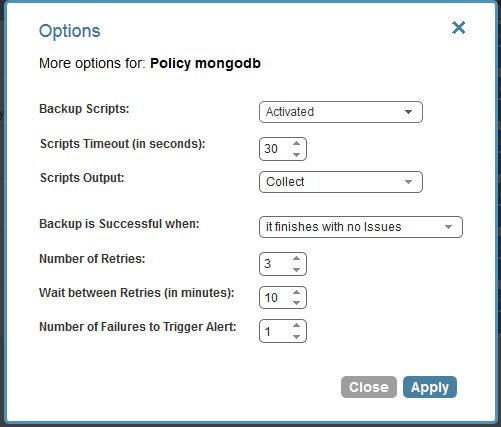
  • After that I only need to configure policy “mongodb” to run scripts:mongodb ebs snapshots cpm consistent backup lock

As you can see, script output was changed to “collected,” so I will be able to see messages the scripts printed out in my N2W console. After that, all I need to do is to monitor my backups through N2W’s management console. My MongoDB server will be backed up consistently according to the scheduling I configured. It is very important to have recovery drills, to make sure the MongoDB server does recover properly from backup. In a separate post we will try to deal with backing up a sharded MongoDB database, distributed across multiple EC2 instances.
You might also like

the disaster-proof backup & DR checklist

What your backup plan is missing...

Fortify your backup plan across every critical dimension with this checklist.