PostgreSQL is an Object Relational Database Management System (ORDBMS) that is considered to be one of the most advanced open source relational database management systems around. Like all relational databases, it is an ACID compliant system and supports transactional queries, DDL statements and Master-Slave replication architecture.
Additionally, PostgreSQL offers an easy way to use data importing tools with Postgres Plus, allowing users to import data from enterprise databases, like Oracle.
What is PostgreSQL?
PostgreSQL is managed by the open source community and the most recent version, was released in June 2024. With the advancements in cloud computing, cloud managed databases are becoming more and more popular. They include various advantages, such as a pay as you go pricing model, scalability, as well as easy management.
AWS hosts PostgreSQL in two different ways
The first is via the AWS-managed database service, RDS, and the second is by self hosting your database on AWS EC2 infrastructure. While some users prefer using RDS because it is a managed service, many others still prefer managing their own databases allowing them to:
- Achieve inter-region replication (read replica)
- Set up replicas that have write capacity (e.g. reporting databases that may generate data at the end of the day)
- Set up automatic failover to separate regions
- Manually fine tune all database-level parameters, if you have very good admin capabilities, since RDS may not allow you to modify all parameters
In this article, we will use the example of an EC2-hosted PostgreSQL database. It is also very important to have proper backup and restore mechanisms when it comes to reliable database management. These allow you to achieve better disaster recovery and prevent data loss.
The importance of backup for PostgreSQL
In production, a single human error can result in the loss of valuable data. As a result, it is recommended to back up your system before making any changes to your production database, along with your regular planned backup. There are two primary ways of achieving backup and recovery with cloud-hosted databases:
- Inherent backup and recovery via database engines, that is executed on cloud-hosted database instances
- Backup and recovery on the volume/disk level using your cloud provider’s infrastructure (e.g. EBS snapshots for AWS)
We will discuss both backup and recovery options a bit later in the article. First, let’s introduce you to the different inherent replication strategies that can be implemented for PostgreSQL data backup.
The 2 types of PostgreSQL backups: physical vs logical
There are two types of backups in PostgreSQL. Physical Backups, which are broken up into File System Level Backups and Continuous Archiving and Point-in-Time Recovery (PITR), and Logical Backups.
- Physical Backup: When PostgreSQL begins, its backend creates data files that are copied.
- File System Level Backup: In this strategy, data files can be copied and stored in another location, then archived or compressed as necessary. The command to back up files is as follows: tar -cf backup-dd-mm-yy.tar
l/data - Advantages: A File System Level Backup is typically larger than an SQL dump (pg_dump will not dump the contents of indexes, just the commands to recreate them). However, performing a file system backup might be faster.
- Disadvantages: If data inconsistencies are not checked during backup, they could result in inconsistent backups. To better ensure that your backup is consistent, stop the database before backup.
- Where it’s used: While it’s not recommended for a single database server, it can be used where the PostgreSQL Master-Slave architecture is implemented because the database has to be shut down in order to perform a usable backup with the tar command.
- Continuous Archiving and Point-in-Time-Recovery (PITR): PostgreSQL creates WAL (Write Ahead Log) files that record changes that are made to the database. With this approach, WALs can be backed up at regular intervals and, when combined with the File System Level Backup, used to recreate the database.
- Advantages: Among the many advantages of this approach is the ability to, create and stop the creation of WAL files at a particular interval so that the database can be updated to a previous point in time. With PITR, only the latest modified data is backed up when WAL files are created, reducing the amount of storage needed to backup data.
- File System Level Backup: In this strategy, data files can be copied and stored in another location, then archived or compressed as necessary. The command to back up files is as follows: tar -cf backup-dd-mm-yy.tar
- Logical Backup: PostgreSQL has two utilities (‘pg_dump’ and ‘pg_dumpall) that take consistent database snapshots at a given moment. However, they don’t force other users to use the database. Both utilities are effective tools that create *.sql files. With these utilities, backups can be performed on local databases and recovered on remote databases.
Crash-Consistent Snapshots
AWS EBS snapshots offer point-in-time backups that are considered to be crash-consistent snapshots. These snapshots backup all of a disk’s data at a particular point in time. However, if files are still open, say in the case of I/O transactions in progress in a database, the data may not be completely written to the disk. This may result in inconsistent data since the file system may not be aware that a snapshot is being taken. To overcome this, it is recommended to use application-consistent snapshots.
Application-Consistent Snapshots
It is recommended to have snapshots first inform the OS that a snapshot is being taken and then perform the backup. These types of snapshots are called application-consistent snapshots.
N2WS Backup & Recovery for PostgreSQL
N2WS Backup & Recovery can help in achieving application-consistent snapshots. It is important to note that AWS EBS snapshots are very fast compared to the inherent PostgreSQL backup options (e.g. File System backups) because they take complete block level snapshots.
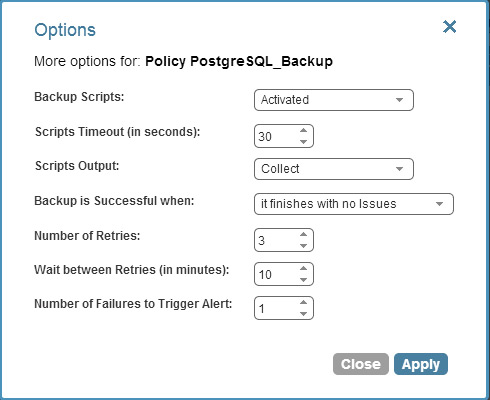
N2WS Backup & Recovery is an enterprise backup, recovery and disaster recovery solution for EC2. It allows you to automate and maintain backups of your entire EC2 environment as well as achieve application-consistent backups.
This is done by providing a mechanism to perform certain tasks before and after snapshots are taken, informing the OS of the backup. N2WS allows you to write scripts that can be performed before a PostgreSQL backup on EC2. In order to allow backup scripts to run, configure your policy as shown below:
N2WS can execute three different scripts: “before”, “after” and “complete”.
- The before script is launched before EBS snapshots are taken. You can execute the ‘pg_start_backup’ command here, which will provide you with the location of the transaction log where your backup will begin. N2WS will start the snapshot procedure after ‘pg_start_backup’ is completed.
- The after script is executed right after backup is started. You can execute the ‘pg_stop_backup’ command here, which will move the the current transaction log insertion point to the next transaction log file.
- The complete script is executed after all snapshots have completed. You can decide if you want to delete the WAL files at this point, and incorporate that into the code accordingly.
It is important to note that unlike MySQL, PostgreSQL does not provide the option to freeze database I/O or temporarily lock databases for backup. For this reason, we use the ‘pg_start_backup’ and ‘pg_stop_backup’ commands.
According to PostgreSQL, “the [‘pg_start_backup’] function writes a backup file (backup_label) into [a] database cluster’s data directory, performs a checkpoint, and then returns the backup’s starting transaction log location as text.” The ‘pg_stop_backup’ function, on the other hand, quickly switches a WAL segment in order to archive the current one.
Due to the fact that PostgreSQL backup is run by postgres users, if you want another user (script) to execute on your behalf, you have to change the ‘pg_hba.conf’ configuration file (generally located in data folder) to allow authentication from other users.
Here, we will execute the ‘pg_start_backup’ and ‘pg_stop_backup’ scripts in PostgreSQL, but N2WS will initiate them using before and after scripts by logging into the PostgreSQL server.
Executing start/stop backup scripts in PostgreSQL
PostgreSQL server backup scripts:
Start Backup Script(db_start_backup.sh)#!/bin/bash
WAL_ARCHIVE=/var/lib/pgsql93/archives
PGDATA=/var/lib/pgsql93/data
PSQL=/usr/bin/psql
label=base_backup_${today}
PGBACKUP=/var/lib/pgsql93/pgsqlbackup
today=`date +%Y%m%d-%H%M%S`
echo "PG_START_BACKUP script will start now with $label..."
CP=`$PSQL -q -Upostgres -w -d template1 -c "SELECT pg_start_backup('$label');" -P tuples_only -P format=unaligned` RVAL=$?
echo "Checkpoint Begins is $CP"
if [ ${RVAL} -ne 0 ]
then
echo "PG_START_BACKUP FAILED!!!"
exit 1;
fi
echo "PG_START_BACKUP SUCCESS!!!"
echo "Compression with Tar starts..."
tar -cvf pgdata-$today.tar.bz2 --exclude='pg_xlog' $PGBACKUP/
echo "Compression with Tar completed..."
echo "PG_STOP_BACKUP script will start now..."
$PSQL -Upostgres template1 -c "SELECT pg_stop_backup();"
if [ $? -ne 0 ]
then
echo "PG_STOP_BACKUP FAILED!!!"
exit 1;
fi
echo "PG_STOP_BACKUP SUCCESS!!!"
Stop Backup Script(db_stop_backup.sh)
[This may return an error message if backup was already completed. However, it is fine because it is more important to have the data checkpoint during the snapshots]
#!/bin/bash
PSQL=/usr/bin/psql
echo "PG_STOP_BACKUP script will start now..."
$PSQL -q -Upostgres -w template1 -c "SELECT pg_stop_backup();"
if [ $? -ne 0 ]
then
echo "PG_STOP_BACKUP FAILED!!!"
exit 1;
fi
echo "PG_STOP_BACKUP SUCCESS!!!"N2WS executes the following scripts:
"before" script ->(before_<policyname>.sh)#!/bin/bash
ssh -i <location of pem file to SSH> <user-name>@<IP Address of PostgreSQL machine> "db_start_backup.sh"
"After" script ->(after_<policyname>.sh)
#!/bin/bash
ssh -i <location of pem file to SSH> <user-name>@<IP Address of PostgreSQL machine> "db_stop_backup.sh"If the scripts are successful, N2WS will relay that in the output.
You can view the output of the log file as:
You can view the script’s log in the recovery panel, so long as N2WS is configured to collect script output.
The output from the script above will create a tar file in the target server (PostgreSQL machine). The tar file is not a dump of entire database, just the WAL files that are stored in the data directory.
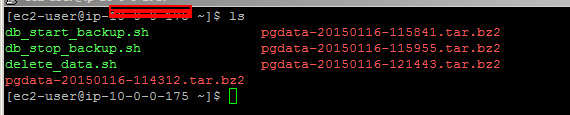
Once you are sure that snapshots are running successfully and your data is consistent with application-consistent snapshots, you can write scripts to remove the tar files. These files will not affect your application but may occupy some space. Therefore, if you don’t want tar files to remain in your database server for an extended period of time, you can also write a delete script that will be executed by the “complete” script that removes the tar file after a snapshot is completed.
N2WS Backup & Recovery can help you achieve application-consistent backup with PostgreSQL (and much more). It’s an enterprise-class backup and recovery solution for Amazon based on EBS & RDS snapshots. It supports consistent application backups on Linux as well as Windows servers.