In our previous article, we discussed the built-in backup and restore processes for MSSQL databases.
In this article, we will look at AWS cloud’s specific backup and restore procedures for MSSQL servers.
With AWS, the process is easy—users can either create AMIs or take snapshots of EBS volumes, which employ point-in-time backups. While there are multiple ways of using snapshots, to keep things simple, we will focus on either manually processing them (which might involve maintaining multiple scripts), or using N2WS Backup & Recovery.
N2WS is a full-featured enterprise-class backup, recovery and disaster recovery solution for Amazon EC2 Instances, EBS volumes, and RDS databases, utilizing AWS’ native EBS and RDS snapshots.
Creating an Amazon EBS Snapshot
Creating an Amazon EBS Snapshot: Amazon uses EBS snapshots to back up and restore volumes with a single click. After writing data to an Amazon EBS volume, you can periodically create snapshots of the volume to use as a baseline for new volumes or for data backup. Even though snapshots are saved incrementally, the snapshot deletion process is designed so that you only need to retain the most recent snapshot in order to restore the volume.
Snapshots have several advantages, such as:
- Point-in-time data backup & restore
- Disaster recovery and high availability – users can create new volumes in separate AZs or even copy snapshots to a separate region in order to create a volume in that region
- Increased EBS volume size
- Immediate instance and data recovery for improved RTO (recovery time objective)
To create a snapshot using the console:
- Open the Amazon EC2 console.
- Click Snapshots in the navigation pane.
- Click Create Snapshot.
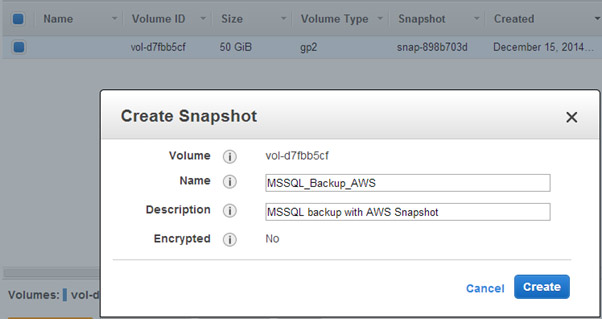
- In the Create Snapshot dialog box, select the volume you’d like to create a snapshot for, then click Create.
This is the simplest method. It lets you create a backup of your volume in a single click. Nonetheless, it is important to note that these snapshots are crash-consistent and might have recovery issues.
This is because a process could be in progress or there might be data in memory when the snapshot is taken.
In addition, logical volumes that were created from multiple disks, may have inconsistent data since it may have been in the process of being written on disk, or more than one disk, in a single I/O operation.
One more challenge with crash-consistent backup is that there is no way to automatically truncate database transaction logs after backup.
Backup and Restore Using N2WS Backup & Recovery
N2WS Backup & Recovery provides a simple, intuitive, and user-friendly web interface to easily manage your EC2 backup operations. People who work in production environments understand the importance of automated backup and recovery options. N2WS offers an advantage on top of Amazon services, making backup administrators’ lives easier.
N2WS has many features that make it a suitable option for backing up AWS cloud-hosted MSSQL servers. Along with its flexible backup policies, N2WS retries when failures occur. It can also copy EBS volumes to other regions. You can restore a complete backup with a single click.
One of the advantages of N2WS is achieving consistent and persistent application data backup. N2WS employs VSS support for Windows machines, which creates shadow copies of multiple volumes in a synchronized manner. The concept is to freeze applications that use multiple volumes; for example, an MSSQL database will have a volume for data and a separate volume for transaction logs. Here, N2WS helps achieve the goal of backing up multiple volumes at a single point in time using the VSS utility.
N2WS supports continuous and persistent backup and DR both for MSSQL AWS cloud-hosted (run on an EC2 instance) as well MSSQL stored in Amazon RDS (managed relational database service). For RDS, N2W supports automatic and flexible backup scheduling as well as the capability to provide enhanced RPO (Recovery Point Objective) policy.
Setting up N2WS Backup & Recovery
N2WS allows you to create backup policies and schedules. These are used to identify the objects (instances/volumes/RDS) that you want to backup and schedule when backups should be performed.
Below, you can see the AWS account credentials that we used to set up our N2W account. It is recommended to create an IAM login with AWS that holds the required permissions instead of providing your root account credentials.
After setting up the account, you will see an entry similar to the one below on your N2W home page.
Scheduling Backup in N2WS
N2WS allows you to schedule backups by the minute, hour, day, or week. The screenshot below shows that we have scheduled a backup every four hours.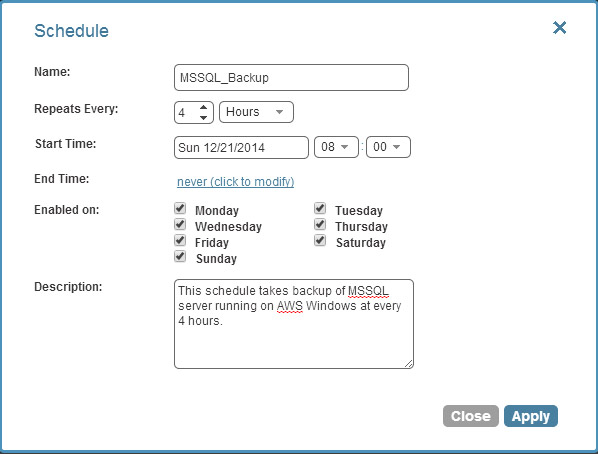
Setting up Backup Policies in N2WS Backup & Recovery
Setting up a backup policy is the most important part of N2WS. Providing you with the ability to select various options, N2WS determines whether backup scripts, DR policies, and other various options should be used. It defines logical groupings of objects (backup targets) that should be backed up together, such as EC2 instances, EBS snapshots/volumes, and RDS instances.
The backup policy created below is linked to the schedule created above at four-hour intervals.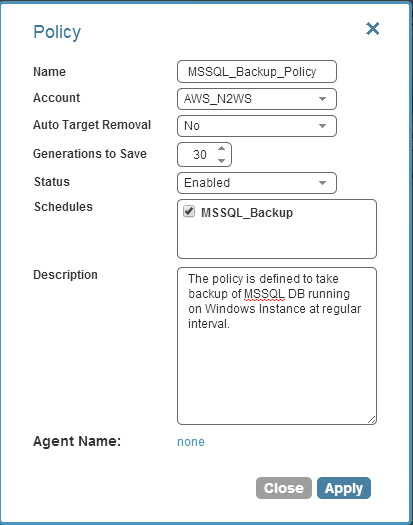
Our backup target is the AWS instance where our MSSQL is hosted. There is no need to set up EBS volumes individually if you have multiple EBS volumes that are attached to a single instance. N2W will take care of that.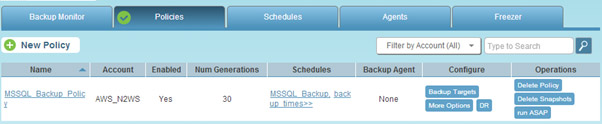
Setting up Backup Targets
Simply click the backup target on the policy you defined, then select the instance from your AWS instance, as shown below.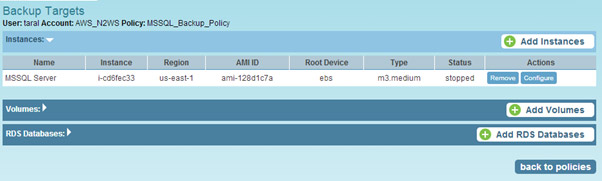
It is not always mandatory to configure backup options, however configurations can be performed in Policies.
If you are working with a Windows instance, it is recommended to enable the VSS (Volume Shadow Copy Service) agent on the instance.
VSS is a consistent backup infrastructure for Windows servers. VSS is very useful for cases where exact point in time backup across volumes/disks is needed. VSS notifies MSSQL that it is being backed up and makes sure backup is consistent across all volumes.
Learn more about Volume Shadow Copy Service (VSS).
To setup VSS, first take note of the backup agent key that was created as part of the options.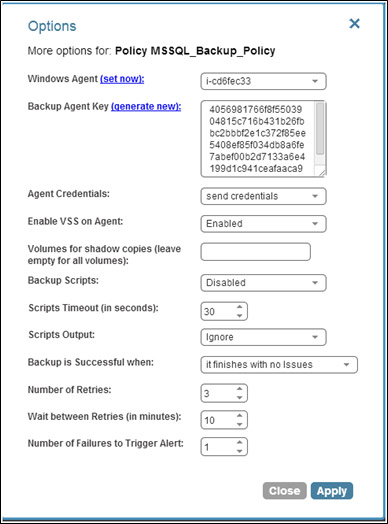
N2WS only supports VSS on Windows 2008 or 2012 servers. N2WS uses the “System Provider” to perform shadow copies.
This process is very simple — when N2WS creates a backup, the N2WS Thin Backup Agent asks the system provider to create shadow copies of all relevant volumes. In this case, differential copies are created, so the complete data of the volume is not copied, only changes that were made from the time the backup began.
As discussed above, crash-consistent snapshots will not truncate log files when the transaction is complete. N2WS provides consistent application backup, which will automatically truncate the logs. You can execute this script after N2WS completes the snapshot by inserting it in the complete script in the policy.
We first set up the N2WS Thin Backup Agent on your EC2 instance to enable VSS in the backup process.
You can download the N2WS Thin Backup Agent from your N2WS server (you can find it at the footer of the N2WS system) as shown below-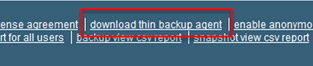
Once downloaded –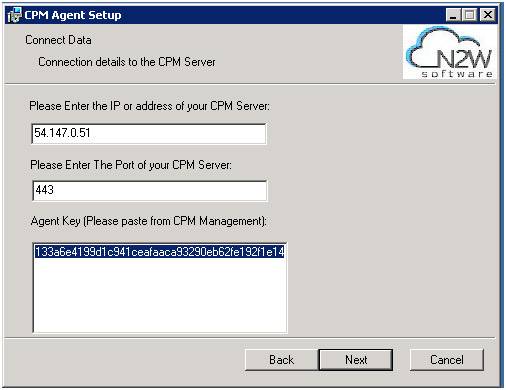
Monitoring Your Backup
You can monitor the backup jobs you have scheduled by clicking the Backup Monitor tab.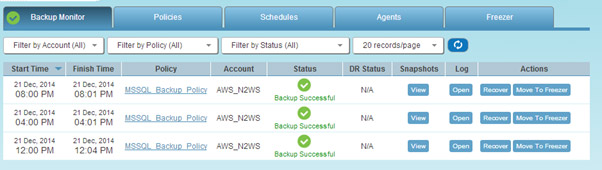
In the section below, we will show you how to backup and restore data using N2WS, looking at a sample case where certain data was stored and deleted by mistake.
We will use N2WS to restore the lost data.
The MSSQL server has an efy database and a table named Persons in it. The screenshot below shows a sample data record of the table.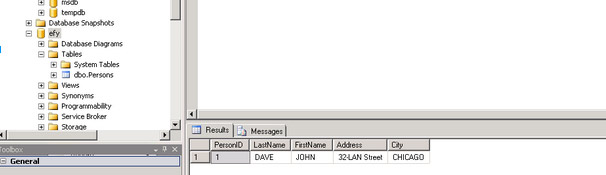
A table may be deleted due to an error, as seen below with the Persons table.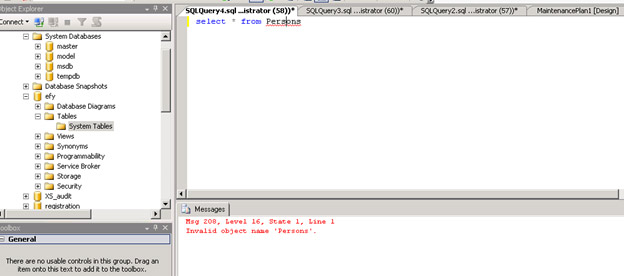
Restore Using N2WS Backup & Recovery
If we set up N2WS correctly, it is likely that it took a snapshot before the table was accidentally deleted.
You can find a Recover option on the same screen where you monitor backups. After you click the Recover button, select Volumes Only and select all volumes as the recovery option in the following screen.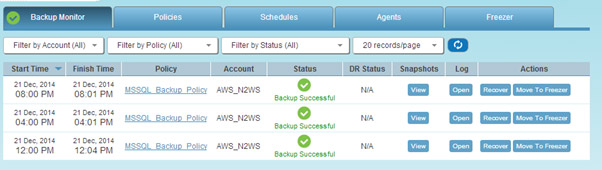
Select the volume or the instance you need to recover.
The restore option is easy (one click).
Once the data is restored, N2WS will create a new volume and attach it to the running EC2 instance. As shown in the screenshot below, once data is restored, both our table and the data that were available in MSSQL when N2WS took the snapshot, are available again in MSSQL.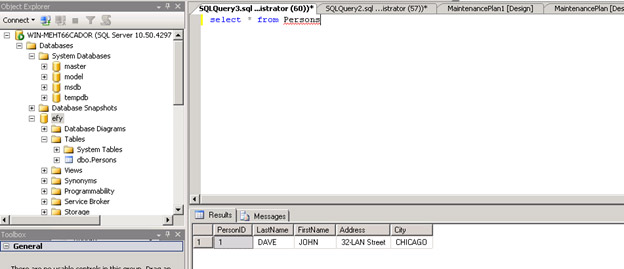
Final Note
We all know that AWS offers durable block level storage with EBS volumes that are very useful for data persistence. EBS also offers snapshots as a useful mechanism for backup and recovery. Nonetheless, if not automated, an EBS snapshot presents a few challenges:
- You need to remember to take snapshots at regular intervals.
- Snapshots may not be persistent when there are large or multi-striped EBS volumes. The consistency issue may happen for a single EBS volume, too, with non-committed or in memory data.
- If a number of snapshots are created, their management and cleaning process is cumbersome.
However, N2WS makes automated backups and snapshot management much easier. By providing an efficient way to regularly backup your system, N2WS ensures that Windows instances stay consistent with VSS, which is crucial for critical production environments, and quick data restoration.