

AWS Sovereign Cloud
N2W, with v5.0 now supports AWS European Sovereign cloud.
AWS European Sovereign cloud is a fully separate cloud with currently one region in Germany. Recently, we dove into how exactly AWS European Sovereign Cloud is considered a completely separate partition and how it’s changing the way EU organizations implement backup and disaster recovery.
In this post, we’ll cover how to use N2W for AWS EU Sovereign Cloud along with a step-by-step on ensuring that you maintain full compliance while simplifying and optimizing your backup and disaster recovery procedures, no matter how long your retention period may be.
This guide walks through deployment, workload protection, endpoint configuration, and recovery validation while helping organizations maintain compliance.
N2W is Available for AWS Sovereign Cloud
N2W is published on the EU Sovereign cloud marketplace, a completely separate marketplace from the standard, commerical one. This is one of the key differences between the two – there is no direct interaction between the two environments. In addition it’s important to note that strict compliance is maintained because:
- You cannot assume a role from the standard AWS commercial cloud into AWS European Sovereign Cloud.
- Cross-cloud disaster recovery or copy operations are not available.
- Resources cannot be copied between the commercial AWS cloud and the European Sovereign Cloud.
- AWS service endpoints use a separate AWS partition and domain structure.
To view your AWS European Sovereign Cloud account in N2W:
- Sign in to N2W.
- Navigate to Accounts.
- Locate your AWS European Sovereign Cloud account.
- Verify that the account is associated with the AWS European Sovereign Cloud environment.
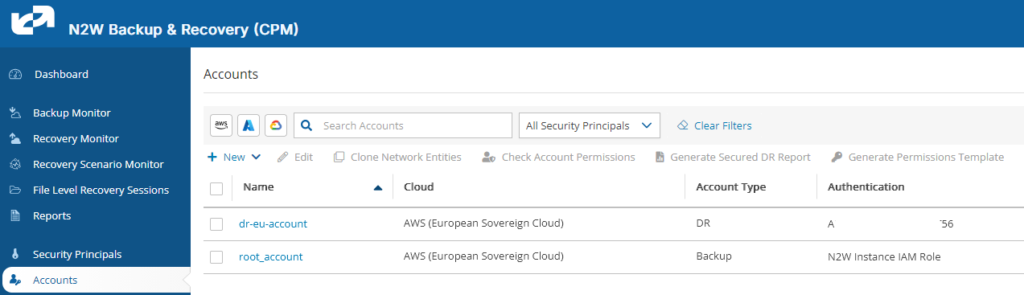
N2W understands that the account belongs to a separate AWS partition and applies the appropriate AWS endpoints and configuration when interacting with the environment.
Protecting AWS European Sovereign Cloud Workloads with N2W
N2W can protect supported workloads running in AWS European Sovereign Cloud, including:
- EC2 instances
- EBS volumes
- Amazon DynamoDB
- Amazon S3
- Amazon RDS
- Amazon EFS
Using Cross-Account Protection
Although AWS European Sovereign Cloud currently has only one Region, customers can still use cross-account protection to improve resilience.
Cross-account protection separates backup data and recovery resources from the production AWS account.
This is particularly important from a security perspective. If a production account is compromised, an attacker may attempt to delete or modify backups as part of the attack.
By maintaining protection in a separate AWS account, organizations can reduce the risk of a single account-level compromise affecting both production resources and their backups.

Step 1: Deploy N2W in the Sovereign Cloud
If you haven’t already, deploy N2W into the AWS European Sovereign Cloud environment using the AWS European Sovereign Cloud Marketplace.
Step 2: Add Your AWS Account
In N2W:
- Open Accounts.
- Select the option to add an AWS account.
- Select or identify the AWS European Sovereign Cloud account.
- Provide the required IAM role and permissions.
- Complete the account configuration.
N2W uses the appropriate AWS endpoints for the sovereign environment.
Step 3: Configure Your Protection Policies
Create your N2W protection policies based on the workloads you need to protect.
For example, you might create policies for:
- Production EC2 workloads
- EBS volumes
- RDS databases
- DynamoDB tables
- S3 data
- EFS file systems

Configure the appropriate backup frequency, retention period, and recovery requirements for each workload.
Step 4: Configure Cross-Account Protection
Where additional account-level isolation is required, configure a separate AWS European Sovereign Cloud account as the backup target.
This provides an additional layer of protection against a compromise of the production account.
The backup account should have appropriately restricted permissions so that production users and workloads cannot easily modify or delete protected backup data.

Step 5: Validate Recovery
After configuring protection, perform a recovery test.
A recovery test should confirm that:
- N2W can access the protected AWS resources.
- Backups are being created successfully.
- All backup metadata (VPC, security groups, Transit Gateway, etc) is available in the target account.
- Resources and network configurations can be recovered successfully.
- The recovery process meets your organization’s RTO and RPO requirements.
N2W provides regular, scheduled recovery testing as well as immediately generated reports and email confirmations using AWS SES. This is particularly important for sovereign environments because cross-cloud and cross-Region recovery options are more limited.

Understanding AWS Endpoints in the Sovereign Cloud
One of the technical differences between AWS European Sovereign Cloud and the standard AWS commercial cloud is the AWS partition and endpoint structure.
AWS European Sovereign Cloud uses different service endpoints, including a different STS endpoint domain.
This matters because AWS API calls must be directed to the correct AWS environment.
For example, using a standard commercial AWS endpoint when attempting to interact with an AWS European Sovereign Cloud resource will not automatically route the request to the sovereign environment.
The environments are intentionally isolated.
N2W handles these differences under the hood so that customers do not need to manually construct or modify AWS service URLs during normal N2W operations.
What Happens If You Use the Wrong Endpoint?
AWS European Sovereign Cloud does not transparently redirect requests between the sovereign and commercial AWS environments.
If an application or configuration attempts to use an endpoint from the wrong AWS partition, the request will not be handled as though it were targeting the correct environment.
For N2W users, the required endpoint differences are handled as part of the product’s AWS Sovereign Cloud support.
This means that when you configure an AWS European Sovereign Cloud account in N2W, N2W knows that it is operating in a separate AWS environment and uses the appropriate endpoints.
There is no interaction between the cloud. DR or copy is disabled.
You can not assume a role from the standard cloud.
N2W understands fully that this is a fully separate cloud.
Learn More
Compliance requirements and data complexity aren’t slowing down. Every new pipeline, resource and additional SaaS tool poses another risk. N2W is deployed as IaaS so customers maintain full control. Their data is never accessed or stored in a proprietary cloud, but rather their own cloud account for full control and compliance.
See all new automated capabilities in v5.0. Reach out for a demo.