 Skip to content

What Are Azure Backup Solutions?
Azure backup solutions protect data stored on Microsoft Azure platforms, or use Azure cloud resources to backup data stored elsewhere. These solutions help organizations secure their critical workloads, databases, and applications in the cloud. By using these tools, organizations can manage backup processes, automate disaster recovery, and reduce downtime in case of data loss or system failures.
Azure backup solutions typically support features like incremental backups, encryption, and easy restore capabilities, ensuring compliance while maintaining high uptime. Advanced solutions offer features like hybrid backup strategies, cross-region backup storage, and AI-enhanced insights into backup health.
Editor’s note: Updated the article to cover recent market trends, updated information for Azure backup solutions to reflect features, capabilities, and limitations in 2026.
In this article:
- The Need for Azure Backup Solutions
- Notable Azure Backup Solutions
- How to Choose the Right Azure Backup Solution
The Need for Azure Backup Solutions
As organizations increasingly migrate workloads to the cloud, the need for backup and disaster recovery becomes critical. While cloud platforms like Azure offer inherent resilience, they don’t replace the need for dedicated backup solutions. Data can still be lost due to human error, malicious attacks such as ransomware, or accidental deletions. Without a reliable backup system in place, recovering this data can be costly or even impossible.
Compliance and regulatory requirements further underscore the importance of having a well-defined backup strategy. Many industries must adhere to strict data retention and recovery policies. Azure backup solutions help meet these mandates by offering secure, policy-driven backup configurations that ensure data is retained and recoverable over required periods.
Cloud and Azure Backup Market Trends
Rapid Market Growth Driven by Cloud Adoption
The cloud backup market is expanding rapidly as organizations continue shifting infrastructure and workloads to platforms like Azure. Analyst estimates vary, but most place the cloud backup market in the roughly $5B–$7B range today, with projections around $20B+ by 2030/2031. Some forecasts estimate CAGR near 25%, while others are closer to 15% depending on market definition.
This growth is closely tied to the explosion of enterprise data and the need for scalable, cloud-native protection. As companies modernize their IT environments and adopt SaaS, PaaS, and IaaS solutions, traditional backup methods are being replaced by flexible, consumption-based cloud backup services. Additionally, small and mid-sized businesses are increasingly adopting these solutions due to their lower upfront costs and ease of deployment, further accelerating market expansion.
Rising Cybersecurity Threats and Compliance Requirements
Cybersecurity threats, especially ransomware, are a major force shaping the Azure backup landscape. Organizations are increasingly viewing backup as a critical security layer that enables fast recovery after attacks. Modern backup strategies emphasize immutable and air-gapped backups, which prevent attackers from altering or deleting recovery data.
At the same time, regulatory pressures are intensifying. Industries such as finance, healthcare, and government must comply with strict data protection and retention requirements. This is pushing organizations to adopt backup solutions that include encryption, policy-based retention, and audit capabilities.
Shift Toward Hybrid and Multi-Cloud Backup Strategies
Enterprises are increasingly adopting hybrid and multi-cloud backup strategies, combining on-premises systems with Azure and other cloud providers. This approach provides greater resilience, flexibility, and control over data placement, especially for organizations operating across multiple regions or regulatory environments.
Emergence of Advanced Backup Technologies
New technologies are reshaping the future of Azure backup solutions, turning them into proactive resilience platforms rather than passive storage systems. Innovations such as immutable storage, zero-trust architectures, and blockchain-based verification are enhancing data integrity and protection against tampering.
Looking ahead, advancements like quantum-resistant encryption, edge backup for IoT environments, and decentralized storage models are expected to play a larger role. These technologies will enable organizations to protect increasingly distributed data while ensuring long-term security against evolving threats.
Sources:
Notable Azure Backup Solutions
Full Backup and Data Management Platforms
1. N2W

N2W is the leading cloud-native backup and disaster recovery platform built for AWS and Azure public clouds. N2W pioneered cloud-native data protection on AWS and has spearheaded into Microsoft Azure bringing its revolutionary data protection capabilities to enterprises in an effort to eliminate complex backup management and deliver peace of mind knowing IT teams can recover both full environments and single files in a matter of minutes. N2W is a tool that sits on top of the users’ cloud(s) using policy-driven backup operations under a single console. Teams enjoy immediate recovery from any region, subscription, even across clouds. It also has extremely cost-effective, secure data lifecycle management into Azure Blob storage.
Key features include:
- Multi-Cloud Backup Support – N2W provides centralized backup and recovery across AWS and Azure, allowing unified management and visibility of cloud data protection operations in hybrid or multi-cloud environments.
- Azure Resource Flexible Backup – Supports automated, snapshot-based backups for Azure virtual machines using native Azure APIs, enabling fast and application-consistent backups that can be taken as little as every 60 seconds, with minimal performance impact.
- Easy-To-Use Policy-Driven Automation – Enables scheduling and retention policies for Azure resources (and AWS) under a single console without the need to toggle back and forth. N2W automates backups, lifecycle management, and archives to optimize costs and maintain compliance.
- Instant Recovery & Cross-Region and Cross-Subscription Restore – Delivers near-instant recovery of Azure VMs and the ability to restore across regions and subscriptions, supporting disaster recovery and geographic redundancy.
- Cost Optimization & Storage Tiering – Allows tiering of incremental backup data to Azure Blob Storage for long-term retention and cost-effective storage management potentially saving up to 92%. Pricing is completely transparent and based on number of VMs, rather than complicated tiering based on size.
- Secure & Compliant Storage – Backups are encrypted both in-transit and at-rest, and users can leverage RBAC and IAM policies for secure access controls, aligned with compliance standards like GDPR and HIPAA.
- Monitoring & Reporting – Built-in reporting and alerting tools offer visibility into backup health, SLA compliance, and usage metrics across Azure and AWS resources.
- Regular, Automated DR Testing – Supports non-disruptive DR testing by allowing users to spin up isolated copies of Azure VMs from backups in alternate regions or subscriptions. Users can schedule drills regularly, prioritize resources and prepare for worst-case scenario with full-healthy failover checks, network settings recovery and comprehensive reporting (great for compliance teams).
Advantages of N2W for Azure Users:
- Unified AWS + Azure Protection: Ideal for organizations running workloads across both clouds, consolidating backup management under one pane of glass.
- Faster Recovery Times: Snapshot-based backups allow near-zero RTOs for Azure VMs.
- Cost Efficiency: Native snapshot usage and tiering to low-cost storage help reduce backup and retention costs. In addition, N2W charges a flat rate regardless of VM size.
- Minimal Infrastructure Overhead: Operates as a lightweight solution with minimal impact on performance or additional Azure resources.
- Scalable for Enterprise: Supports large-scale environments and is frequently used by managed service providers and enterprises with compliance and governance needs.
2. Cohesity

Cohesity provides a unified data management platform that combines backup, recovery, security, and data insights into a single system. It handles large-scale data protection across cloud, on-premises, and hybrid environments while also supporting security and analytics use cases. The platform focuses on consolidating data services to reduce fragmentation and improve visibility across protected workloads.
Key features include:
- Unified data platform – Combines backup, recovery, security, and data insights into a single platform to manage data across environments.
- Data protection across environments – Supports protection of cloud, on-premises, and hybrid workloads within one system.
- Integrated data security – Includes capabilities for securing data alongside backup operations to reduce risk exposure.
- Data insights and analytics – Provides visibility into stored data for analysis and operational decision-making.
Limitations of Cohesity:
- Reporting limitations: Many users have noted that the reporting capabilities are basic and lack customization options. Reports often do not provide granular insights or detailed metrics about data protection activities, which limits their usefulness for large enterprise environments. Additionally, generating advanced reports often requires support tickets or leveraging APIs, which may not be ideal for all users.
- Inefficient restore process: Several users have experienced delays during file-level restores, with even small files taking hours to recover. This inefficiency could lead to operational disruptions, especially during critical recovery scenarios. Some users have also reported challenges with restoring SQL databases or instances due to the lack of batch recovery options.
- Cost and licensing concerns: Some users believe the pricing could be more competitive. Certain features, such as advanced cyber resilience tools, are limited or require additional costs, reducing affordability for smaller organizations.
- Interface and usability issues: The user interface, while functional, is not as intuitive or user-friendly as competitors’ platforms. Navigation can feel clunky, and certain tasks require additional steps or workarounds. Users also mentioned that search functionality, such as locating backups, could be more precise and efficient.
- Support for legacy systems: Organizations with older systems have reported difficulties with legacy hardware and software support. For example, Cohesity lacks comprehensive compatibility for older operating systems and backup platforms like Windows 2003 or legacy Oracle workloads, which some competitors still support.
- Delays in feature rollouts: Users have expressed frustration with the pace of feature releases. For example, capabilities such as advanced AI-based analytics, enhanced reporting, and simplified cloud migration tools are often delayed. Additionally, while some features exist, they may not be as robust as expected, requiring frequent updates or fixes.
3. Druva

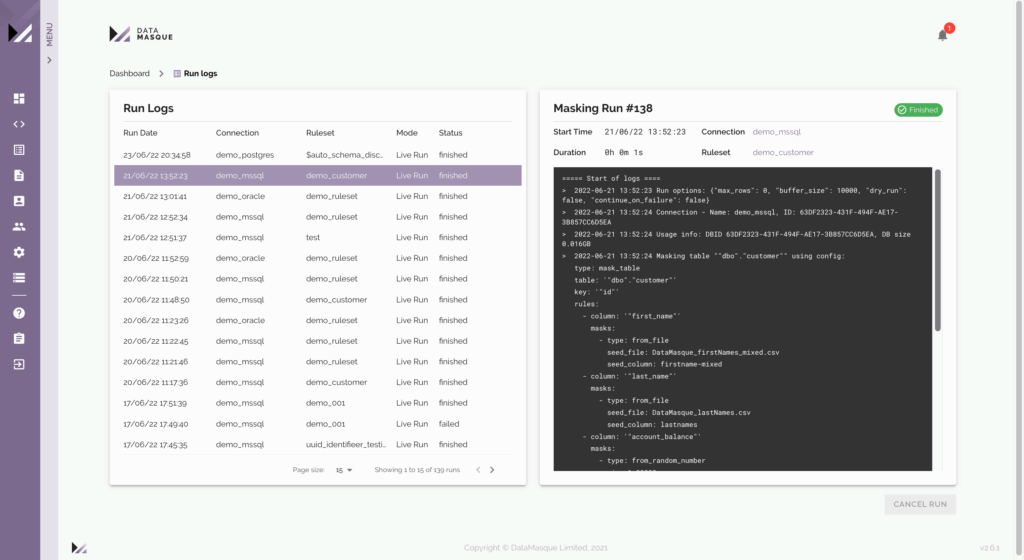
Druva delivers a managed SaaS-based data protection platform with a cloud-native architecture. It removes the need for infrastructure management by handling backup, recovery, and security through a single service. The platform focuses on resilience, combining automated operations with security controls such as immutability and encryption to protect against data loss and cyber threats.
Key features include:
- Fully managed SaaS platform – Eliminates infrastructure management with a cloud-delivered backup and recovery service.
- Cloud-native architecture – Uses microservices and cloud APIs to scale backups and integrate with cloud workloads.
- Immutable and logically air-gapped backups – Protects data from ransomware using isolated and tamper-resistant storage.
- Centralized management – Provides a single interface to manage backups, recovery, and policies across environments.
- AI-assisted operations – Uses AI to identify backup issues, recommend fixes, and simplify administration.
- Auto-scaling and self-healing – Automatically adjusts capacity and resolves issues to maintain backup reliability.
- Integrated security and monitoring – Includes encryption, threat detection, and continuous monitoring for data protection.
Limitations of Druva:
- Dependency on SaaS infrastructure: As a fully SaaS-based solution, Druva relies entirely on its cloud-hosted interface. If this interface experiences downtime, users are unable to manage or recover backups until the issue is resolved, with no control over resolution timelines.
- Limited AWS region support: Druva supports only 14 AWS regions and GovCloud, restricting flexibility compared to solutions with broader global region support.
- Rigid scheduling options: Backup policies in Druva are limited to daily, weekly, monthly, and yearly schedules, lacking the granularity offered by competitors that support minute-level scheduling.
- No cross-cloud support: Druva does not provide functionality for cross-cloud backup or recovery, limiting versatility for multi-cloud strategies.
- Learning curve: Some users find Druva less intuitive compared to alternatives, which offer simpler and more user-friendly interfaces.
4. MSP360

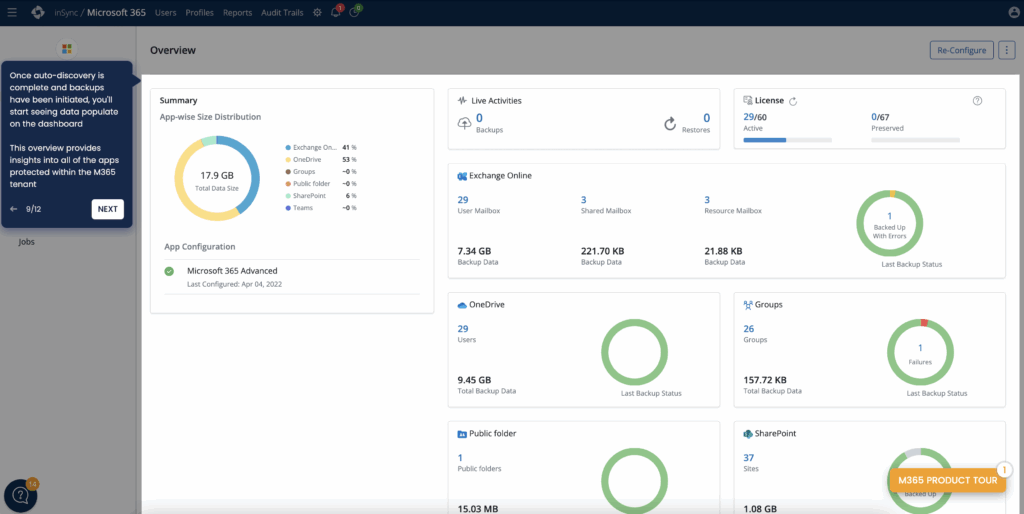
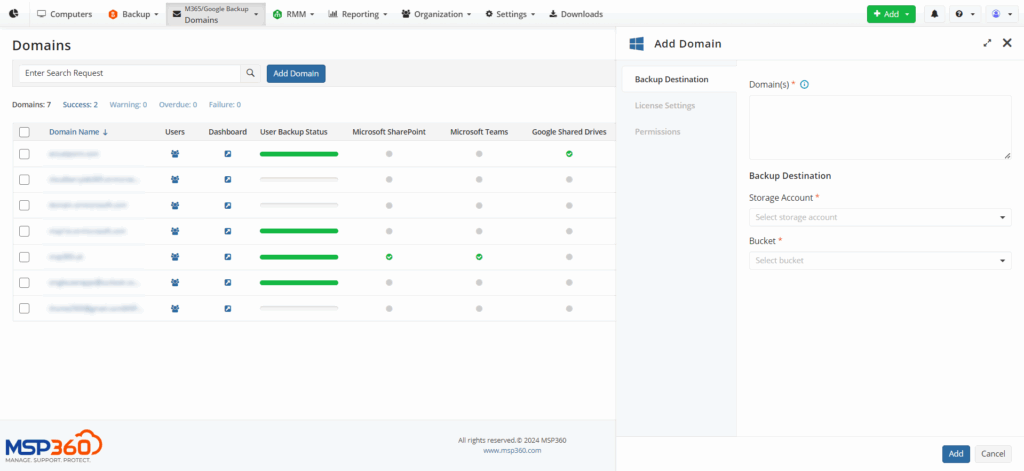
MSP360 provides a flexible backup solution that integrates with Microsoft Azure to deliver secure and scalable data protection across multiple platforms. Built for managed service providers and IT teams, it offers centralized control, easy deployment, and compatibility with major operating systems and cloud environments.
Key features include:
- Azure integration: Natively supports Microsoft Azure cloud storage, enabling direct backup to Azure with minimal configuration steps.
- Centralized management: Unified web-based console for monitoring, managing, and reporting across protected endpoints and storage accounts.
- Multi-platform support: Backs up data from Windows, Linux, macOS, VMware, Hyper-V, Microsoft 365, and Google Workspace.
- File and system image backup: Supports both file-level and full system image backups.
- Synthetic full backups: Reduces backup time and bandwidth by only uploading changed data blocks to Azure.
Limitations of MSP360 Backup:
- Performance issues: Backup performance in terms of speed has been noted as suboptimal. Users have reported that backups can take longer to complete compared to other solutions, especially for large datasets. This can lead to delays in both backup and recovery operations during critical scenarios.
- Complex update process: The software’s update cycle is not intuitive and has not seen significant improvements over the years, despite feedback from users. This can result in a frustrating experience when upgrading to new versions or applying patches.
- Limited support for critical backups: Some users feel MSP360 Backup is not well-suited for mission-critical backups or full disaster recovery solutions. The lack of local immutable storage backup options is a particular shortcoming for organizations needing ransomware protection or compliance with data integrity standards.
- Rudimentary SharePoint and Office 365 Restore: Microsoft 365 SharePoint restore functionality is basic and can make finding and restoring files or folders from large document libraries cumbersome. This is a limitation for organizations heavily dependent on Office 365 for their workflows.
- Web portal and user interface challenges: The interface has been described as clunky and difficult to navigate, particularly for new users. The web portal login expiration can also be annoying, and some users have expressed a desire for a desktop-based GUI for easier management. Additionally, certain menu items are inconsistently located, requiring users to search unnecessarily.
- Customer support issues: Customer support quality is inconsistent. While some support representatives provide excellent service, others are less responsive, particularly for escalated Tier 2 or Tier 3 issues. Delays in resolving “Priority 1” issues have been reported, which can be critical during downtime.
Other Data Protection and Recovery Platforms
5. Veeam

Veeam provides a data protection platform focused on backup, recovery, and cyber resilience across hybrid and multi-cloud environments. It emphasizes fast recovery, security, and simplified operations through a software-based approach that removes the need for complex infrastructure management. The platform also integrates security features to help ensure backups are clean and usable during recovery.
Key features include:
- Instant recovery to Azure – Enables rapid restoration of workloads directly to Azure without maintaining duplicate standby hardware in many scenarios.
- Immutable and secure backups – Protects backup data from tampering and ransomware with hardened storage and immutability.
- AI-driven intelligence – Uses analytics to assess backup integrity and support recovery decisions.
- Integrated threat detection – Includes malware analysis and threat assessment to identify risks in backup data.
- Flexible software appliance – Simplifies deployment and maintenance by reducing OS management and patching needs.
- Role-based access control and SSO – Enhances security with granular access controls and identity integration.
- Unified management interface – Provides a web-based UI for managing backup and recovery operations.
Limitations of Veeam:
- Limited deployment flexibility: Veeam’s reliance on CloudFormation templates for AWS limits users who prefer custom naming schemes or manual deployments.
- Challenging backup configuration: Creating backup policies often involves extensive tagging and lacks intuitive guidance, posing difficulties for teams unfamiliar with infrastructure internals.
- Lack of multi-tenancy: The solution does not support multi-tenancy, limiting its use for MSPs who need to provide separate backup consoles for individual clients.
- Outdated terminology: Veeam uses on-premise terminology for cloud solutions, such as referring to backups as “replicas,” which can confuse users accustomed to modern cloud terminology.
- Recovery limitations: The recovery process is cumbersome, requiring users to know specific resources for restoration, as policies are not searchable or linked to the recovery workflow.
- Security exposure with file-level restore: Restoring files directly to production instances could pose risks—especially if malware is present in the backup set.
- Immutability gaps: Veeam does not support immutable EBS snapshots for AWS but does offer S3 object lock for certain storage classes. However, it lacks support for cost-efficient options like S3 Infrequent Access.
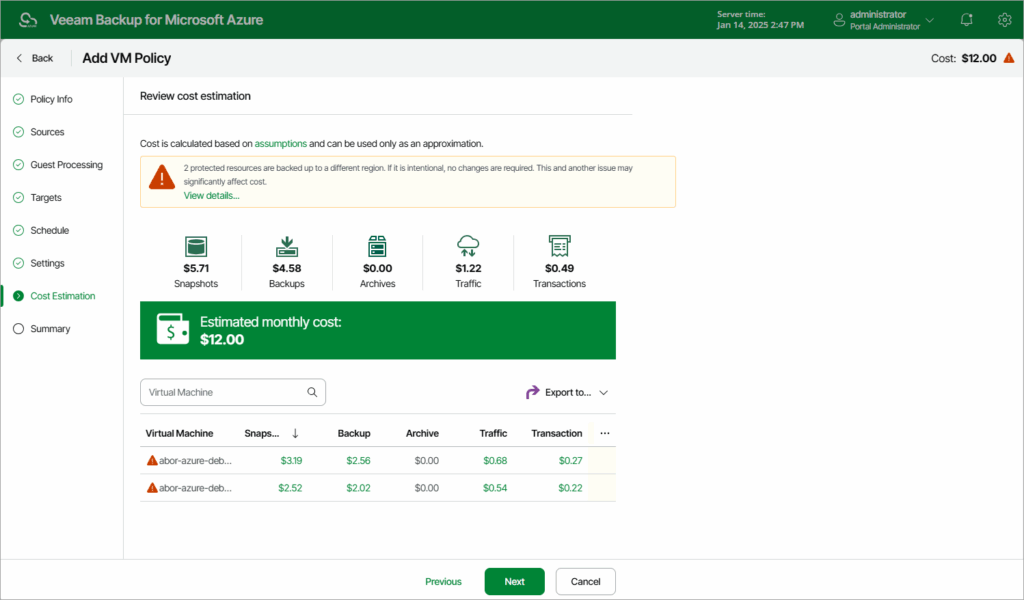
- Ineffective cost estimation: The cost estimation tool for archives often provides inaccurate calculations due to its inability to account for all variables, reducing its utility for budget planning.
- Inefficient cleanup: Unused backups can only be cleaned up once daily, potentially leading to unnecessary Azure storage costs until the next cleanup cycle.
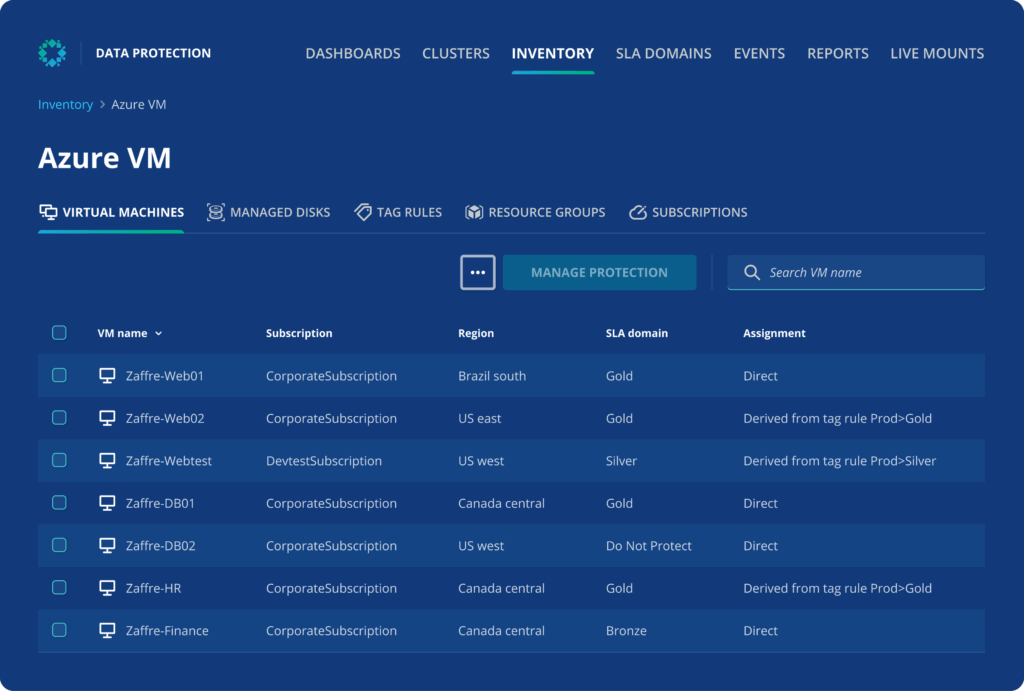
6. Rubrik

Rubrik delivers a cloud data protection platform that combines backup, security, and cyber recovery into a single system. It focuses on maintaining data integrity and enabling fast recovery after cyber incidents. The platform also integrates monitoring and policy controls to manage access and detect threats across cloud, SaaS, and on-premises environments.
Key features include:
- Immutable and logically air-gapped backups – Ensures data integrity by storing protected copies that cannot be altered.
- Unified data protection across environments – Secures cloud, SaaS, and on-premises data within one platform.
- Threat detection and analytics – Identifies and analyzes potential cyber threats affecting protected data.
- Identity protection and recovery – Secures identity systems and enables rollback after unauthorized changes.
- Policy-based governance – Applies policy-based access, governance, and recovery controls to manage access and enforce data protection policies.
- Rapid cyber recovery – Restores systems to a clean state with minimal downtime after incidents.
Limitations of Rubrik (as reported by users on G2):
- High cost and pricing complexity: Users frequently note that pricing is relatively high, especially for smaller organizations, and costs can increase significantly as data grows.
- Limited reporting and customization: Reporting capabilities are considered basic, with limited out-of-the-box customization, often requiring APIs or external tools for detailed insights.
- Additional licensing for advanced features: Some advanced capabilities require separate licensing, increasing overall cost and complexity.
- Learning curve for initial setup: Initial configuration, particularly around policy and SLA domains, can be complex and require time to understand.
- Limited flexibility in configuration: The platform’s policy-driven approach can restrict fine-grained control for more advanced or custom use cases.
- Gaps in feature depth: Some users report missing or less mature features, particularly in analytics and advanced functionality.
- Challenges with legacy systems: Configuring backups for older or less common applications may require additional manual effort.
- Performance considerations: Some users mention that certain operations could be faster in specific scenarios.
- Reduced deployment flexibility: The shift toward SaaS-only management has removed some on-premises management options, limiting flexibility for certain environments.
7. Commvault
Commvault provides a cloud-native platform that unifies data protection, security, and recovery across enterprise environments. It helps manage large-scale data while integrating identity governance. The platform focuses on delivering resilience by combining backup, threat protection, and recovery into a single system.
Key features include:
- Unified data protection platform – Manages backup, security, and recovery across all data locations.
- Integrated data security and governance – Protects and controls access to data in real time.
- Identity resilience – Safeguards identity systems and enables restoration of trusted access.
- Scalable cyber recovery – Supports fast and complete recovery across large and complex environments.
- Cloud-native architecture – Designed to operate across cloud and hybrid infrastructures.
- Centralized visibility – Provides a single view of data protection and security operations.
Limitations of Commvault:
- Access management concerns: As a SaaS solution, Commvault’s reliance on cloud-hosted services raises potential privacy and access management challenges for organizations handling sensitive data.
- Limited snapshot archiving: Commvault cannot archive RDS snapshots to cold storage solutions like S3 or Azure Blob, which limits cost-effective long-term storage options.
- Complex cross-cloud recovery setup: While cross-cloud recovery is supported, it requires a virtual server acting as an HTTP/HTTPS proxy, introducing additional costs and a potential single point of failure.
- Restricted DR backup flexibility: Disaster recovery backups must be stored in object storage (e.g., S3 or Azure Blob), which can lead to longer recovery times compared to snapshot-based DR backups.
- Challenging infrastructure optimization: Architecting and scaling deduplication servers and optimizing backup jobs require expertise, making the platform less accessible for teams without dedicated specialists.
- Policy limitations: Users cannot include multiple resource types in a single Azure backup policy, which may complicate backup management for diverse workloads.
- Incomplete VPC backup support: Commvault only backs up attributes of EC2 instances within a VPC, not the entire VPC itself, limiting comprehensive recovery options for cloud environments.
- No VPC cloning or recovery scenario features: The platform lacks tools to easily clone VPCs or orchestrate rapid, full-infrastructure recovery, reducing efficiency during large-scale disaster recovery operations.

8. Zerto

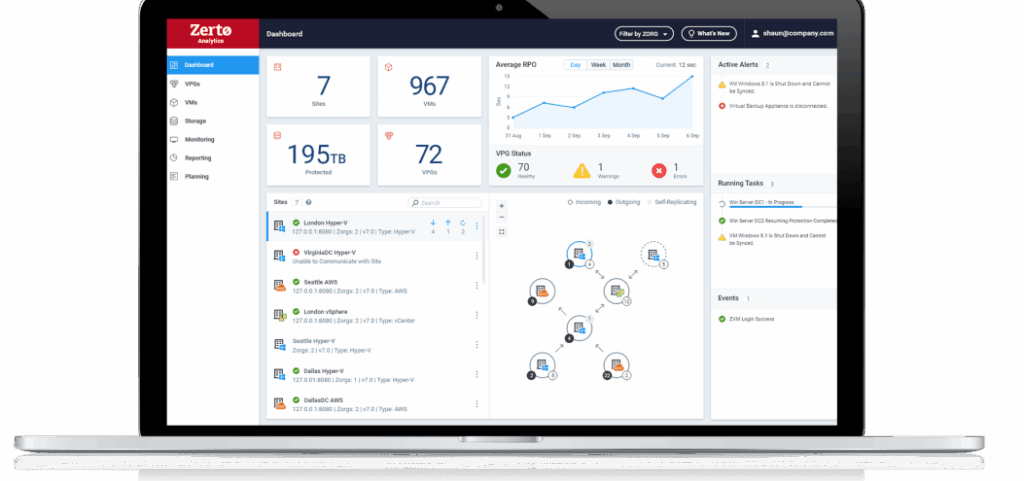
Zerto (HPE Zerto) focuses on continuous data protection and disaster recovery using real-time replication. It aims to minimize data loss and downtime by continuously capturing changes and enabling fast failover. The platform also supports workload mobility and ransomware recovery through automation and non-disruptive testing.
Key features include:
- Continuous data protection – Uses real-time replication to reduce data loss with near-zero recovery point objectives.
- Fast disaster recovery – Enables rapid recovery with low recovery time objectives for critical workloads.
- Ransomware detection and recovery – Identifies encryption activity and restores clean data copies.
- Non-disruptive testing – Allows testing of recovery processes without impacting production systems.
- Automation and orchestration – Simplifies recovery and migration workflows across environments.
- Cross-platform mobility – Supports movement of workloads between on-premises and cloud environments.
Limitations of Zerto (as reported by users on G2):
- Scalability concerns: Some users report challenges scaling the platform, particularly when working with newer machines or expanding environments.
- Storage growth from replication journals: Continuous replication can lead to rapidly increasing storage usage, requiring additional capacity planning.
- Performance issues with WAN connectivity: Users have noted slower performance in environments with limited or constrained WAN bandwidth.
- Reporting limitations: Reporting features are considered less flexible, with limited customization and improvements needed in the reporting interface.
- Operating system dependency: The platform requires a Windows Server base OS, limiting deployment flexibility for some environments.
- Limited application-aware capabilities: Some users highlight the lack of deeper application-aware backup and recovery features for certain workloads.
- Management console limitations: The interface lacks some advanced configuration options, and certain management tasks may require workarounds.
- Documentation and support resources: Users mention gaps in documentation and limited availability of detailed online resources.
- Versioning and update delays: Some users report slow release cycles and delays in availability of newer versions or features.
- Cost considerations: The platform is viewed as expensive, making it more suitable for organizations with larger IT budgets.
How to Choose the Right Azure Backup Solution
Choosing the right Azure backup solution depends on a mix of technical requirements, compliance needs, and operational preferences. Here are the key factors to evaluate when making your selection:
- Workload support: Verify that the solution can protect all critical assets, including virtual machines, structured databases, file shares, and cloud-native applications. Consider whether it supports hybrid and SaaS environments if the infrastructure spans multiple platforms.
- Deployment architecture: Decide between a SaaS-based solution and one that requires infrastructure deployment. SaaS simplifies operations but may offer limited control. Infrastructure-based deployments allow deeper customization but introduce additional management overhead.
- Recovery capabilities: Evaluate the ability to meet recovery point objectives (RPOs) and recovery time objectives (RTOs). Solutions should offer flexible restore options—full, granular, and cross-region—to match workload sensitivity and downtime tolerance.
- Security and compliance: Look for features like immutability, encryption (in-transit and at-rest), and air-gapped storage. Role-based access controls and native identity integrations improve security, while policy-based retention and audit capabilities support compliance with industry regulations.
- Cost efficiency: Assess licensing models and storage optimization features such as deduplication, compression, and incremental backups. Consider tools that offer cost predictability and eliminate fees related to data recovery or long-term retention.
- Scalability and administration: The solution should support large-scale environments and allow centralized management across regions and resource types. Automated policy enforcement, intuitive interfaces, and robust monitoring reduce operational complexity.
- Integration with Azure services: Ensure tight integration with Azure-native APIs, identity services, and storage layers. Compatibility with tools like Azure Policy and monitoring services ensures smoother operations and fewer performance bottlenecks.
- Disaster recovery support: Beyond backup, evaluate whether the solution offers disaster recovery orchestration, including automated failover, test environments, and region-to-region replication. Effective DR capabilities reduce downtime and simplify compliance testing.
Conclusion
Azure backup solutions aid in protecting cloud-based workloads by ensuring data availability, integrity, and recoverability across diverse IT environments. With growing reliance on cloud infrastructure, these solutions help address the challenges of data loss, compliance, and operational continuity.
If you’re looking at Azure Backup Solutions as part of a cross-cloud or multi-cloud strategy, download our free checklist for the 10 must-have features in a solution.