
What Is Azure Backup Software?
Azure backup software provides organizations with tools to reliably protect, manage, and recover data within the Microsoft Azure cloud environment. These solutions automate the backing up of virtual machines, databases, applications, and files, both within Azure and across hybrid or multi-cloud architectures. By using cloud-native or third-party platforms designed for Azure, businesses can apply backup policies consistently, run scheduled or ad-hoc backups, and keep critical assets available after accidental deletion, corruption, or a disaster.
An efficient Azure backup solution should integrate tightly with Azure-native resources and services while supporting your compliance and governance requirements. Such platforms typically offer features like incremental backups, long-term archiving options, policy-based automation, and easy scalability. By employing Azure backup software, enterprises can reduce manual backup overhead, minimize risks of data loss, and meet stringent recovery time objectives (RTO) and recovery point objectives (RPO) appropriate for diverse workloads.
In this article:
- The Need for Third-Party Azure Backup Software: Limitations of Native Azure Backup
- Third-Party Azure Backup Software: Key Features and Requirements
- Notable Azure Backup Software
The Need for Third-Party Azure Backup Software: Limitations of Native Azure Backup
Azure provides built-in technologies that enable backup and archival, but they have several important limitations, leading many organizations to turn to third-party Azure backup software:
- No automated drills or testing: Azure Backup restore testing is largely manual; automated DR drills typically require Azure Site Recovery and/or automation. This can increase operational overhead and leave potential recovery issues undiscovered until an actual incident occurs.
- Tagging may require command-line interface (CLI): Automating tagging and cost allocation at scale often requires PowerShell/CLI or policy-based governance.
- No cross-cloud capability (vendor lock-in): Azure Backup is limited to Microsoft’s cloud and does not support replication or offloading to other cloud providers. This prevents cross-cloud redundancy and makes it impossible to create a ransomware-proof copy in another cloud. Multi-cloud clients lack a centralized dashboard to view or manage all environments.
- Bandwidth limitations: Large-scale backups can strain Azure network bandwidth, especially during peak usage hours. Microsoft recommends scheduling backups during off-peak periods, which restricts operational flexibility and increases scheduling complexity for global environments.
- Non-optimized recovery point objective (RPO): Azure Backup’s Standard policy backs up a VM once a day, and the Enhanced policy raises that to as often as every 4 hours. That interval may not meet the RPO requirements of applications with high transaction rates or continuous data changes.
- High-cost archival storage: Backup archives are stored in the Azure Backup Vault rather than Azure Blob Storage. The Vault’s higher pricing tier increases long-term retention costs, especially for organizations maintaining extensive historical data.
- Size-based pricing: Azure Backup charges a protected-instance fee banded on the size of the data being backed up, plus the vault storage it consumes, so the bill grows with both the number of VMs and the size of each one.
- Inefficient granular recovery: Granular restore exists in certain instances, but can be operationally clunky at scale compared to tools with built-in file browsers / multi-generation browsing. This can reduce operational agility.
- Cross-region recovery limited to the paired region: Azure Backup’s Cross Region Restore restores only to the Azure paired region, and only when the vault uses geo-redundant storage with the feature turned on. Recovering into any other region, or testing DR on a schedule, means adding Azure Site Recovery or your own scripts.
Related content: Read our guide to Azure backup costs
Third-Party Azure Backup Software: Key Features and Requirements
Workload Coverage
When evaluating Azure backup software, the first critical aspect is workload coverage. Modern enterprises often have a mix of workloads, including Azure Virtual Machines (VMs), SQL databases, file shares, and application-specific data. Effective backup solutions must support all these diverse workloads natively, without requiring extensive configuration or manual scripts. Coverage should extend to hybrid environments as well, enabling backup and recovery for on-premises resources that synchronize to or interact with Azure.
Beyond standard workloads, organizations should consider whether their backup software supports containerized workloads, SaaS applications, and Azure-specific services such as Azure Kubernetes Service (AKS) or Cosmos DB. Ensuring comprehensive coverage reduces the risk of data silos and simplifies holistic management via a central platform. Lack of support for certain workloads may result in data protection gaps or the need for multiple isolated solutions, complicating management and increasing operational risk.
Recovery Objectives
Meeting defined recovery time objectives (RTO) and recovery point objectives (RPO) is central to any enterprise backup strategy. Azure backup software should facilitate rapid, predictable restores that align with the business’s tolerance for downtime and data loss. Solutions must provide granular restore options, allowing for file-level, folder-level, or complete system recoveries, and support application-consistent snapshots to ensure data integrity on critical workloads such as databases and transactional systems.
To accurately evaluate software capabilities, organizations need to test restore functionality under real-world scenarios. Features supporting instant VM recovery, cross-region restores, and automated failover significantly enhance resilience. Usability in orchestrating restores, restoration validation, and the ability to perform point-in-time recoveries are also essential. Software lacking in these areas may fulfill backup requirements but leave the business exposed when rapid, reliable recovery is needed.
Storage Flexibility
Azure backup solutions should offer flexibility in storage options to accommodate varying data retention and compliance needs. This includes the ability to choose between different Azure storage tiers, such as hot, cool, or archive, for balancing access speed with cost efficiency. Some advanced platforms also allow integration with non-Azure storage, including on-premises devices or other public clouds, supporting hybrid or multi-cloud strategies.
Flexibility extends to data lifecycle management features, such as automated retention policies or automated tiering as data ages. Administrators should be able to define and enforce archive policies that align with both regulatory requirements and budget constraints. Inflexible storage options can increase costs or lead to compliance violations, especially as data volumes grow or requirements evolve over time.
Security Features
Security is a mandatory consideration, especially in the face of rising cyberthreats targeting backups. Azure backup software should offer end-to-end encryption (both at-rest and in-transit) using industry-standard encryption protocols. Multi-factor authentication (MFA), role-based access controls (RBAC), and detailed audit logging are also essential to preventing unauthorized access and tracking user actions.
Besides access protection, advanced solutions may provide immutable backups or “air-gapped” storage, ensuring that backup data cannot be deleted or tampered with by ransomware or compromised accounts. Integration with Azure’s native security tools, support for compliance certifications, and alerting for unusual activities round out an effective security posture. Weaknesses in these areas directly translate to heightened risk of data loss or regulatory penalties.
Scalability, Performance, and Bandwidth Efficiency
As data volumes increase, backup solutions must scale efficiently without performance degradation. Azure backup software should manage growing workloads by automatically allocating resources, distributing backup loads, and optimizing throughput. The capability to protect thousands of VMs or petabytes of data with consistent backup and restore speeds is vital for enterprises operating at scale.
Bandwidth efficiency is also crucial, especially for distributed environments. Technologies such as change block tracking, incremental or differential backups, and WAN acceleration are necessary to minimize network usage and speed up operations. Inefficient software can lead to prolonged backup windows, increased cloud storage costs, or missed SLAs, impacting business continuity and user productivity.
Cost Model and Licensing
Understanding the cost model of Azure backup software is fundamental to controlling operational expenses. Solutions vary, with some using pay-as-you-go cloud pricing, others charging by data protected, number of resources, or feature tiers. Transparent, predictable pricing models are preferable to avoid unexpected charges, especially as data sets grow or workloads fluctuate over time.
Licensing should also be evaluated for alignment with organizational practices, such as centralized management, delegated administration, or multi-tenant scenarios common among MSPs. Check which features come in the base license and which are paid add-ons, such as advanced reporting, long-term retention, or ransomware recovery. A solution that initially appears cost-effective can become expensive once essential features or scaling requirements are factored in.
Notable Azure Backup Software
How we evaluated these tools
We compared each tool on six criteria:
- Azure workload coverage: VMs, managed disks, Azure SQL, file shares and Microsoft 365.
- Where the backup data lives: in your own subscription, or in storage the vendor manages.
- Recovery path: cross-region and cross-subscription recovery, and whether a recovery brings back the network along with the VMs.
- Immutability mechanism: what gets locked, and who can remove the lock.
- Pricing model: per instance, per workload or per terabyte, and whether the price is published.
- Console scope: Azure only, or other clouds from the same console.
1. N2W

N2W runs as a VM inside your own Azure subscription, so backups stay in your account and N2W never holds your data. It protects Azure VMs, Managed Disks and Azure SQL through Azure APIs and snapshots, with no agent in the protected VMs, and manages Azure, AWS and Google Cloud from one console. Adding a cloud means adding an account, not installing a second product.
Key Features:
- Cross-region and cross-subscription recovery: Restore into a clean subscription to keep recovery away from a compromised environment.
- Recovery Scenarios and DR drills: Recovery Scenarios capture the VNet and subnets alongside the VMs, so a recovery brings back an environment rather than machines with nowhere to land. Run drills without touching production.
- Multiple retention schedules in one policy: Keep daily, weekly, monthly and yearly backups in a single policy, without separate backup chains.
- Archiving to Azure Blob or Wasabi: Copies backups incrementally into Azure Blob Hot, Cool or Cold tiers, or to Wasabi, cutting storage cost by up to 90%.
- Immutable backups: Delete locks on Azure snapshots and leases on archived copies, plus Wasabi’s native object lock.
- Cross-cloud recovery, AWS to Azure: Recover AWS workloads into Azure from the same console. Bootable restore runs one way, AWS to Azure, for Ubuntu 22 and 24; Windows workloads recover as data disks.
- Azure Resource Control: Schedule VM shutdowns, including across subscriptions, to cut compute waste.
- Azure Government and DoD regions: All five, US Gov Virginia, Texas and Arizona, and US DoD Central and East, deployed from a commercial account. FedRAMP and DoD IL authorizations belong to Azure.
- RPO as low as 60 seconds: Set the backup interval per policy to every minute, if desired. Whereas the lowest RPO you can get with Azure Backup is 4 hours (under their Enhanced policy).
Strengths:
- Flat pricing by instance count, not data size: the Standard plan is $249 a month for up to 20 instances
- Sets up in minutes and runs on tag-driven policies
- Recovers the VNet and subnets with the VMs
- MSP and multi-tenant support
Limitations: No Microsoft 365 backup, and no protection for on-premises workloads.
N2W is ideal for:
Azure teams, and teams running Azure alongside AWS or Google Cloud, who want backups to stay in their own subscription, recovery that brings back the network, and licensing that does not grow with data size. Also MSPs running backup for several customers from one console.
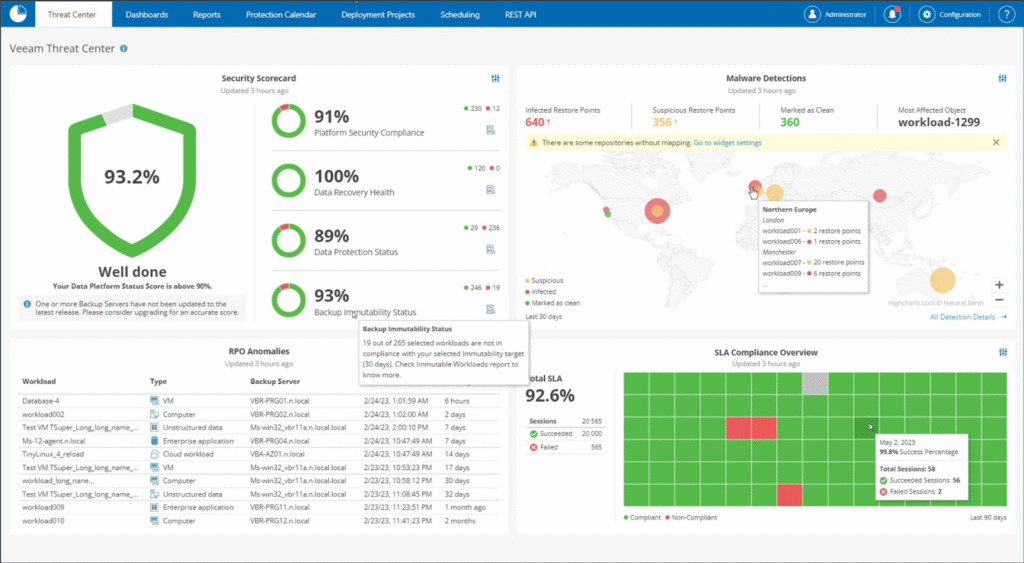
2. Veeam Data Platform

Veeam supports Azure-native workloads with a focus on control and hybrid integration. It supports a range of Azure-native services, like Azure VMs, SQL databases, file data, and unstructured storage like Blob.
Key features include:
- Offers control over backup infrastructure with self-managed deployment
- Supports backup of Azure VMs, Azure SQL, Azure File, Blob
- Uses Azure Blob Storage and Archive tier for scalable and cost-efficient storage
- Integrated support for Veeam Vault to enable immutability and ransomware protection
- Supports Azure Data Box for offline data transfer and reduced bandwidth usage
Limitations (as reported by users on G2):
- Users report complex licensing structures and high costs, with limited flexibility across pricing tiers
- Some users encounter technical issues with backups, including glitches and snapshot failures
- Migration processes can fail or be unreliable during transition scenarios
- Setup and configuration may require significant effort, reducing ease of use
- Support experiences vary, with some users noting limited responsiveness or effectiveness
3. Cohesity

Cohesity offers a cloud-native backup and recovery solution to protect Microsoft Azure workloads, Microsoft 365 data, and on-premises infrastructure. Deployed either as a self-managed or managed service in Azure.
Key features include:
- Unified platform to manage backup, recovery, and data security for Azure, Microsoft 365, and on-premises environments
- Native support for Azure VMs, Azure SQL, Microsoft 365, and Azure VMware Solution
- AI-based threat protection and multilayered security architecture to defend against ransomware
- Available as self-managed or managed deployment within Microsoft Azure
- Integrated cyber vaulting via Cohesity FortKnox for immutable, isolated backups in Azure
Limitations (as reported by users on G2):
- Steep learning curve and high upfront complexity
- Licensing is expensive, especially for smaller teams or limited deployments

4. Acronis

Acronis delivers a backup with cyber protection features for Microsoft Azure, combining secure VM backup, disaster recovery, and threat defense. Intended for both enterprises and managed service providers (MSPs), Acronis Cyber Protect supports agentless backup of Azure virtual machines.
Key features include:
- Agentless backup of Azure VMs for simplified deployment and management
- Restore feature to enable rapid VM recovery
- AI-based ransomware detection and automatic recovery
- Support for file-level and full-disk image backups
Limitations (as reported by users on G2):
- Users report performance degradation when cybersecurity features are active
- Customer support is criticized for slow responses and limited weekend coverage
- Access control settings are seen as overly complex and hard to manage
- Some users find the technical documentation and licensing terms unclear
- Issues have been noted with backup reliability, including failed antivirus checks and fragmented data exports

5. MSP360

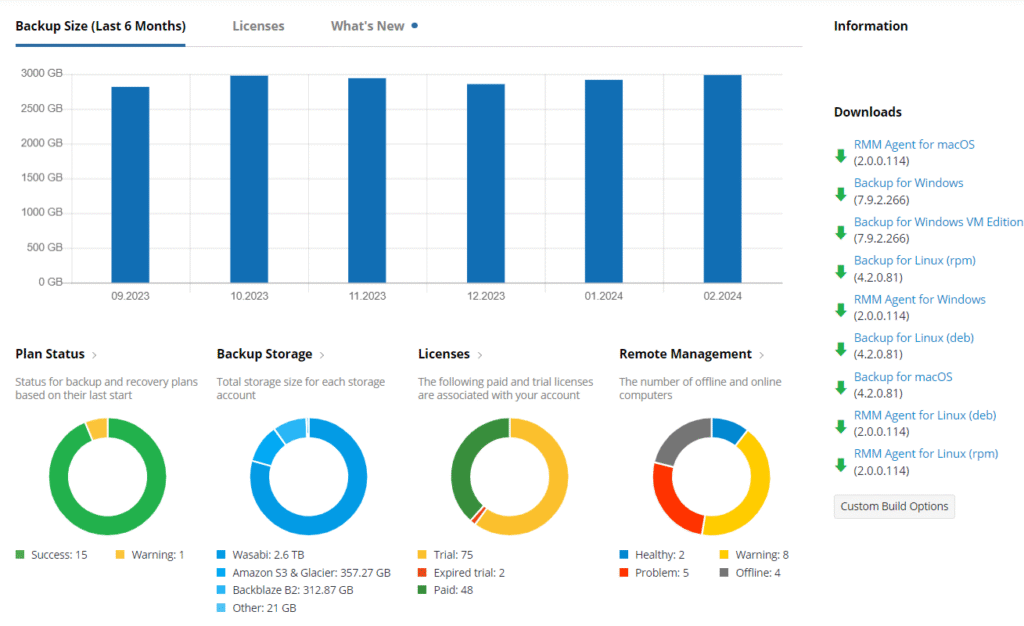
MSP360 provides a lightweight solution that integrates with Microsoft Azure for cloud-based data protection. It supports workloads like Windows, Linux, macOS, VMware, Hyper-V, and Microsoft 365, and allows users to leverage Azure as a cloud storage destination.
Key features include:
- Native integration with Microsoft Azure for secure cloud storage
- Centralized management, monitoring, and reporting via a unified web console
- Support for diverse workloads including servers, endpoints, virtual machines, and Microsoft 365
- File-level and full system image backups to Azure
- Synthetic backups to optimize performance and reduce storage costs
Limitations (as reported by users on G2):
- Occasional backup errors raise concerns for mission-critical or disaster recovery use
- Interface design is seen as unintuitive, especially for new users
- Some users report unclear terminology and error messages, complicating troubleshooting
- Customer support response times can be slow, with limited support for non-English-speaking users
- Perceived learning curve exists despite the product’s general ease of use
Frequently Asked Questions
Azure backup software protects data running in Microsoft Azure, such as virtual machines, managed disks and databases, by taking scheduled backups and restoring them after deletion, corruption, an outage or an attack. It comes in two forms: Microsoft’s native Azure Backup service, and third-party tools that run in or connect to your Azure subscription and add capabilities such as multi-cloud management, cheaper long-term retention or automated DR testing.
Not always. Azure Backup covers many Azure-only estates well. Teams usually add a third-party tool when they need recovery into a region other than the Azure paired region, automated DR drills, a backup copy outside Azure, or one console for Azure and AWS.
Once a day with the Standard policy. The Enhanced policy adds hourly schedules with a minimum interval of 4 hours, so up to six backups a day, and you can set the interval to 4, 6, 8, 12 or 24 hours.
Native tools stay inside their own cloud: Azure Backup covers Azure and AWS Backup covers AWS. Several third-party tools cover both, though many do it with a separate product per cloud, which means separate deployments, licenses and policies. N2W manages Azure, AWS and Google Cloud from a single deployment, so adding a cloud means adding an account. It can also recover AWS workloads into Azure, in that direction only, with bootable restore for Ubuntu 22 and 24.
Pricing models vary. Azure Backup charges a protected-instance fee banded by the size of the data being backed up, plus the vault storage it uses. Third-party tools charge per workload, per protected terabyte or per instance, and several do not publish prices. N2W charges by instance count rather than data size, with the Standard plan at $249 a month for up to 20 instances, and your Azure storage and compute stay on your own Azure bill.
Yes. N2W backs up Azure VMs and disks through Azure APIs and snapshots, with no agent installed in the protected VMs.
Conclusion
Native Azure Backup gives Azure-only estates solid baseline protection, but it backs up a VM at most every 4 hours, restores across regions only to the paired region, and stays inside Microsoft’s cloud. A third-party tool earns its place when you need recovery into any region or subscription, a backup copy outside Azure, or one console across clouds.
N2W covers those cases from inside your own subscription: cross-subscription Azure DR, locked snapshots and archives, and Azure, AWS and Google Cloud in one console.
Related content: read our guide to Azure Backup Services