

Quick Summary
How to Restore a Full EC2 Instance to Azure (Root Volume Included)
Need to restore an EC2 instance to Azure after an AWS outage, account compromise, or regional failure? With N2W v5.0, you can recover a full EC2 instance, root volume included, as a bootable Azure VM. No rebuilding the server from scratch, then restoring data on top.
This guide covers what you need before you start, why the SSH key matters, the step-by-step cross-cloud restore, and what’s supported today.
Key takeaways
- N2W v5.0 restores an AWS EC2 root volume as a bootable Azure OS disk, so you recover the whole server, not just its data.
- Recovery pulls from your backup repository (S3, Azure Blob, Wasabi Hot, and others), not from the live AWS environment.
- Recovering a Linux root volume requires an SSH public key.
- Supported today: AWS to Azure, Ubuntu 22 and Ubuntu 24. Windows support is coming in the next release.
Why cross-cloud restore matters for multi-cloud disaster recovery
Multi-cloud backup is growing fast as teams look to reduce vendor lock-in and the risk of depending on a single cloud provider. But backups sitting in a second cloud don’t make you resilient on their own.
Cross-cloud restore is what turns a multi-cloud backup strategy into real disaster recovery. It proves you can bring workloads back up in another cloud when your primary one isn’t available.
What’s new in N2W v5.0: full EC2 instance recovery in Azure
N2W customers could already restore AWS backups into Azure as data disks, which works well for recovering files and application data.
v5.0 goes further. Azure can now recognize a recovered AWS root volume as a bootable OS disk for the original EC2 instance. Your operating system, applications, and data come back together, giving you a much faster path from disruption to a fully running environment.
Prerequisites for restoring an EC2 instance to Azure
Before you start a cross-cloud recovery, make sure you have:

- A backup in a storage repository. Cross-cloud recovery runs from the repository your AWS backups are archived to: standard S3, Azure Blob, Wasabi Hot, or another supported type. Confirm your Data Lifecycle Management (DLM) policy archives the instances you’ll want to recover.
- A source and a target. The source (“from”) is your AWS storage repository. The target (“to”) is your Azure account.
- A worker configured for the recovery job. N2W uses the worker to execute the cross-cloud restore.
- An SSH key pair (Linux root volumes only). This is what makes full instance recovery possible, as explained below.

Why you need an SSH key to boot an AWS root volume in Azure
An EC2 instance typically uses two kinds of storage:
| EC2 Instance Storage in 2 Parts | OS Volume | Data Volume |
| Purpose | Stores the operating system | Stores application/user data |
| Usually | Root EBS volume | Additional EBS volume |
| Example | /dev/xvda | /dev/xvdb |
| Needed to boot? | Yes | No |
The root volume holds everything needed to boot: the operating system, /etc, /home, and the SSH configuration and authorized keys that control who can log in. A data volume alone lets you recover files, but not the original instance’s OS and configuration. That’s why root volume recovery is selected by default when you recover a full VM. If you only need the data, you can uncheck it.
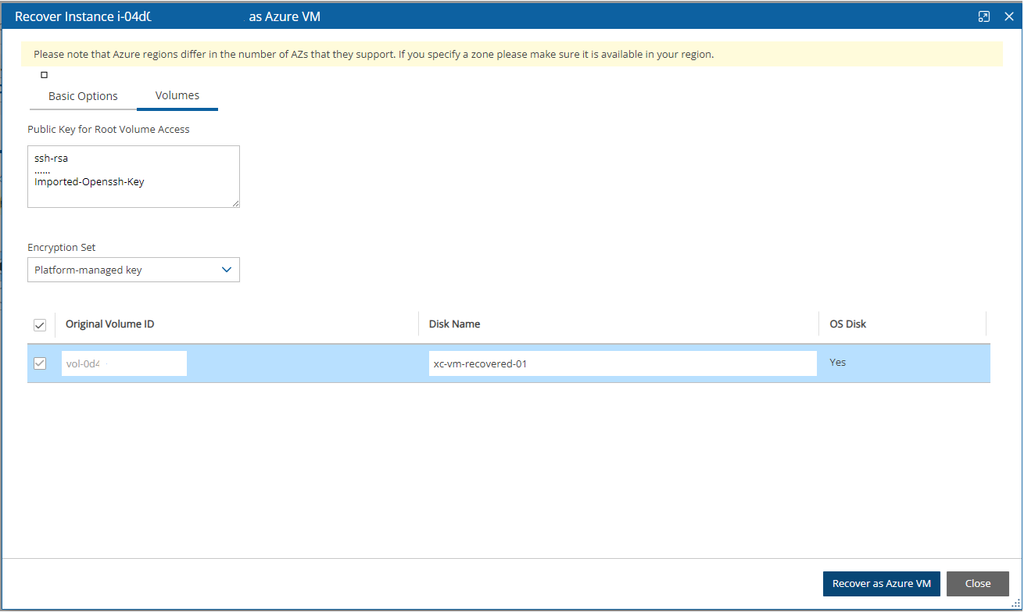
When Azure builds a VM from a recovered root disk, it must recognize the disk as an OS disk and give you a way to log in. You provide an SSH public key during setup, just as you would when creating a VM in the Azure portal. N2W uses it to prepare the root volume so Azure boots it correctly. You then connect with the matching private key.
How to restore an EC2 instance to Azure: step by step.
Confirm your backup exists in a repository. Check that the EC2 instance has been backed up and archived to your chosen repository through your DLM policy.
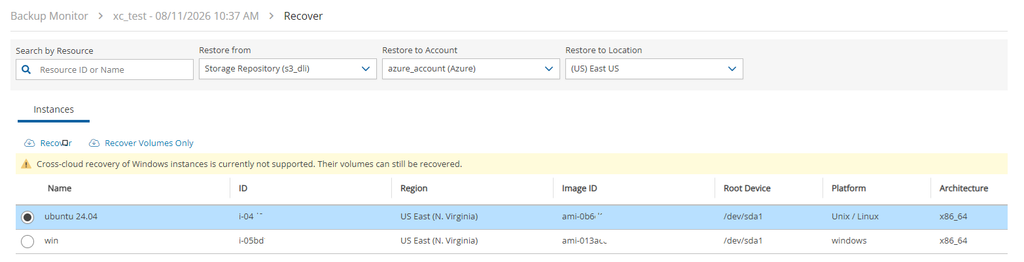
Start a recovery job and set source and target. Choose your AWS storage repository as the source and your Azure account as the target.

Select what you’re recovering. For a full instance, leave the root/OS volume checked (the default). For application data only, uncheck the root volume and recover the data disk.

Paste your SSH public key. When recovering a root volume, N2W prompts for the public key of the key pair you’ll use to access the VM. Data-only recoveries skip this step.

Set the remaining recovery parameters. Choose the target resource group, network settings, and instance size as usual.

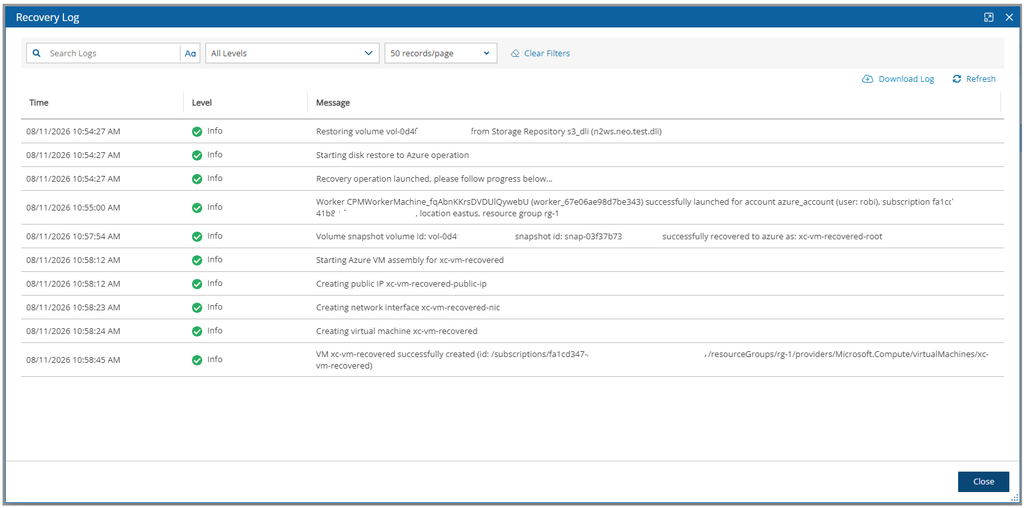
Run the recovery and check the Recovery Log. The log shows the source cloud and repository and the target cloud, so you can confirm the job ran as expected.

Connect to the recovered VM. Once the VM is running in Azure, SSH in with the private key that matches the public key from step 4.
What happens if you skip the SSH key
You can’t recover a root volume without an SSH public key. N2W grays out the recovery option and tells you a key is required, so you find out immediately instead of ending up with a VM you can’t access.
As always, audit logs are available right away and show which repository you restored from and which cloud you restored to.
Supported operating systems and current limitations
| Area | Status in v5.0 |
|---|---|
| Direction | One-way, AWS to Azure only |
| Ubuntu 22 and 24 | Fully tested, production-ready |
| Ubuntu 26 | Not yet supported; on the roadmap |
| Windows | Coming in the next release |
If you only need data from a workload, such as files on a Windows volume, data disk recovery still works on its own today.
Start planning your AWS-to-Azure disaster recovery strategy
Full cross-cloud recovery from AWS to Azure is one of the most requested capabilities in N2W v5.0, and Linux (Ubuntu 22/24) is ready for production today. Start by confirming your Linux workloads are backed up to a supported repository, then reach out to your N2W contact or book a demo to see a cross-cloud restore in action.
Frequently asked questions
Yes. With N2W v5.0, you can restore a full EC2 instance, including its root volume, as a bootable Azure VM. Recovery runs from your backup repository rather than the live AWS environment.
Yes. N2W v5.0 prepares the recovered root volume so Azure recognizes it as an OS disk. For Linux, you provide an SSH public key during recovery so you can log in to the new VM.
Azure needs a way to treat the recovered disk as bootable and to let you log in. The SSH public key handles both. Without it, N2W won’t let you start a root volume recovery.
Ubuntu 22 and Ubuntu 24 are fully supported today. Ubuntu 26 is on the roadmap, and Windows support is planned for the next release.
Not yet. Cross-cloud recovery currently runs one way, from AWS to Azure, for full instances and data disks alike. To move a Windows VM from Azure to AWS today, you do it by hand: our guide to migrating a Windows VM from Azure to AWS walks through it with PowerShell.
Yes. Uncheck the root volume during setup to recover just the data disk. Data disk recovery also works for Windows volumes today.