 Skip to content

What Are Azure Backup Services?
Azure Backup Services provide scalable and secure solutions for protecting and restoring data stored in Microsoft Azure, or using Microsoft Azure to backup systems running on-premise or in other clouds. Azure Backup Services help organizations protect critical workloads, applications, and virtual machines by enabling efficient data recovery.
Azure Backup Services typically provide capabilities like automated backup scheduling, customizable retention policies, and encryption for data security. As these services integrate with the Microsoft Azure ecosystem, they are also well-suited for hybrid cloud environments, offering cost-effective and reliable data protection.
Editor’s note: Updated the article to include recent market trends, updated information about Azure backup services to reflect features, capabilities, and limitations in 2026.
In this article
- Key Features of Azure Backup Services
- Third-Party Azure Backup Services
- First-Party Azure Backup Services
- Frequently Asked Questions
Key Features of Azure Backup Services
Azure Backup Services offer a framework for protecting data across cloud-native and hybrid environments:
- Integration with Azure resources: Built-in support for backing up Azure virtual machines, Azure Files, Azure SQL Database, and other native services, with configuration managed directly from the Azure portal.
- Granular and policy-based management: Backup policies can be defined by resource type, location, or business unit, enabling fine-grained control over backup schedules, retention periods, and compliance alignment.
- Backup for on-premises workloads: Azure Backup Server and Azure Arc allow on-premises Windows and Linux systems to be backed up to Azure, supporting hybrid and phased cloud migration strategies.
- Data lifecycle and tiering options: Users can move older backup data to archive storage tiers for cost savings, while keeping recent backups in hot or cool tiers for faster access.
- Security and compliance features: Features like encryption, multi-factor authentication, soft delete, and immutable backup support help meet regulatory requirements such as GDPR, HIPAA, and ISO 27001.
Azure Backup Services Market Trends
The cloud backup market is growing quickly, though estimates vary by analyst firm. Grand View Research valued the global cloud backup market at $4.69 billion in 2023 and projected it to reach $20.34 billion by 2030, while Global Market Insights projects the market will exceed $31 billion by 2032.
This growth is largely driven by the explosion of enterprise data, digital transformation initiatives, and the need for scalable, cost-efficient backup solutions. As organizations generate more data from applications, IoT devices, and remote work environments, traditional backup systems are becoming insufficient, pushing adoption toward cloud-native services like Azure Backup.
Adoption: Expert Insights cites research showing that 92% of organizations host at least some data in the cloud, yet backup practices vary widely by data type. For example, 62% of organizations back up proprietary application data, while fewer than one in five back up SaaS data. That gap matters because cloud providers protect the infrastructure, but customers remain responsible for recovering their own data after deletion, corruption, misconfiguration, or attack.
Cyber threats, especially ransomware, are one of the biggest drivers of backup adoption. In 2025 alone, ransomware victims increased by ~58%, with 7,515 claimed victims listed on dark web leak sites. For backup buyers, the takeaway is simple: recovery copies need to be isolated, encrypted, immutable where possible, and regularly tested. Azure Backup solutions address this need with encryption, secure vaults, and immutable backups that can enable organizations to recover data without paying ransom and minimizing downtime.
Hybrid and multi-cloud strategies are also reshaping backup requirements. Gartner has predicted that 90% of organizations will adopt a hybrid-cloud approach through 2027, and Mordor Intelligence reports that public cloud leads the cloud backup market while hybrid cloud is the fastest-growing deployment model. Native Azure Backup is a strong fit for Microsoft-centric environments, including Azure VMs, Azure Files, SQL Server, and SAP HANA on Azure VMs. Organizations that need unified protection across Azure, AWS, object storage repositories, and isolated DR accounts may need a third-party platform built for cross-cloud operations.
Sources:
Third-Party vs First-Party Azure Backup Services: What Is the Difference?
First-party backup tools are developed and maintained by Microsoft as part of the Azure platform. These services, such as Azure Backup, Azure Site Recovery, and Azure Archive Storage, are built to protect Azure workloads and integrate natively with other Azure services.
Third-party backup tools, such as N2W and Veeam, are developed by independent vendors and typically run on Azure infrastructure or integrate with it through APIs. They are not limited to Microsoft environments and often support multiple cloud providers, including AWS, Google Cloud, and on-premises systems.
Third-party tools offer several advantages over first-party options:
- Broader platform coverage, allowing organizations to manage backups across hybrid and multi-cloud environments from a single interface.
- More advanced functionality, such as policy-based automation across cloud providers, customizable SLAs, detailed reporting, and tighter integration with security and compliance tools.
While first-party tools are easier to deploy and often free for Azure-only workloads, third-party solutions are more flexible and feature-rich for complex or large-scale environments.
Third-Party Azure Backup Services and Their Pros and Cons
Here are some of the leading Azure backup solutions provided by third-party vendors on top of Azure infrastructure.
Head to Head Comparison
| Product | Description | Pros | Cons |
| N2W | Cloud-native backup and disaster recovery for AWS and Azure, with cross-cloud recovery and repository support across Azure, AWS, and Wasabi. | Flexible, policy-based backup; centralized AWS/Azure management; cross-region, cross-account, cross-subscription, and cross-cloud recovery; immutable backup options; automated DR scenarios; resource control for cost savings; lifecycle tiering and archiving. | No native Microsoft 365 backup; does not protect on-prem workloads except with AWS Outposts |
| Veeam Backup for Microsoft Azure | SaaS-based Azure backup with policy automation and security features | Policy automation; immutable and encrypted backups; air-gapped protection; flexible recovery | Can require multiple Veeam components depending on architecture; some scenarios have Azure-specific limitations; configuration may be more involved in hybrid or multi-cloud deployments. |
| Rubrik | Policy-driven cloud data protection platform with integrated security and automation | SLA-based automation; granular recovery; ransomware protection; zero trust model; strong analytics | Platform may be cost-prohibitive for smaller teams; deployment and architecture can be more involved for complex Azure, hybrid, or multi-cloud environments; advanced reporting needs should be validated during eval. |
| Acronis Backup for Azure | Backup and cybersecurity platform for Azure with flexible storage and recovery options | Agentless Azure VM backup; Azure VM disaster recovery; file and disk backup; integrated cyber protection and ransomware recovery features. | Platform can feel complex; capabilities vary by product edition and licensing; experience should be validated for MSP vs. enterprise use cases. |
| Veritas NetBackup | Data protection platform, now under Cohesity following its combination with Veritas’ enterprise data protection business, with support for large-scale hybrid, cloud, and long-term retention use cases. | Unified data protection; immutable backups; AI insights; strong security integrations | Limited pricing transparency; complex setup; enterprise-focused; integration overhead |
| Azure Backup | Native Microsoft backup service for Azure and selected on-premises workloads. | Built into Azure; Recovery Services and Backup vaults; encryption; soft delete; immutable vaults; cross region/subscription restore for supported workloads. | Microsoft-centric; not a unified AWS/GCP backup platform; pricing depends on protected instances, storage, redundancy, retention, and restore patterns; advanced DR may require Azure Site Recovery or third-party tools. |
| Azure Site Recovery | Disaster recovery service with replication and automated failover | Continuous replication; automated failover; recovery orchestration; test failover | Primarily focused on workload replication and failover rather than backup retention; setup and testing require careful planning; costs include replicated compute/storage/networking considerations. |
| Azure Archive Storage | Low-cost storage tier for long-term backup retention and archival | Very low cost; high durability; flexible tiering; compliance support | Slow retrieval times; limited features; latency issues; potential cost variability |
1. N2W

N2W Backup for Azure is a cloud-native data protection solution built for fast Azure VM and disk backup, rapid recovery, and flexible disaster recovery across Azure, AWS, and Wasabi repositories. N2W uses snapshot-based protection, automated backup policies, cross-region recovery, and Azure cross-subscription DR to help teams recover into clean, isolated environments when production is unavailable or compromised. It also supports automated archival to Azure Blob, Amazon S3, and Wasabi repositories for long-term retention and cost optimization. Originally known for deep AWS backup and DR, N2W now gives organizations centralized control across AWS and Azure from a single console, with cross-cloud backup, immutability, and recovery workflows designed for ransomware resilience and operational simplicity.
Pros:
- Snapshot-Based Azure Backup: Uses Azure-native snapshot workflows for fast VM and disk protection, with support for consistency controls such as application-consistent backup workflows where configured.
- Cross-Region and Subscription Recovery: Enables rapid recovery of Azure VMs across regions or subscriptions, supporting high availability and business continuity.
- Cross-Cloud Backup & Recovery: Enables automated backup and rapid recovery of Azure VMs across multiple cloud providers (AWS, Azure and Wasabi) for the ultimate defense against cyber threats, cloud power outages and vendor lock-in.
- Policy-Driven Automation: Automates protection of Azure resources based on tags, groups, or schedules, simplifying backup management at scale.
- Disaster Recovery Testing: Facilitates non-disruptive DR testing by launching isolated copies of backups, ensuring compliance-readiness and recovery validation.
- Centralized Multi-Cloud Management: Manages backup and recovery across both Azure and AWS from a unified interface, ideal for hybrid or multi-cloud operations.
- Long-Term Cost Optimization with Blob Storage Tiering: Automatically copy backup data to cold Azure Blob tiers based on retention policies, significantly reducing storage costs over time while meeting compliance and archival requirements.
Cons:
- Focused primarily on IaaS workloads (not broad PaaS/SaaS coverage)
- Not a replacement for full Microsoft 365 backup suites
2. Veeam Backup for Microsoft Azure

Veeam Data Cloud for Microsoft Azure is a SaaS-based backup service for protecting Azure workloads with automated policies, immutable storage, encryption, and air-gapped protection.
Pros:
- Policy-based automation: Automates backup scheduling and management using predefined policies
- Immutable backups: Ensures backup data cannot be modified or deleted, protecting against ransomware
- Air-gapped protection: Isolates backups from production environments to reduce attack exposure
- Encryption: Secures data both in transit and at rest
- Flexible recovery options: Enables restoration of data across locations and workloads
- Data lifecycle management: Moves snapshots to object storage for long-term retention and cost control
- Unified management: Provides a single platform for managing backups across cloud workloads
Cons:
- Limited deployment options: Some Azure workload scenarios have documented limitations, including unsupported configurations such as Azure VMs with Ephemeral OS disks and certain disk authentication modes.
- Complex backup configuration: Setting up backup policies is not user-friendly and often requires tagging resources, making it difficult to exclude specific volumes without in-depth knowledge of the infrastructure.
- Lack of multi-tenancy: The solution does not support multi-tenancy, limiting its use for MSPs who need to provide separate backup consoles for individual clients.
- Outdated terminology: Veeam uses on-premise terminology for cloud solutions, such as referring to backups as “replicas,” which can confuse users accustomed to modern cloud terminology.
- Recovery limitations: The recovery process is cumbersome, requiring users to know specific resources for restoration, as policies are not searchable or linked to the recovery workflow.
- File-level recovery concerns: File and folder-level recovery allows restoring to the same instance, raising potential security risks as this access could inadvertently introduce malware.
- Immutability gaps: Veeam does not support immutable EBS snapshots for AWS but does offer S3 object lock for certain storage classes. However, it lacks support for cost-efficient options like S3 Infrequent Access.
- Ineffective cost estimation: The cost estimation tool for archives often provides inaccurate calculations due to its inability to account for all variables, reducing its utility for budget planning.
- Inefficient cleanup: Unused backups can only be cleaned up once daily, potentially leading to unnecessary storage costs until the next cleanup cycle.
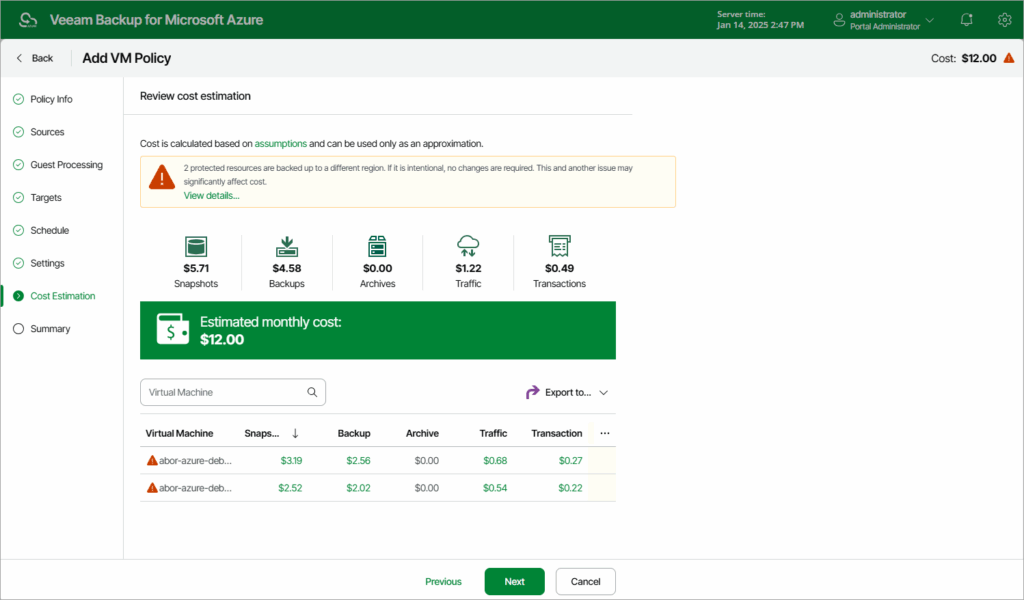
Source: Veeam
3. Rubrik Data Backup for Azure

Rubrik provides a cloud-native platform for Azure backup and recovery that uses policy-driven automation to protect workloads across subscriptions and regions while offering centralized management. The platform integrates security features such as threat detection and zero trust controls, enabling organizations to recover quickly from incidents.
Pros:
- Unified management plane: Manages backup and recovery across Azure, on-premises, and multi-cloud environments
- SLA-driven automation: Applies predefined policies to automatically protect workloads at scale
- Granular recovery capabilities: Supports point-in-time and file-level recovery with orchestration
- Ransomware protection: Detects threats, identifies clean recovery points, and enables secure restoration
- Zero trust security model: Uses immutable, air-gapped backups with access controls and MFA
- Cost optimization: Uses tiered storage and incremental backups to reduce storage overhead
- Threat monitoring and analytics: Provides anomaly detection and threat hunting for backup data
Cons (as reported by users on G2):
- High cost for smaller organizations: Pricing can be expensive, especially for startups or environments with limited backup needs
- Unclear licensing model: Users report difficulty understanding pricing and licensing structures
- Limited feature depth in some areas: Some advanced capabilities or analytics features are lacking or require additional development
- Complex initial configuration: Setting up policies and SLA domains can involve a learning curve
- Limited reporting customization: Built-in reporting is not always flexible, requiring APIs or external tools for customization
- UI performance issues: Some users experience lag or minor glitches in the interface
- Less flexibility in advanced configurations: Some reviewers note that certain advanced capabilities or custom reporting workflows may require additional configuration, APIs, or external tooling.
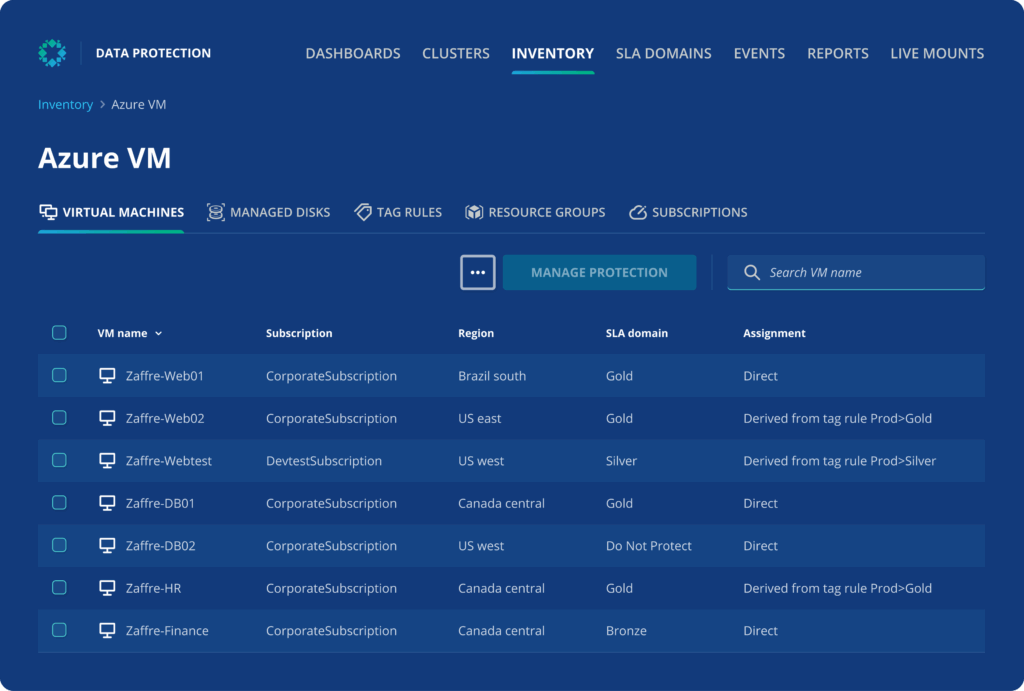
Source: Rubrik
4. Acronis Backup for Azure

Acronis Backup for Azure combines data protection with cybersecurity features to secure Azure workloads. It supports both file-level and full-system backups, along with flexible storage options across cloud and on-premises environments. The platform emphasizes automation, ransomware protection, and fast recovery to maintain business continuity.
Pros:
- Agentless Azure VM backup: Protects virtual machines using native snapshot capabilities without additional agents
- Full-image and file-level backup: Supports granular or complete system backups
- Flexible storage options: Allows backups to be stored in public cloud, private cloud, or local storage
- Ransomware protection: Combines immutable storage options with AI-based anti-malware and automatic ransomware recovery capabilities
- Encryption: Secures data in transit and at rest with strong encryption standards
- Incremental and differential backups: Optimizes storage and performance by backing up only changes
- Deduplication: Supports in-archive deduplication in certain backup scenarios, helping reduce redundant data and improve storage efficiency
Cons:
- Limited customer support on weekends: Users have reported dissatisfaction with the lack of support during weekends, a critical period for many organizations performing Azure disaster recovery (DR) tests or backups.
- Complex access control: The technical documentation for configuring access control is not well-explained, leading to challenges in implementation and administration.
- Inconsistent onboarding: Some users experienced issues during onboarding due to changes in account representatives and unclear credit and setup processes.
- Overwhelming product range: While Acronis offers a broad suite of features, the learning curve can be steep. The partner portal includes resources, but best practices can be challenging to interpret without additional guidance.
- Non-intuitive interface: Setting up backups, especially selecting files and folders, can be cumbersome. Users must rely on third-party tools like TreeSize to estimate folder sizes, which adds to setup time.
- Inefficient backup connection process: When connecting an old backup to a new PC, the process can be lengthy and error-prone, potentially resulting in wasted storage space.

Source: Acronis
5. Veritas NetBackup for Azure

Cohesity NetBackup, formerly Veritas NetBackup, is an enterprise data protection platform for large-scale hybrid, cloud, SaaS, and on-premises environments. For Azure, NetBackup supports marketplace deployment, Snapshot Manager components, backup data movement to Azure Blob Storage and Azure Archive for long-term retention, and integrations with Microsoft security tools such as Microsoft Sentinel.
Pros:
- Unified data management: Protects Azure, on-premises, and SaaS data from a single platform
- Immutable and air-gapped backups: Isolates critical data to defend against ransomware
- Threat detection integration: Connects with security tools to detect anomalies and respond to incidents
- Multi-environment protection: Covers Azure workloads, Microsoft 365 data, and on-premises systems
- Role-based access controls: Restricts access to backup data based on user roles
- Integration with security tools: Works with platforms like Microsoft Sentinel for centralized monitoring
- Analytics and security insights: Uses reporting, anomaly detection, and security integrations to improve visibility and recovery decision-making.
Cons(as reported by users on G2):
- Limited public pricing transparency: Pricing details are not clearly available, making cost evaluation difficult
- Primarily enterprise-focused: May be less suitable for smaller organizations with simpler requirements
- Dependence on vendor support: Users rely on vendor documentation and support for troubleshooting and setup
- Potential integration complexity: Supporting diverse environments may require additional configuration effort

Source: Veritas
First-Party Azure Backup Services
The following are Azure Backup solutions offered as part of the Azure services ecosystem.
6. Azure Backup
Azure Backup is a native Azure service that provides centralized data protection for cloud and hybrid workloads. It enables organizations to manage backups across resources from a single control plane while incorporating built-in security, compliance, and long-term retention capabilities.
Pros:
- Centralized management: Monitor and manage backups across infrastructure from a unified control plane
- Built-in security and compliance: Uses encrypted vaults, role-based access control, and immutable settings
- Ransomware protection features: Includes alerts and controls to prevent unauthorized changes to backups
- Durable backup storage: Supports LRS, ZRS, GRS, and RA-GRS options depending on vault configuration and workload requirements
- Cross-region and cross-subscription restore: Supports recovery to secondary regions or different subscriptions for supported workloads and configurations
- Long-term retention optimization: Supports Azure Backup Archive tier for eligible recovery points, helping reduce long-term retention costs when restore-time tradeoffs are acceptable
Cons (as reported by users on G2):
- Complex pricing structure: Costs can be difficult to estimate due to multiple factors like storage tiers, retention, and data transfer
- High storage and retention costs: Long-term storage and large data volumes can become expensive
- Slower backup and restore performance: Large datasets may take longer to back up or recover depending on bandwidth
- Interface complexity: Some configurations and advanced settings can be difficult to navigate
- Limited support for non-Microsoft environments: Less suitable for organizations heavily using non-Microsoft systems

Source: Microsoft
7. Azure Site Recovery
Azure Site Recovery is a disaster recovery service that replicates workloads and enables failover during outages. It supports continuous replication of virtual machines and physical servers, allowing organizations to maintain business continuity with minimal disruption. The service includes orchestration and testing capabilities to validate recovery processes without affecting production systems.
Pros:
- Continuous replication: Replicates workloads with low recovery point objectives
- Failover orchestration: Supports planned, unplanned, and test failover workflows for supported workloads and target environments.
- Recovery plans: Orchestrates recovery for multi-tier applications
- Centralized monitoring: Tracks replication status and alerts at scale
- Test failover capability: Validates disaster recovery without impacting live systems
- Data consistency options: Supports crash-consistent and application-consistent recovery points
Cons (as reported by users on G2):
- Complex setup and configuration: Initial deployment can be time-consuming, especially in complex environments
- Limited support for non-VM workloads: Primarily focused on virtual machines, with gaps for other services
- Additional infrastructure costs: Costs can increase due to storage, bandwidth, and compute usage
- Learning curve for new users: Feature-rich interface may require time to understand and configure properly
- Network bandwidth requirements: Replication can impact network performance in bandwidth-constrained environments
- Limited visibility during recovery: Users report lack of clear progress indicators for recovery operations

Source: Microsoft
8. Azure Archive Storage
Azure Archive Storage is a low-cost Azure Blob Storage access tier for rarely accessed data and long-term retention. It is often used as a storage target for compliance archives, historical data, and backup copies created by backup platforms. However, it is not a standalone backup service: archived blobs are offline and must be rehydrated to an online tier before they can be read or modified.
Pros:
- Low-cost storage tier: Optimized for rarely accessed data and long-term retention
- High durability and availability: Provides durable object storage for large volumes of long-retention data, but archived data is offline until rehydrated
- Support for backup retention: Suitable for storing long-term backup data
- Flexible data tiering: Allows movement between archive, cool, and hot storage tiers
- Compliance support: Helps meet regulatory requirements for long-term data retention
- Replacement for tape storage: Eliminates the need for physical archival infrastructure
Cons (as reported by users on G2):
- Slow data retrieval times: Accessing archived data can be significantly slower compared to other storage tiers
- Archive-tier limitations: Blob snapshots are not supported directly in the archive tier, and archived snapshots or previous versions cannot be directly rehydrated back to hot or cool tiers
- Latency in management tools: Users report delays or inconsistencies when interacting with data
- Cost concerns for certain pricing models: Pay-as-you-go pricing can become expensive depending on usage patterns
- Internet dependency: Requires stable connectivity, and service interruptions can affect access
- Format and functionality limitations: Some users report constraints in supported data types or operations

Source: Microsoft
Frequently Asked Questions
What are Azure Backup Services used for?
Azure Backup Services are used to protect data from loss or corruption by creating regular backup copies of virtual machines, databases, files, and workloads. These services allow organizations to recover data after incidents such as ransomware attacks, accidental deletion, or system failure.
How is data secured in Azure Backup?
Azure Backup uses encryption both in transit and at rest. Backup data is encrypted using AES-256 and can be integrated with Azure Key Vault for key management. Additional features like soft delete and immutable backups help protect against malicious or accidental data deletion.
How does N2W Backup for Azure differ from other backup tools?
N2W is a cloud-native, policy-driven backup solution that focuses on speed, cost-efficiency, and cross-cloud functionality. Unlike some other tools, it offers cross-region and cross-subscription restore, supports AWS and Azure simultaneously, and provides granular policy-based automation without the need for additional infrastructure.
Can N2W be used for both AWS and Azure workloads?
Yes. N2W supports backup and recovery for both AWS and Azure environments. It allows users to manage multi-cloud backups from a single interface and supports cross-cloud disaster recovery, enabling organizations to restore Azure workloads into AWS and vice versa.
Does N2W support long-term retention and cost optimization?
Yes. N2W can automatically move older backup data to lower-cost Azure Blob storage tiers (cool or archive), helping reduce long-term storage costs while maintaining compliance with data retention policies.
Is N2W Backup for Azure agentless?
Yes. N2W uses native Azure APIs to create backups without requiring agents on the protected virtual machines. This simplifies deployment and reduces overhead.
Can N2W perform disaster recovery testing?
Yes. N2W allows organizations to perform non-disruptive DR testing by launching isolated environments from backups. This helps validate recovery procedures and maintain compliance without affecting production workloads.
Conclusion
Azure Backup Services offer a range of options for organizations operating in both cloud-native and hybrid environments. These solutions emphasize automation, security, scalability, and integration to ensure resilient and compliant data protection strategies. However, users should carefully evaluate deployment complexity, support quality, and recovery performance when selecting a backup strategy to ensure alignment with business continuity and regulatory requirements.
What’s next? Consider cross-cloud air-gapping for impenetrable protection.
👉 Download our Multi-Cloud Survival Guide