

Quick summary
- Azure vault sprawl is what happens when one backup standard turns into many vaults and policies, because Recovery Services vaults are regional and policies are created per vault.
- A small estate with two regions, VMs, disks and SQL already needs 10 vaults and policies, or 14 with disk role assignments.
- The cost shows up as drift: teams end up with different frequencies, retention and immutability settings, and moving later is hard because recovery points can’t move between vaults.
How many vaults do you run?
Azure vault sprawl is the growth in vaults, policies and settings that comes with protecting more regions and workload types using Azure Backup. If you can’t answer that question from memory, count them:
az graph query -q "resources
| where type in~ ('microsoft.recoveryservices/vaults','microsoft.dataprotection/backupvaults')
| summarize vaults=count() by type, location, subscriptionId"
Then count your policies. That number is usually the surprise.
What Azure Backup does well
Azure Backup is good baseline protection. It’s built in, you don’t run any infrastructure, it covers a long list of workloads, and it backs up reliably. If you run a handful of VMs in one region, you may never need anything else.
The friction starts when you run it across a growing estate.
Why vaults multiply
Vaults are regional. A Recovery Services vault has to be in the same region as the VMs it protects. Every new region adds a vault, a copy of your policy and its settings.
Policies are per vault. Microsoft’s architecture docs say policies are created per vault. You can use the same settings in several vaults, but you have to apply them to each one, and each copy can then change on its own.
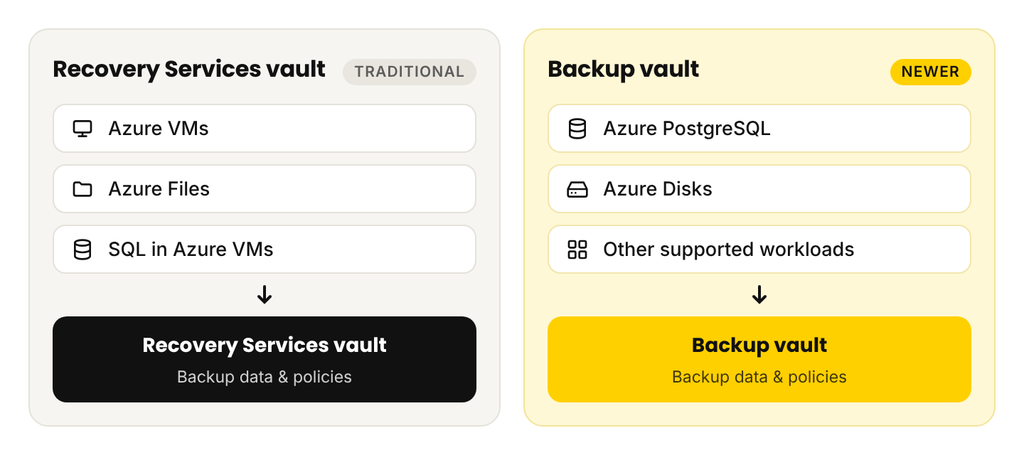
There are two vault types. Recovery Services vaults and Backup vaults are different resources protecting different things.
Microsoft has started loosening one of these rules: cross-subscription VM backup reached preview in April 2026, within the same tenant and region. The regional rule stands.
So sprawl comes in layers. Your infrastructure spreads across regions and subscriptions. Backup management follows it into more vaults and policies. Then recovery follows that, and everything has to be found again on the day you need it.
One application, four protection models
Take one ordinary application. It’s a VM, a SQL Server database on that VM, some standalone managed disks and an Azure SQL Database. Here’s where each piece is managed:
| Component | Protected by | Where it’s configured |
|---|---|---|
| Azure VM | Azure Backup | Recovery Services vault, VM policy |
| SQL Server in the VM | Azure Backup, workload backup | Same vault type, workload registration, separate SQL policy |
| Standalone managed disk | Azure Disk Backup | Backup vault, disk policy, role assignments |
| Azure SQL Database | The SQL service itself | The logical server’s own backup settings |
Four models, each with its own screens and its own way of being wrong. Recovery Services vault vs Backup vault comes down to this: Recovery Services vaults hold VM and SQL-in-VM backups, and Backup vaults hold newer workloads like Disk Backup.
A small estate, counted
Two regions, one subscription, VMs, SQL Server in VMs and standalone disks:
| Object | Per region | Total |
|---|---|---|
| Recovery Services vault | 1 | 2 |
| VM backup policy | 1 | 2 |
| SQL Server backup policy | 1 | 2 |
| Backup vault | 1 | 2 |
| Disk backup policy | 1 | 2 |
| Vaults and policies | 10 | |
| Backup vault role assignments (Disk Backup Reader and Disk Snapshot Contributor, at minimum) | 2 | 4 |
| With role assignments | 14 |
That assumes a single backup standard for everything. Add a second retention tier and the policies double. Add a third region and everything goes up by half. Azure SQL Database retention is configured separately again, on each server.
Policy drift: when “our backup standard” becomes many standards
Once there are 10 places to set a standard, you have 10 chances for it to differ. A team shortens retention to save money. Someone chooses LRS on the new vault because that’s cheaper. Immutability gets turned on in the production vault and forgotten in the new region. Each choice made sense on the day.
Azure Policy can enforce a lot of this, and it’s worth using. But it’s another system to build and maintain.
An admin on Reddit, for example, ran into this exact scenario automating VM backup through Azure Policy. He hit remediation, tagging, nested deployments and custom policy assignments, and called it a nightmare.
Drift is expensive for a specific reason: it stays invisible until a restore or an audit. How to set up Azure Backup policies is covered here.
When the architecture has to change
Sooner or later someone wants to reorganize, and that’s when the vault design pushes back. Microsoft’s documentation is clear on the limits:
- Recovery points can’t move between vaults.
- A vault can move across subscriptions in the same tenant, or between resource groups, but not across regions.
- A vault can only move if it holds supported item types, and vaults using customer-managed keys can’t move.
In practice, changing the design often means protecting VMs again in new vaults and keeping the old vault running until its retention runs out. You pay for both in the meantime.
One admin on Microsoft Q&A in March 2025 described exactly this: reprotecting more than 400 VMs in new Recovery Services vaults across subscriptions, without deleting the existing backup data, with customer-managed keys in a Key Vault per subscription, availability sets and restore point collections all in the mix.
Various G2 reviews flag complex configuration and difficulty in moving data out of a Recovery Services Vault to a different subscription or to a different region. ‘It can be painful‘, according to an engineer running even just a small cloud environment.
What happens every time the estate grows
Say your team deploys one VM in a new region. Before it’s protected:
- Create a Recovery Services vault in that region.
- Set its redundancy and security settings to match your standard.
- Recreate your backup policy.
- Turn on protection for the VM.
- Connect diagnostics to Log Analytics, or the vault won’t show up in your backup reports.
- Add Backup vaults, policies and role assignments if disks need their own protection.
It’s maybe 30 minutes, and most of it can be scripted. It also only happens if someone remembers, and new regions tend to arrive with new projects whose owners aren’t thinking about backup.
What to look for in an Azure backup tool
Whether you stay native or look elsewhere, these are the questions that matter at scale:
| Capability | The question to ask |
|---|---|
| Inventory and discovery | Can I see what’s protected and what isn’t, across subscriptions and regions, in one view? |
| Policy automation | Does a new resource get protected without someone creating objects by hand? |
| Recovery destination | Can I recover across subscriptions and to a region of my choice, or only the pair? |
| Environment recovery | Does the network come back with the VMs? |
| Precise recovery | Can I pull one file from an old backup without restoring the whole VM? |
| Cost control | Do I choose the storage tier and retention, or inherit a default? |
| Access to backup data | Can I look inside a backup before committing to a restore? |
| Security controls | How is access controlled, how are backups locked, and what can a compromised admin still do? |
How N2W reduces the object count
N2W runs as one VM in your own subscription, and that’s where you manage everything. There are no vaults. Backups stay as snapshots and Blob storage in your account.
One console across subscriptions and regions. Each subscription is an account in the same console, and adding one means adding an account rather than deploying anything.
One policy per subscription for VMs, disks and Azure SQL. A policy holds the schedule and retention, and its targets can be a mix of VMs, disks and Azure SQL servers.
Tags bring new resources in. Tag a VM, disk or SQL server with cpm_backup and the policy name, and the next tag scan adds it. The scan interval is yours to set, down to one hour, and you can run one on demand.
Unprotected resources are visible. A dashboard widget shows protected and unprotected resources across your connected accounts. [CONFIRM: from it, you can add unprotected resources to a policy in one click, up to 200 at a time.]
Recovery comes along. Recovery Scenarios recover a policy’s VMs, disks and SQL servers in order, into a subscription and region you choose, with the VNet configuration and subnets captured (it’s possible to maintain connectivity cross-cloud as well by cloning from AWS VPC into Azure VNet). Files come back from any retained generation with no indexing.
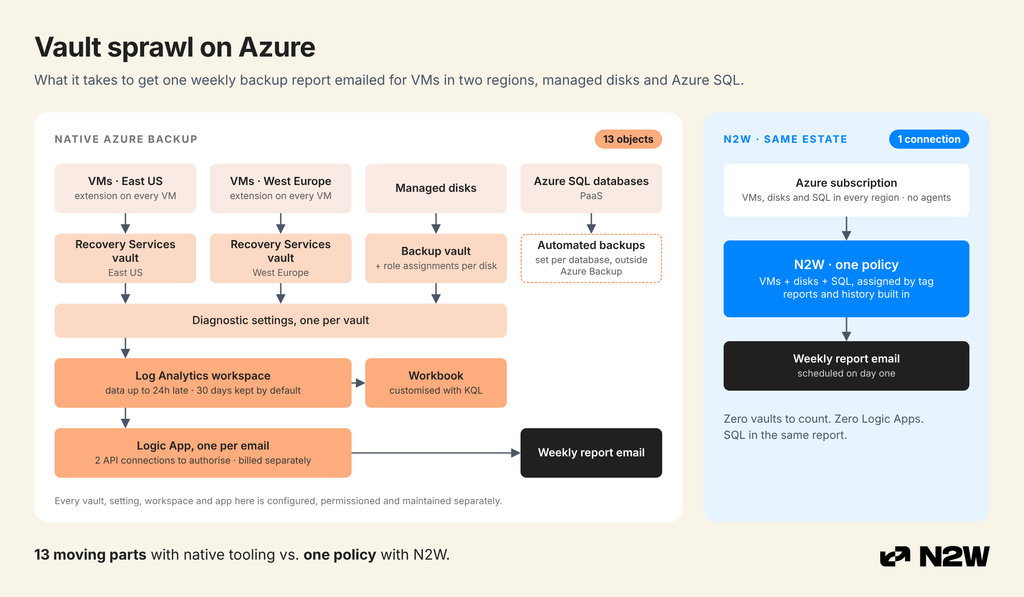
Here’s the same small estate:
| Azure Backup | N2W | |
|---|---|---|
| Vaults | 4 | 0 |
| Backup policies | 6 | 1 |
| Role assignments for disk backup | 4 | Set once, on N2W’s role |
| Things you run | None | 1 N2W VM |
| Storage repositories (for Azure SQL and archiving) | Not applicable | 2 |
| Worker configurations (per location) | Not applicable | 2 |
So N2W has moving parts too: a VM to run and patch, plus repositories and worker settings per location. What changes is where the standard lives. It’s in one policy you can see, so it has far fewer places to drift.
N2W also doesn’t cover everything Azure Backup does. SAP HANA, Azure Files, Blobs and AKS stay with Azure Backup, and SQL Server inside a VM gets protected as part of the VM, without log-level backups. Plenty of teams run both. Here’s when each one fits.
Count your vaults, then see what they cost →
Frequently asked questions
It’s the growth in vaults, policies and settings as an Azure estate adds regions, subscriptions and workload types. Recovery Services vaults are regional and policies are created per vault, so one backup standard becomes many copies that can drift apart.
They’re two separate resource types. Recovery Services vaults protect Azure VMs and SQL Server or SAP HANA in VMs, among others. Backup vaults protect newer workloads such as Azure Disk Backup, Blobs and PostgreSQL. A mixed estate usually needs both.
For Azure VM backup, yes. The vault must be in the same region as the VMs it protects. Cross-subscription VM backup is in preview, but it stays within the same region.
Not as one shared object. Policies are created per vault, so you apply the same settings to each vault, and each copy can then change independently. Azure Policy can help enforce consistency.
No. Microsoft doesn’t support moving backup data between vaults. You can move some vaults across subscriptions in the same tenant, but not across regions. Changing vault design usually means protecting resources again and keeping the old vault until its retention runs out.
How do I count my Azure backup vaults and assess my Azure environment, find what isn’t protected and spot where I can save on backups?
Use N2W’s free Azure Backup Audit script. It scans your Azure environment and gives you a full picture of your backup coverage in one place.
To get started, download the script and run it against your environment. Then see what your audit receipt shows for a clear summary of your coverage gaps and savings opportunities.